Packet loss in Lorawan
-
I have two lopys :
- nano gateway
- node that just sends an unconfirmed packets with a 4s period
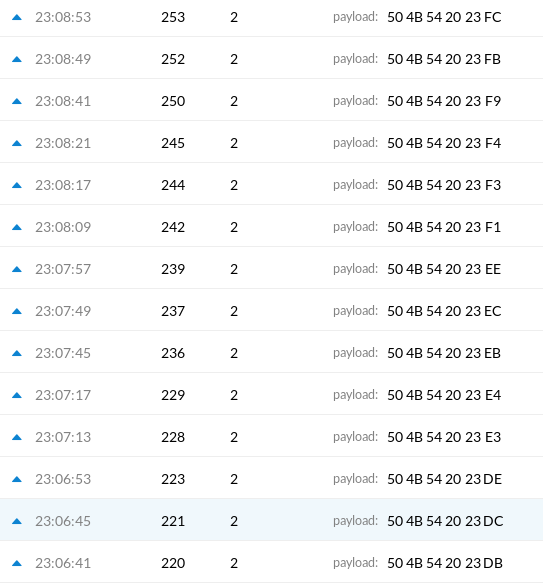
I get lot of packet losses as you can see here in TTN console :
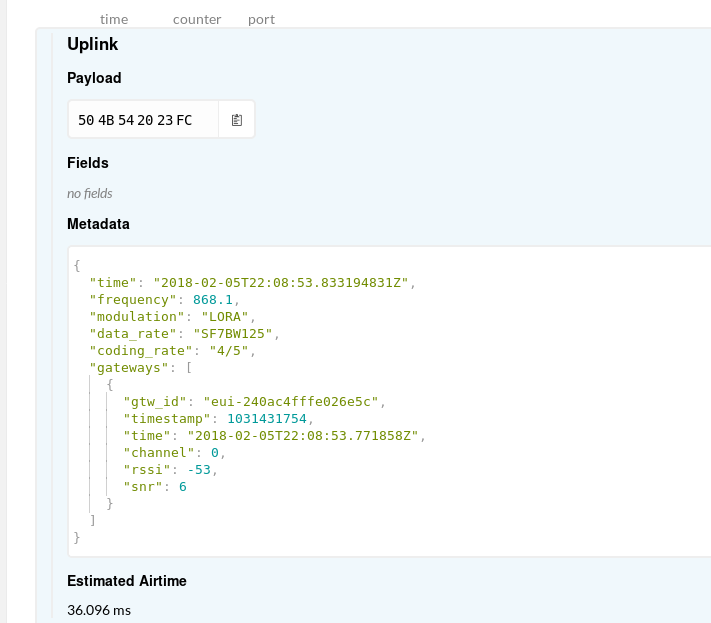
Here is packet detail with RSSI :
Lopys are in an indoor environment, either quite close < 5m or < 20m separated by a wall. I've tested in two buildings and got in both cases lot of losses > 50%.
Have you experienced same results?
How can I reduce packet loss?As a workaround I could send confirmed packets and retransmit it when it is lost. But for class A device, that means a retransmission will be done after 2s, meaning a very high latency.
-
@rpct Have you correctly configured the sending node to only use the single frequency the nano-gateway is listening on?
-
Here is node code :
""" Node example compatible with the LoPy Nano Gateway """

from network import LoRa
import socket
import binascii
import struct
import time
import config
import pycom

print("Single channel node")

# initialize LoRa in LORAWAN mode.
lora = LoRa(mode=LoRa.LORAWAN)

dev_eui = binascii.hexlify(lora.mac()).decode('utf-8').upper()
if dev_eui in config.NODES_AUTH :
    print('Got auth parameters for {} TTN node'.format(config.NODES_AUTH[dev_eui].ttn_name))
else :
    raise Exception('Cannot get OTA auth parameters for node with DEV_EUI {}'.format(dev_eui))

# set the 3 default channels to the same frequency (must be before sending the OTAA join request)
lora.add_channel(0, frequency=config.LORA_FREQUENCY, dr_min=0, dr_max=5)
lora.add_channel(1, frequency=config.LORA_FREQUENCY, dr_min=0, dr_max=5)
lora.add_channel(2, frequency=config.LORA_FREQUENCY, dr_min=0, dr_max=5)

# remove all the non-default channels
for i in range(3, 16):
    lora.remove_channel(i)

# join a network using OTAA
if(config.NODES_AUTH[dev_eui].auth_type == LoRa.ABP) :
    print('doing ABP activation')
    if(config.NODES_AUTH[dev_eui].abp_auth == None) :
        raise Exception('No abp params for node {}'.format(config.NODES_AUTH[dev_eui].ttn_name))
    else :
        lora.join(activation=LoRa.ABP, auth=(struct.unpack(">l", binascii.unhexlify(config.NODES_AUTH[dev_eui].abp_auth.dev_add))[0],
                                             binascii.unhexlify(config.NODES_AUTH[dev_eui].abp_auth.nw_sess_key),
                                             binascii.unhexlify(config.NODES_AUTH[dev_eui].abp_auth.app_sess_key)),
                                       timeout=0, dr=config.LORA_NODE_DR)
elif(config.NODES_AUTH[dev_eui].auth_type == LoRa.OTAA) :
    print('doing OTAA activation')
    if(config.NODES_AUTH[dev_eui].otaa_auth == None) :
        raise Exception('No otaa params for node {}'.format(config.NODES_AUTH[dev_eui].ttn_name))
    else :
        lora.join(activation=LoRa.OTAA, auth=(binascii.unhexlify(config.NODES_AUTH[dev_eui].otaa_auth.app_eui),
                                              binascii.unhexlify(config.NODES_AUTH[dev_eui].otaa_auth.app_key)),
                                        timeout=0, dr=config.LORA_NODE_DR)
                                        # wait until the module has joined the network
        while not lora.has_joined():
            time.sleep(2.5)
            print('Not joined yet...')
        print('Joined')
else :
    raise Exception("Authentification type : {} not handled".format(config.NODES_AUTH[dev_eui].auth_type))

pycom.heartbeat(False)
pycom.rgbled(0x00ff00)

# create a LoRa socket
s = socket.socket(socket.AF_LORA, socket.SOCK_RAW)

# set the LoRaWAN data rate
s.setsockopt(socket.SOL_LORA, socket.SO_DR, config.LORA_NODE_DR)

# make the socket blocking
s.setblocking(False)

time.sleep(1.0)

i = 0
while True :
    pkt = b'PKT #' + bytes([i])
    print('Sending:', pkt)
    s.send(pkt)
    i += 1
    #time.sleep(4)
    rx, port = s.recvfrom(256)
    if rx:
        print('Received: {}, on port: {}'.format(rx, port))
    time.sleep(4)
time.sleep(6)
I observed that moving code that removes all default channel
# remove all the non-default channels
for i in range(3, 16):
    lora.remove_channel(i)
AFTER join gives better results. I cannot explain it. In my case, I'm only using 1 channel, Join request / Accept will be done using 3 first channels all configured as same channels. Deleting other channels before or after join success should be the same? In all cases, when node sends a packet it only sends it on 3 first channels.
-
@rpct In the general case, changing the frequencies after the join (and a few packet exchanges) could be different as the gateway can give instructions to the node about which channels to use.
Not sure if the nano-gateway code does anything like that...
-
@jcaron said in Packet loss in Lorawan:
@rpct In the general case, changing the frequencies after the join (and a few packet exchanges) could be different as the gateway can give instructions to the node about which channels to use.
Not sure if the nano-gateway code does anything like that...
Gateways never give instructions (more precisely MAC commands) to devices, it is up to the Network Server. Gateways do not have encryption keys nor any knowledge on devices.
-
@jcaron The node is to close to gateway ...
-
@rpct how did you import the network module please? I'm new to pycom and I'm having problems with that . Can you help?
-
@chumelnicu could you be more precise about mechanisms causing packet loss when gw is too close from node? How can we calculate minimum distance? How can we check a node is too close?
-
@rpct try to delete all channels but one after joining. That solved it for me
-
@rpct To much power could bring lora module in supra-saturation ...For that is important to have a minimum distance between node and gateway .... Just try to put the gateway in other room
-
That’s only true for single channel gateways (using a Lopy as a nano-gateway). When using a real, full, LoRaWAN gateway you should keep all the channels.
Real gateways also have more sensitivity it’s recommended that nodes are least 2 meters away to avoid overloading the RX amplifiers.
-
@jmarcelino as far as OI read it, that's the case here.
-
Yes thanks @robert-hh,
Just wanted to make it clear to anyone looking this answer up for the more generic node - gateway separation concern that was being discussed


Hello! It looks like you're interested in this conversation, but you don't have an account yet.
Getting fed up of having to scroll through the same posts each visit? When you register for an account, you'll always come back to exactly where you were before, and choose to be notified of new replies (either via email, or push notification). You'll also be able to save bookmarks and upvote posts to show your appreciation to other community members.
With your input, this post could be even better 💗
Register Login