How to connect an ultrasonic sensor to a lopy via the expansion board.
-
Hi everybody,
I have an Ultrasonic sensor and a LoPy and I want to connect the sensor to the LoPy via the expansion board.
First, I do not know how to program it and how to wire the pin. There are two kind of sensors for me to choose. One model is HC-SR04,which has 4 feet: trig, echo,vcc, gnd. The other one has 3 feet: sig vcc, gnd. The power supply are all 5v. Anybody know which sensor is suitable and how to connect woth lopy?
Second question I want to see the values sent by my sensor on the pymakr console but I don't know how to do that. I program in Python.
The last question, I need use LoRa to send the data deteceed by senor to the network(I have gateway). I know using OTAA to realize it but I do not know how to put the data in the OTAA part. I have know the I've already looked on the Internet but without success. I am beginner of the device. That all the knowledge I learned in the pycom Official website.Can anybody help me?Thank you for your answers.
-
I've used the SR04 with the following program which continuously (i.e. every second) measures the distance and print it to the console. I used expansion board pins G7 en G8. Take your 5V from Vin and Gnd is just next to it. Just load the program in Atom and run it via the pymakr plugin.
import time from machine import Pin, Timer echo = Pin(Pin.exp_board.G7, mode=Pin.IN) trigger = Pin(Pin.exp_board.G8, mode=Pin.OUT) trigger(0) chrono = Timer.Chrono() while True: chrono.reset() trigger(1) time.sleep_us(10) trigger(0) while echo() == 0: pass chrono.start() while echo() == 1: pass chrono.stop() distance = chrono.read_us() / 58.0 if distance > 400: print("Out of range") else: print("Distance {:.0f} cm".format(distance)) time.sleep(1) -
@erik Thank you very much!!!! I tried and it works perfectly.
May I ask you what your project with this distance measurement module.
Because I have a project at hand now is detecting a bin's trash height then send the date to LoRa. I also need it has sleep mode function. Do you know how to achieve the sleep mode function, can you give me a direction if you know. -
@rachelsimida You're welcome. This code snippet was part of a test to use an SR04 on top of a pan & tilt servo kit to measure the dimensions of a room. I stopped working on it as the directional sensitivty of the SR04 (at least the one I had) wasn't good enough for this purpose. The whole thing was for fun anyhow.
On the sleep mode; unfortunately I've got no knowledge of that.
For a few more snippets on how to connect things to a WiPy have look here: (https://github.com/erikdelange). Perhaps it saves you some time. -
@erik Thank you so much.
-
If you are powering the SR04 using 5v I would highly recommend a level shifter between the SR04 echo & trigger pins and the LoPy because the GPIO pins are not rated for 5v and you risk damaging them. I use this bi-directional level shifter in many applications with success:
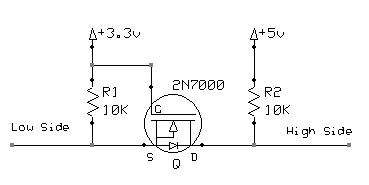 .
.In regards to sleep modes, If you are using a lopy + expansion board you will need to use the deep sleep shield to achieve proper low power sleep, example code for this can be found here: https://docs.pycom.io/chapter/datasheets/boards/deepsleep/api.html
-
@seb Hello I am trying to use your diagram to wire the SR05 to the LoPy4 can you please explain what the high side and low side mean in your diagram? Thank you this post mate its been VERY helpful
-
@justin-binda the low side is the signal pin on the 3.3V side (the ESP32 / Pycom module), the high side is signal pin on the 5V side (the sensor).
I think that sensor actually has two signal pins, one for trigger (MCU -> sensor) and the other for echo (sensor -> MCU) so you would need two level shifters.

Hello! It looks like you're interested in this conversation, but you don't have an account yet.
Getting fed up of having to scroll through the same posts each visit? When you register for an account, you'll always come back to exactly where you were before, and choose to be notified of new replies (either via email, or push notification). You'll also be able to save bookmarks and upvote posts to show your appreciation to other community members.
With your input, this post could be even better 💗
Register Login