[SOLVED] LoPy LoRa general consumption/effiency (code and scope printscreen)
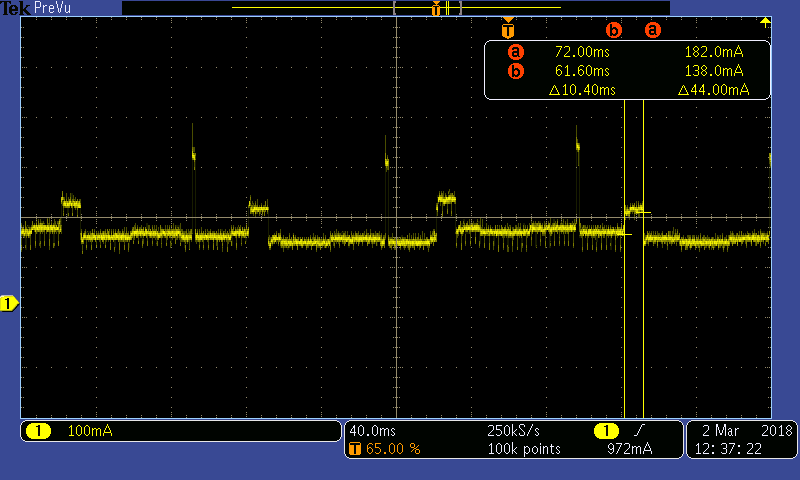
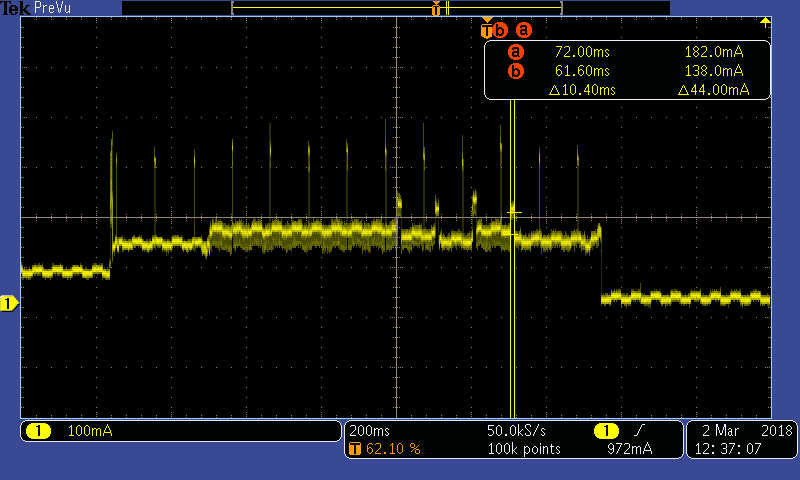
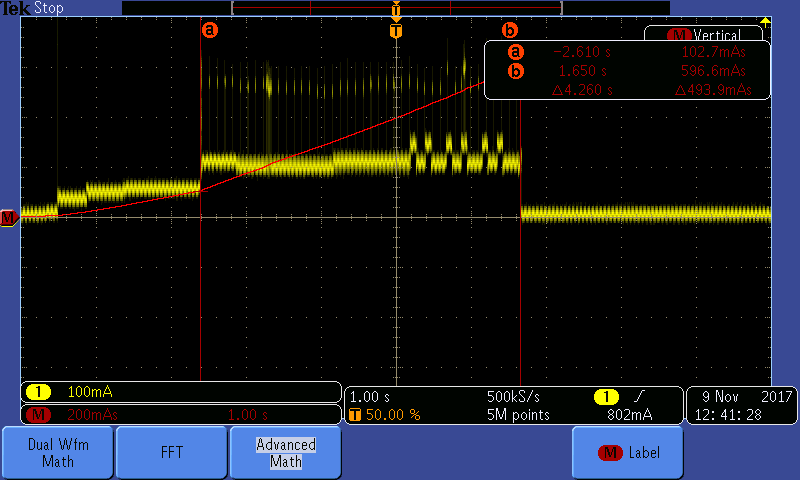
-
@iplooky The slowest data rates (smallest DR number and largest SF) have in theory the longest coverage.
With devices in the same room, DR5 (SF7) should be more than enough. If you want to test long-distance, you'll probably go for DR0 (SF12). You can adjust the actual DR based on the received signal levels (RSSI and SNR).
-
It's not possible to have accurate DR to distances calculations. What you can know is what is the lowest SNR at which a signal can be decoded and that depends on the spreading factor:
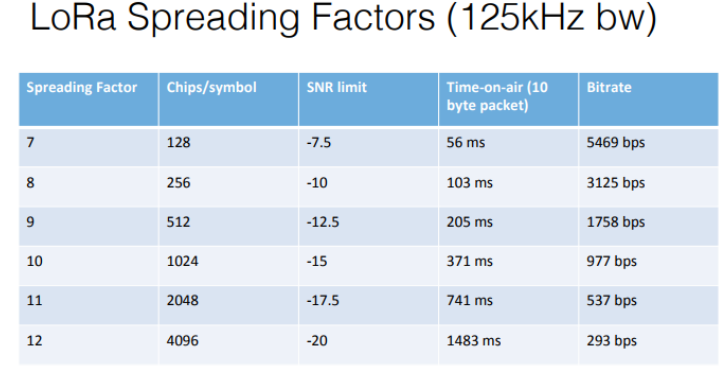
Higher spreading factors mean lower data rates. So at SF7 (or DR5) you can decode up to SNR -7.5, at SF12 (DR0) you can go as low as -20 so effectively being able to pick up weaker signals.
However three problems:
At SF12 you can see transmission of 10 bytes takes 1483ms, this means that (considering Europe's) duty cycle restrictions of 1% mean you'll need to wait a very long time until you can transmit again on that channel: 131 seconds!
Also it means you have the radio full on for that time consuming more energy
Finally since the transmission takes so long you're also at higher risk of collision/interference from other transmitters operating on the same frequency.
-
@jmarcelino would tx_power = 20 (the maximum value) influence in any way ? (in comparison with the default value?)
I've read one of your old posts : https://forum.pycom.io/topic/1652/solved-lopy-max-transmit-power-20-dbm-at-869-mhz but being 7 month old I was wondering if updates/imporvements appeared.
-
@iplooky
TX Power = 20dBm isn't legal in Europe for most channels (there are some exceptions), by law it should be 14dBm.But yes it generally would greatly increase the signal (at the cost of higher power consumption).
-
@jmarcelino the reciever code should be the same in any case or do I need there to modify Lora's paramethers too?
I mean :
from network import LoRa
import socket
import time


lora = LoRa(mode=LoRa.LORA, rx_iq=True ,frequency=863000000)
s = socket.socket(socket.AF_LORA, socket.SOCK_RAW)
s.setsockopt(socket.SOL_LORA, socket.SO_DR, 5)
s.setblocking(False)

print("start")
  while True:
  mesaj = s.recv(64)
  if(mesaj != b''):
    print(mesaj)
..should be a universal code OR should I try to modify there too ?(DR,SF,freq)
Also:
- from what i've understand DR and SF are complementary, if DR is 5 that means automatically that SF is 7 (and therefore I should not modify it because it's known already from DR) ?
- tx_power=20 should have also a rx_power=20 or just rx_iq=True ?
- putting the 2 lopy's at several meters and testing the code has the same bad results (poor transmission)
-
@iplooky How is your antenna set-up? And what do you call a poor transmission?
-
@iplooky
In LoRa mode the socket.SO_DR socket options are ignored, those are meant for LoRaWAN mode.For LoRa please set all these parameters at init time in your LoRa() call, for LoRaWAN set it via socket options.
-
@robert-hh poor transmission means the following: if I want to send a short message (7characters) it is a slightly chance to recieve it from the first time ( but still I send it 6 times consecutively just to be shure ), 10,20,40 or 80 characters have a nearly to 0 chance to be recieved. (10 meters, SF=7/DR=5 , TX_power=20 )
@jmarcelino so:
 lora = LoRa(mode=LoRa.LORA, tx_power=20 , sf=7 ,frequency=863000000) #europe 863MHz
 s = socket.socket(socket.AF_LORA, socket.SOCK_RAW)
 s.setblocking(False)
should work just fine ?
-
@iplooky Hard to say what's wrong. I made my first test with the lopy-lopy examples https://github.com/pycom/pycom-libraries/tree/master/examples/lopy-lopy, and they worked ok, as long as I started lopy-b first. No problem with a short distance.
I have also set up a LoPy as TTN gateway and a FiPy a TTN node, and walked away like 500m from the gateway. Still at rrsi of -100, being able to send and receive messages. I also receive messages at the gateway from nodes like 3 km away, estimated from the rssi level of -126 to -130. I'll try some larger (than 500m) distances later. -
Solved the TX part using the functions chrono.start() / chrono.read() / chrono.stop() among lora.callback() and lora.events()
It now takes 28ms to send 1 character, 58ms to send 20, 115ms to send 60 and so on...
-
I am in equal measure happy and mad, the ONLY problem regarding the transmission quality was the SF, at the default value it had the biggest problems but when I put it to 12(maximum) it worked just fine (in short distances too).
Altough it is an old post I hope that someone with the same problem with find this answer usefull in the future! -
Please Help me in this code.
import time
chrono = Timer.Chrono()
...
chrono.start()
time.sleep(5)
chrono.stop()
....
print(chrono.read())
I measure 5023 seconds. How can I make accurate measurements?. It should be 5 seconds -
Hello @braulio.
I think the extra milliseconds are from Lopy info processing, you can try with a different number (10 seconds, 20, 30 etc) and the "extra" time is the same then you have a solution. Also you hsould try to make a new post, the topic is quite different from this one.


Hello! It looks like you're interested in this conversation, but you don't have an account yet.
Getting fed up of having to scroll through the same posts each visit? When you register for an account, you'll always come back to exactly where you were before, and choose to be notified of new replies (either via email, or push notification). You'll also be able to save bookmarks and upvote posts to show your appreciation to other community members.
With your input, this post could be even better 💗
Register Login