Welcome to the Pycom forum Forum
    • \[\[global:header.categories\]\]
    • \[\[global:header.recent\]\]
    • \[\[global:header.tags\]\]
    • \[\[global:header.popular\]\]
    • Login

    Explore Pybytes | Official Documentation | Report a Firmware Bug/Issue | GitHub

    OSError: I2C bus error

    Scheduled Pinned Locked Moved LoPy
    9 Posts 4 Posters 5.2k Views 5 Watching
    Loading More Posts
    • Oldest to Newest
    • Newest to Oldest
    • Most Votes
    Reply
    • Reply as topic
    Log in to reply
    This topic has been deleted. Only users with topic management privileges can see it.
    • B Offline
      Baruch1966
      last edited by

      i2c bus: doesn't work for me.

      This is what I did:

      from machine import I2C
      i2c = I2C(0, I2C.MASTER, baudrate=100000)
      i2c.scan()

      [72] <- REPL reply

      So the system recognize the slave at address 0x72 (temp. sensor TC74)
      normally on I would request 1 bytes from slave device by writing to the slave to initiate the read sequence.

      i2c.writeto(0x72, b'1')
      OSError: I2C bus error

      On the scope with i2c protocol analyser it puts the address byte on the bus but no ACK follows (weird). Because the scan works okay it seems to be wrong with the write functions. Or do I mis something?!?
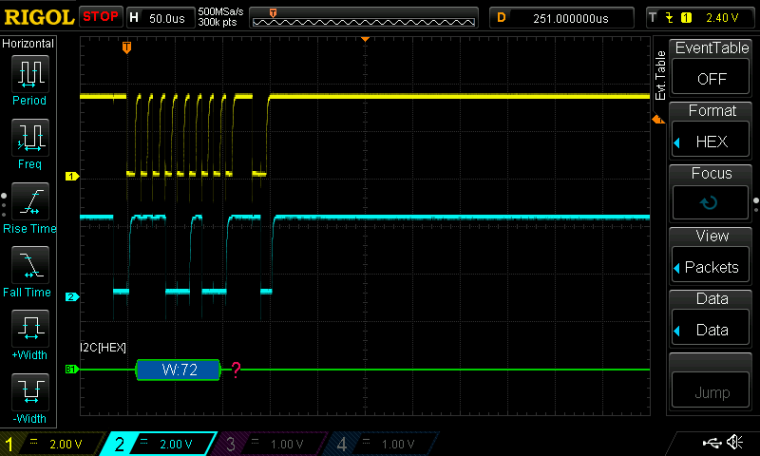
      0_1479403538242_DS1Z_QuickPrint1.png

      Same slave (working) on a arduino, the code would be:

      Wire.requestFrom(72, 1);
      while(Wire.available()) temperatuur = Wire.read();

      Please help! Any suggestions?

      R G 2 Replies Last reply Reply Quote 0
      • L Offline
        littlebat
        last edited by

        Have you tried just I2C.readfrom(addr, nbytes)

        B 1 Reply Last reply Reply Quote 0
        • B Offline
          Baruch1966 @littlebat
          last edited by

          @littlebat said in OSError: I2C bus error:

          Have you tried just I2C.readfrom(addr, nbytes)

          i2c.readform(0x72, b'1')
          Traceback (most recent call last):
          File "<stdin>", line 1, in <module>
          AttributeError: 'I2C' object has no attribute 'readform'

          i2c.readform(0x72, 0x01)
          Traceback (most recent call last):
          File "<stdin>", line 1, in <module>
          AttributeError: 'I2C' object has no attribute 'readform'

          i2c.readform(0x72, 1)
          Traceback (most recent call last):
          File "<stdin>", line 1, in <module>
          AttributeError: 'I2C' object has no attribute 'readform'

          1 Reply Last reply Reply Quote 0
          • L Offline
            littlebat
            last edited by

            You spelled it wrong

            B 1 Reply Last reply Reply Quote 0
            • B Offline
              Baruch1966 @littlebat
              last edited by

              @littlebat said in OSError: I2C bus error:

              You spelled it wrong

              Your right but also no result.

              1 Reply Last reply Reply Quote 0
              • R Offline
                rskoniec @Baruch1966
                last edited by rskoniec

                @Baruch1966 I think this @daniel's post should help (from thread https://forum.pycom.io/topic/265/wipy-2-0-and-bme280-sensor):

                This error occurs because the function expects a bytes object and you are trying to send an integer. Could you try with:

                i2c.writeto_mem(0x76, 0xF4, bytes([0x3F]))
                

                Cheers,
                Daniel

                The machine is working as good as it's code.

                B 1 Reply Last reply Reply Quote 0
                • B Offline
                  Baruch1966 @rskoniec
                  last edited by

                  @rskoniec said in OSError: I2C bus error:

                  This error occurs because the function expects a bytes object and you are trying to send an integer. Could you try with:
                  i2c.writeto_mem(0x76, 0xF4, bytes([0x3F]))

                  Cheers,
                  Daniel

                  Solved

                  i2c.readfrom_mem(72, 0, 1)
                  b'\x19'

                  Did the trick. Manual sucks! Cost me hours of my life!!!

                  1 Reply Last reply Reply Quote 0
                  • G Offline
                    gertjanvanhethof Pybytes Beta @Baruch1966
                    last edited by

                    @Baruch1966 The i2c.scan() is returning a integer. You need a hex value for write.

                    I tried this:

                    from machine import I2C
                    i2c = I2C(0)
                    i2c = I2C(0, I2C.MASTER)
                    i2c.init(I2C.MASTER, baudrate=10000)
                    i2c.scan()
                    [68] <- REPLY
                    i2c.writeto(0x44 , '1')
                    1 <- REPLY

                    B 1 Reply Last reply Reply Quote 0
                    • B Offline
                      Baruch1966 @gertjanvanhethof
                      last edited by

                      @gertjanvanhethof

                      All are integers.

                      #working code for TC74 i2c temp. sensor
                      from machine import I2C
                      i2c = I2C(0, I2C.MASTER, baudrate=400000)
                      t = i2c.readfrom_mem(72, 0, 1)
                      print('temperature room: ', t[0])

                      1 Reply Last reply Reply Quote 0

                      Hello! It looks like you're interested in this conversation, but you don't have an account yet.

                      Getting fed up of having to scroll through the same posts each visit? When you register for an account, you'll always come back to exactly where you were before, and choose to be notified of new replies (either via email, or push notification). You'll also be able to save bookmarks and upvote posts to show your appreciation to other community members.

                      With your input, this post could be even better 💗

                      Register Login
                      • 1 / 1
                      • First post
                        Last post

                      Pycom on Twitter

                      Pycom