Welcome to the Pycom forum Forum
    • \[\[global:header.categories\]\]
    • \[\[global:header.recent\]\]
    • \[\[global:header.tags\]\]
    • \[\[global:header.popular\]\]
    • Login

    Explore Pybytes | Official Documentation | Report a Firmware Bug/Issue | GitHub

    ValueError: invalid join data rate 3 Lopy LORAWAN
    Scheduled Pinned Locked Moved LoPy
    lopydata rateerrorloralora lopy
    29 Posts 12 Posters 7.3k Views 13 Watching
    Loading More Posts
    • Oldest to Newest
    • Newest to Oldest
    • Most Votes
    Reply
    • Reply as topic
    Log in to reply
    This topic has been deleted. Only users with topic management privileges can see it.
    • rubencg195R Offline
      rubencg195 @seb
      last edited by

      Hi @seb ,

      Sure I am going to send them to your email. Thank you very much.

      1 Reply Last reply Reply Quote 0
      • rubencg195R Offline
        rubencg195 @seb
        last edited by

        @seb the link is https://docs.pycom.io/chapter/tutorials/lora/lorawan-nano-gateway.html

        1 Reply Last reply Reply Quote 0
        • sebS Offline
          seb
          last edited by

          Hi,

          I located the cause for your issue, when we updated our LoRa stack to allow users to change regions we added this: https://github.com/pycom/pycom-micropython-sigfox/blob/master/esp32/mods/modlora.c#L1664

          This was based on a recommendation in the LoRaWAN spec and I believe it will be relaxed in a future firmware update. For now just make sure when you run lora.join, you set the dr to either 0 or 4.

          1 Reply Last reply Reply Quote 1
          • rubencg195R Offline
            rubencg195
            last edited by rubencg195

            Hi @seb, the only problem is that when I put 0 gives the same error and with 4 it hangs out.

            1 Reply Last reply Reply Quote 1
            • sebS Offline
              seb
              last edited by

              which line of code are you changing?

              rubencg195R 1 Reply Last reply Reply Quote 0
              • rubencg195R Offline
                rubencg195 @seb
                last edited by

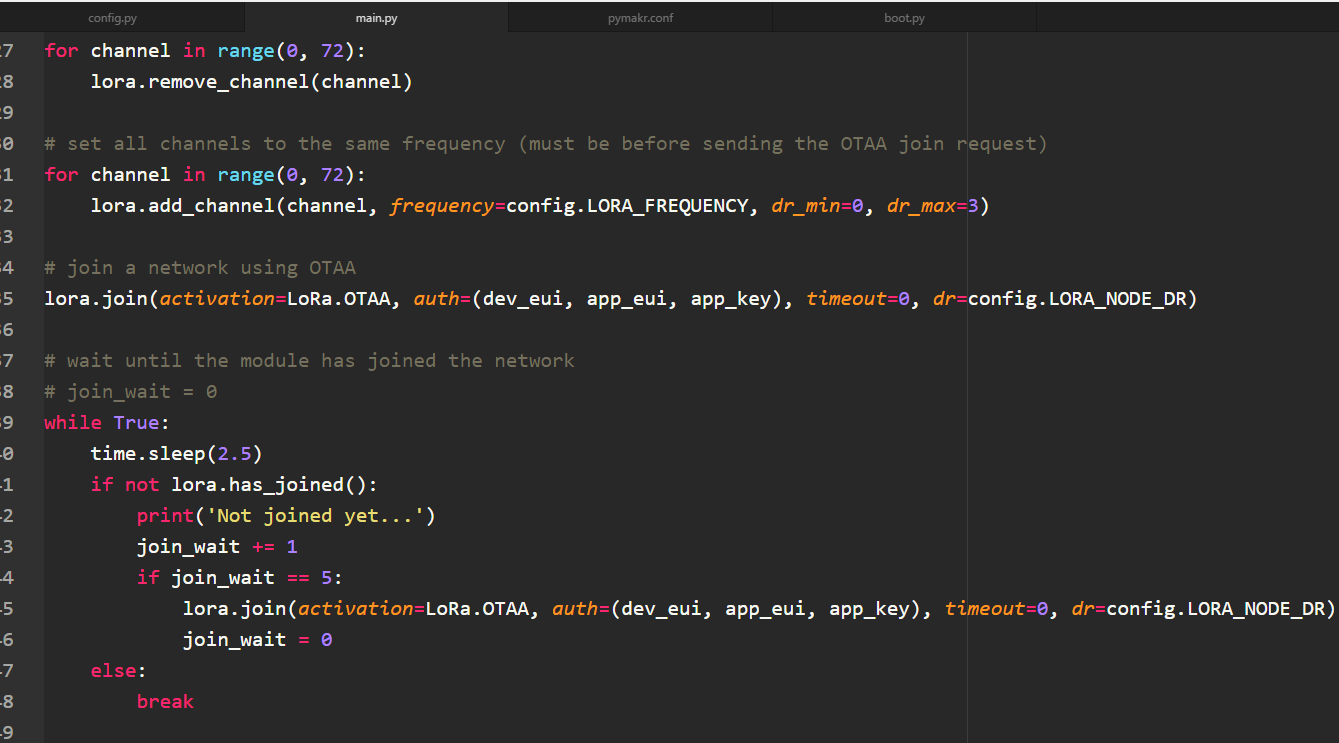
                @seb line 32 where it says lora.add_channel

                sebS 1 Reply Last reply Reply Quote 0
                • sebS Offline
                  seb @rubencg195
                  last edited by

                  @rubencg195

                  You need to adjust the lora.join function not the add_channel. The join has to be DR 0 or 4

                  1 Reply Last reply Reply Quote 0
                  • B Offline
                    Barillaro
                    last edited by

                    Hello,

                    I am having similar issue with same example published on https://github.com/pycom/pycom-libraries/blob/master/examples/lorawan-nano-gateway/otaa_node_US915.py
                    I have modified line 32 at the end like these:
                    dr=0 (hang)
                    dr=1 File "<stdin>", line 32, in <module> ValueError: invalid join data rate 1
                    dr=2 File "<stdin>", line 32, in <module> ValueError: invalid join data rate 2
                    dr=3 File "<stdin>", line 32, in <module> ValueError: invalid join data rate 3
                    dr=4 (hang)
                    dr=5 File "<stdin>", line 32, in <module> ValueError: invalid join data rate 5
                    dr=6 File "<stdin>", line 32, in <module> ValueError: invalid join data rate 6
                    dr=7 File "<stdin>", line 32, in <module> ValueError: invalid join data rate 7
                    dr=8 File "<stdin>", line 32, in <module> ValueError: invalid join data rate 8

                    1 Reply Last reply Reply Quote 0
                    • J Offline
                      jclo13
                      last edited by

                      Hello @seb,

                      I have the same problem, I change the DR to 4 or 0 and the Lopy4 hangs out. Do you have a solution?

                      thank you

                      J 1 Reply Last reply Reply Quote 0
                      • J Offline
                        jmarcelino @jclo13
                        last edited by

                        @jclo13
                        This is a bug expected to be fixed in the next firmware release. Sorry for the inconvenience.

                        If you are able to compile a custom firmware there is a fix already on master (compile instructions are there too)

                        https://github.com/pycom/pycom-micropython-sigfox

                        T 1 Reply Last reply Reply Quote 0
                        • T Offline
                          Tombee @jmarcelino
                          last edited by

                          @jmarcelino When do you anticipate the next f/w release?

                          J 1 Reply Last reply Reply Quote 0
                          • J Offline
                            jmarcelino @Tombee
                            last edited by

                            @tombee
                            I'm not sure sorry, maybe next week

                            J 1 Reply Last reply Reply Quote 0
                            • J Offline
                              jclo13 @jmarcelino
                              last edited by

                              @jmarcelino do you have news about the new firmware release?

                              thank you in advance.

                              Jose

                              J 1 Reply Last reply Reply Quote 0
                              • J Offline
                                jclo13 @jclo13
                                last edited by

                                I tried whit the last Pybytes firmware and it works, but the memory space is less. And it needs internet to function, right?

                                1 Reply Last reply Reply Quote 0
                                • B Offline
                                  Burgeh
                                  last edited by

                                  Any update on how this works with the stable firmware release? (1.17.3.b1?)

                                  1 Reply Last reply Reply Quote 0
                                  • J Offline
                                    jclo13
                                    last edited by

                                    @Burgeh, the firmware 1.18 is already published,

                                    @jmarcelino, I updated the firmware of my lopy4, the problem mentioned before disappeared, but I have another problem, the lopy4 connect successfully whit TTN but it lost connection after the deepsleep, in other words, the lopy4 goes to deep sleep, it wakes up and it think that is connected, it send the data, the gateway receive the data, the TTN Gateway Traffic window shows the packet arrived, but the APPLICATION DATA window doesn´t show anything, if I made the connection procedure again, it shows the data again. Can you help me?, please

                                    thank you

                                    Jose.

                                    X robert-hhR F 3 Replies Last reply Reply Quote 0
                                    • X Offline
                                      Xykon administrators @jclo13
                                      last edited by

                                      @jclo13 Are you running lora.nvram_save() before going to deepsleep and lora.nvram_restore() after waking up?

                                      Christian Ehlers

                                      1 Reply Last reply Reply Quote 1
                                      • robert-hhR Offline
                                        robert-hh @jclo13
                                        last edited by

                                        @jclo13 Deepsleep wakeup is a reset. So before going to deepsleep, you have to save the LORA state tio nvram and restore it after that from nvram. No need to run join again, because the credentials are still valid. Actually, once a device has being joind and the credentials are established, there is no need to join with again, at least with OTAA.

                                        The problem you see may be caused by replaying packet numbers. You can verify that in the TTN console by unchecking the box "frame counter checks" in the devices settings. For testing this is an acceptable setting.

                                        J 1 Reply Last reply Reply Quote 1
                                        • J Offline
                                          jclo13 @robert-hh
                                          last edited by

                                          @Xykon yes, I am using lora.nvram_save() and then lora.nvram_restore().

                                          @robert-hh, I unchecked the box mentioned and it worked, thank you. but you mention for testing, how can I solve the problem if I want to check the counter frame?

                                          Jose

                                          robert-hhR 1 Reply Last reply Reply Quote 0
                                          • robert-hhR Offline
                                            robert-hh @jclo13
                                            last edited by

                                            @jclo13 You can reset the counter in the TTN console to 0. Then the next message from the mote will synchronize the counter to a common value.


                                            1 Reply Last reply Reply Quote 1

                                            Hello! It looks like you're interested in this conversation, but you don't have an account yet.

                                            Getting fed up of having to scroll through the same posts each visit? When you register for an account, you'll always come back to exactly where you were before, and choose to be notified of new replies (either via email, or push notification). You'll also be able to save bookmarks and upvote posts to show your appreciation to other community members.

                                            With your input, this post could be even better 💗

                                            Register Login
                                            • 1
                                            • 2
                                            • 2 / 2
                                            • First post
                                              Last post

                                            Pycom on Twitter

                                            Pycom