Welcome to the Pycom forum Forum
    • \[\[global:header.categories\]\]
    • \[\[global:header.recent\]\]
    • \[\[global:header.tags\]\]
    • \[\[global:header.popular\]\]
    • Login

    Explore Pybytes | Official Documentation | Report a Firmware Bug/Issue | GitHub

    How to send data to characteristic over BLE

    Scheduled Pinned Locked Moved LoPy
    lopy bleble lopyble send datalopy
    18 Posts 3 Posters 3.8k Views 4 Watching
    Loading More Posts
    • Oldest to Newest
    • Newest to Oldest
    • Most Votes
    Reply
    • Reply as topic
    Log in to reply
    This topic has been deleted. Only users with topic management privileges can see it.
    • sebS Offline
      seb @CodeManiac64
      last edited by

      @codemaniac64

      In the code you have posted the callback parameter is called char not characteristic so please adjust your code accordingly.

      C 1 Reply Last reply Reply Quote 0
      • C Offline
        CodeManiac64 @seb
        last edited by

        @seb
        Do I need to change every char to characteristic?
        Nothing changed when I changed the char in the characteristic_callback

        sebS 1 Reply Last reply Reply Quote 1
        • sebS Offline
          seb @CodeManiac64
          last edited by

          @codemaniac64

          What exactly are you trying to achieve?

          C 1 Reply Last reply Reply Quote 0
          • C Offline
            CodeManiac64 @seb
            last edited by

            @seb

            I want to send something over BLE from LoPy. That is all. A simple 'Hello' or a value that I can enter in putty.

            sebS 1 Reply Last reply Reply Quote 1
            • sebS Offline
              seb @CodeManiac64
              last edited by

              @codemaniac64

              Are you sending to another LoPy or a third party device?

              C 1 Reply Last reply Reply Quote 0
              • C Offline
                CodeManiac64 @seb
                last edited by

                @seb
                It's not a LoPy, I'm using a PSoC 4 BLE

                sebS J 2 Replies Last reply Reply Quote 1
                • sebS Offline
                  seb @CodeManiac64
                  last edited by

                  @codemaniac64

                  So firstly you need to find the desired characteristic from the device using code like:

                  from network import Bluetooth
                  import time
                  
                  bluetooth = Bluetooth()
                  bluetooth.start_scan(10)
                  
                  while True:
                      adv = bluetooth.get_adv()
                      if adv and binascii.hexlify(adv.mac) == 'XXXXXXXXXX':
                          try:
                              print('1')
                              conn = bluetooth.connect(adv.mac)
                          except:
                              bluetooth.start_scan(5)
                              continue
                          break
                  
                  wanted_char = None
                  services = conn.services()
                  for service in services:
                      print("Service: {}".format(service.uuid()))
                      if service.uuid() == b'XXXXXXXXXXXXX':
                          characteristics = service.characteristics()
                          for characteristic in characteristics:
                              print("Characteristic: {}".format(characteristic.uuid()))
                              if characteristic.uuid() == b'XXXXXXXXXXXX':
                                  wanted_char = characteristic
                  

                  You will then need to check the wanted_char.properties() to see if it has the writable bit set, if it does you can then do wanted_char.write(b'x0f')

                  C 1 Reply Last reply Reply Quote 0
                  • J Offline
                    jmarcelino @CodeManiac64
                    last edited by

                    Hi @codemaniac64

                    Can you clarify what is your GATT Server and Client in your setup?

                    If the LoPy is your GATT Server you'd trigger on a CHAR_READ_EVENT in order to send data to the remote device

                    def char_cb_handler(chr):
                        global some_number
                        return some_number
                    
                    
                    char.callback(trigger=Bluetooth.CHAR_READ_EVENT, handler=char_cb_handler)
                    
                    C 1 Reply Last reply Reply Quote 0
                    • C Offline
                      CodeManiac64 @seb
                      last edited by

                      @seb

                      I already have the connection established to the desired characteristic, so that step is not needed. I also already know that the characteristic has a writable bit set because I've already programmed it that way and done tests.

                      I have tried the characteristic.write(value) aswell but it doesn't work. The only step I want to know is how to send something to the GATT server.

                      J 1 Reply Last reply Reply Quote 0
                      • C Offline
                        CodeManiac64 @jmarcelino
                        last edited by

                        @jmarcelino
                        My LoPy would be my GATT Client that I will send to my PSoC 4 BLE that will be my GATT Server.

                        Another thing, in your trigger you have Bluetooth.CHAR_READ_EVENT, but the documentation says that it can must be Bluetooth.CHAR_NOTIFY_EVENT.

                        So if I want to write something wouldn't it be: char.callback(trigger=Bluetooth.CHAR_WRITE_EVENT, handler=char_cb_handler)

                        1 Reply Last reply Reply Quote 0
                        • J Offline
                          jmarcelino @CodeManiac64
                          last edited by jmarcelino

                          @codemaniac64

                          If the PSoC 4 is your GATT Server and you’ve already connected and found the characteristic it should just be a matter of doing characteristic.write(value)

                          But do this outside of the callback function. Just use the characteristic you found via service.characteristics()

                          1 Reply Last reply Reply Quote 0
                          • C Offline
                            CodeManiac64
                            last edited by

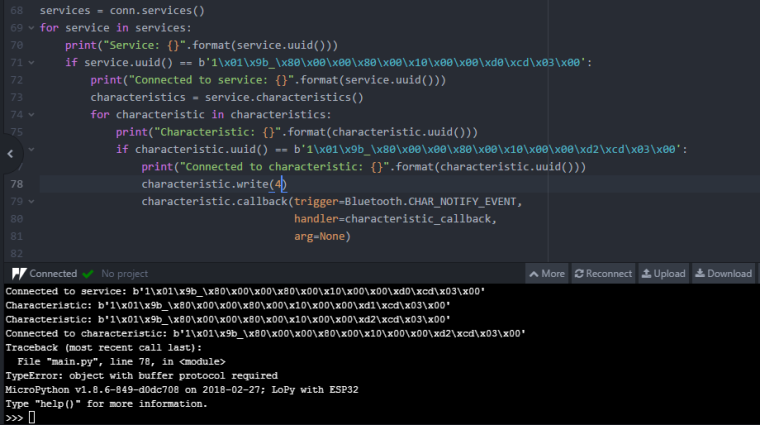
                            0_1520947932312_Skärm.PNG
                            Should it be like this? Also what does the error I get mean?

                            J 1 Reply Last reply Reply Quote 0
                            • J Offline
                              jmarcelino @CodeManiac64
                              last edited by jmarcelino

                              @codemaniac64
                              Yes that should do it.

                              As explained on the documentation "For now it only accepts bytes object representing the value to be written." so you need to covert your integer to a bytes type with (for example to write one byte with the number 4):

                              bytes([4])

                              C 1 Reply Last reply Reply Quote 0
                              • C Offline
                                CodeManiac64 @jmarcelino
                                last edited by

                                @jmarcelino
                                Thank you so much! This has helped a lot.
                                Is it also possible that I store it in a variable and print it out, that way I can enter numbers and letters I want to send over. bytes([value])

                                J 1 Reply Last reply Reply Quote 0
                                • J Offline
                                  jmarcelino @CodeManiac64
                                  last edited by jmarcelino

                                  @codemaniac64

                                  bytes([]) really expects an array of one byte integer to convert, if you try to covert something larger than one byte you'll get an error.

                                  To do it properly you should use struct.pack functions() where you can specify the byte order, for example to get the byte representation of 2048 as a little endian 16 bit short you''d use:

                                  import struct
                                  payload = struct.pack("<H", 2048)
                                  characteristic.write(payload)
                                  

                                  For Strings you can use payload_str = mystring.encode('ascii') (or Unicode, etc)

                                  Finally you can simple concatenate bytes with + e.g. payload + payload_str

                                  1 Reply Last reply Reply Quote 1
                                  • C Offline
                                    CodeManiac64
                                    last edited by

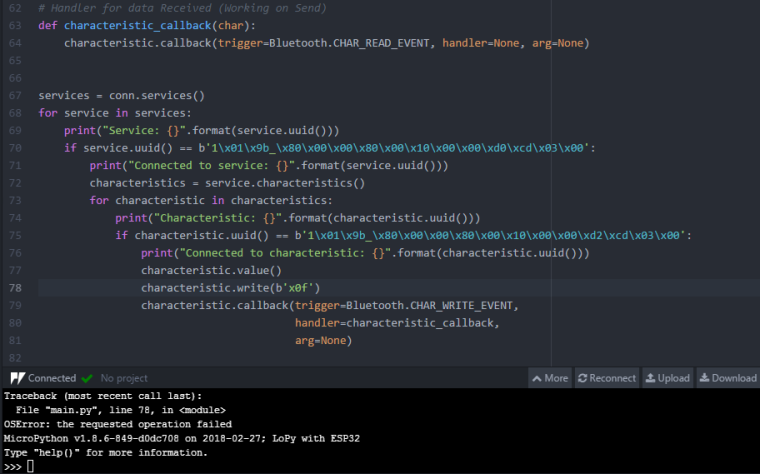
                                    0_1521018341352_Request fail.PNG

                                    So I've tried both using bytes([4]) and payload = struct.pack("<H", 2048) and I get this error everytime. What am I doing wrong? Is it because I'm not doing anything in my characteristic_callback?

                                    Also I did change char to characteristic just as Seb said.

                                    J 1 Reply Last reply Reply Quote 0
                                    • J Offline
                                      jmarcelino @CodeManiac64
                                      last edited by

                                      @codemaniac64
                                      Umm I'm not sure, do you have any debug visibility on your PSoC code?

                                      Seems like it's rejecting something. Can you see if the BLE connection is still up when you try the .write(b'x0f')?

                                      It really helps to have a BLE sniffer like this https://www.nordicsemi.com/eng/Products/Bluetooth-low-energy/nRF-Sniffer

                                      1 Reply Last reply Reply Quote 0

                                      Hello! It looks like you're interested in this conversation, but you don't have an account yet.

                                      Getting fed up of having to scroll through the same posts each visit? When you register for an account, you'll always come back to exactly where you were before, and choose to be notified of new replies (either via email, or push notification). You'll also be able to save bookmarks and upvote posts to show your appreciation to other community members.

                                      With your input, this post could be even better 💗

                                      Register Login
                                      • 1 / 1
                                      • First post
                                        Last post

                                      Pycom on Twitter

                                      Pycom