New firmware release 0.9.5.b1, Pymate iOS released and improved docs
-
@jmaralc
if you attach to usb on your computer then it is installed as COM port.
When you run updater then it provide COM port choose.
remember that to update you must connect GND and G23 on your expanson board with simple wire. -
@livius Thanks for the answer.
The problem is exactly that I connect the board with the USB and it is not installed as COM port....symply the system does not recognize it. I tried in three computer the three with linux and windows....I can use pymakr and load the examples of the tutorials but the computers are not recognizing the board. I tried also with different USB cables....any idea? -
Hi @Daniel. I just updated my WiFy 2.0 to the latest firmware version (1. I noticed that I cannot find the RTC module.
If I import machine and then do a dir(machine); RTC class seems to be missing.
Best
Alan
-
@jmaralc In deed I am noticing that I can not connect with pymakr with the serial COM, I did it this morning but through the wifi.....Could it be a defective board?
-
No - pymakr have problem connecting by COM
-
@livius And any suggestion for the board not being detected by any computer/system after connecting it with USB? Any special USB cable is needed? Could you show me a screenshot of how the device list should look like in case of a proper detection?
Thanks and sorry for the extra work. I was eager to work on the board....I am still but more frustrated. -
@livius Just some good news. In Ubuntu, I manage to connect the board through the serial port (COM) with the updater and the pymakr. I notice that the port was /dev/ttyUSB0 and I could type it in the linux updater and worked fine.
Thanks for the help. Motivation comes up again! -
May I ask which USB cable do you use to connect the board? I lost the connection again with the same cable in Ubuntu, not accessible any more.....
-
@jmaralc
best use expansion board
if you have not one then use any converter - e.g. - remember about voltage 3V3
-
@livius Thanks Livius. I am already using the expansion board (the Wipy 2.0 is plugged in).
Still no solution...next time today after work. I have some ideas in mind that this board could help a lot but.....well let see whether it improves or at least I manage to solve my problems
Cheers
-
I work on Windows and there are no problems with updater
If you connect GND + GP23 by wire
and turn power on(or reset WiPy)
and you run Firmware Updater - it work for me without problem with Expansion Board -
if someone have not expansion board then this is i suppose helpfull
I attache WiPy2 to computer by UART/USB converter like this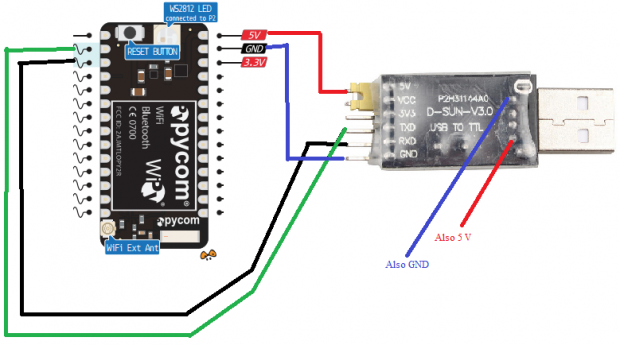
Hello! It looks like you're interested in this conversation, but you don't have an account yet.
Getting fed up of having to scroll through the same posts each visit? When you register for an account, you'll always come back to exactly where you were before, and choose to be notified of new replies (either via email, or push notification). You'll also be able to save bookmarks and upvote posts to show your appreciation to other community members.
With your input, this post could be even better 💗
Register Login