Atom terminal disappear

-
Hi there, my atom terminal console suddenly disappear when i open the atom software. How to make the terminal console to re-appear?!
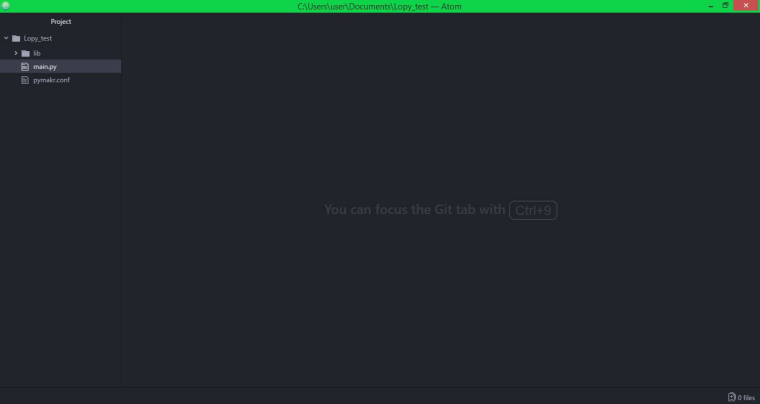
Those "run", "upload", "download", "Connect" is disappear. How can i make it reappear again? Thanks
-
you should see it at the bottom of the window like so:

If it has not appeared can you please check in the settings menu of atom that Pymakr is still installed and enabled?
-
@seb yes i checked and it is enabled and installed. Is it the Pymakr problem? I have uninstall the Atom and install the latest version 1.25.0 and install back the Pymakr Plugin version 1.0.3 which stated compatible for the Atom version. But it failed to install the Pymakr.
-
Hi,
Yes we are aware of this issue. The atom team managed to beat our pymakr team with going from beta to full release. We will update pymakr shortly to support 1.25
-
@seb Hope it will fix for the Atom 1.25 version sooner. Thank you.
-
@seb I reinstalled the Pymakr plugin but it didn`t worked. I keep hlding the error messages. And I am still missing the bottom bar with More, Connect & Settings bar.
Do you have any other tips to resolve it?
I have Atom 1.24.0 and Pymakr 1.2.10, 17.939. -
@han
Can you try uninstalling pymakr, upgrading atom to 1.25.0 and then re-installing pymakr? This process worked for me to fix the recent compatibility issues. Also could you share what error messages you are getting? -
Thanks @seb the bottom bar back again!
-
@mj I had some problem with atom to and the plugin pymakr...
I did uninstall atom and remove all packed from c:\user\atom then I install atom again 1.24 then I remove the auto update and after that I run
cmd: and apm install pymakr@1.2.7 so it did install that version and it works perfect now :) Im happy... I would say that works perfect right now... No error or so! :)

Hello! It looks like you're interested in this conversation, but you don't have an account yet.
Getting fed up of having to scroll through the same posts each visit? When you register for an account, you'll always come back to exactly where you were before, and choose to be notified of new replies (either via email, or push notification). You'll also be able to save bookmarks and upvote posts to show your appreciation to other community members.
With your input, this post could be even better 💗
Register Login