SD Card - Store GPS GPS-coordinates to SD card

-
Im did try this and it works fine
from machine import SD
import os
import gc

print('Hej')
gc.enable()

sd = SD()
os.mount(sd, '/sd')

while True:

    f = open('/sd/test.txt', 'a')
    f.write('Testing SD card write operations')
    f.write('\n')
    #gc.collect()
    f.write('Does this work')
    #gc.collect()
    f.close()
When I try this exampel, I dont get anything, I dont understand how I should pass on the data into the sd card (data and coordinates).
Sorry the look of the post:import machine import math import network import os import time import utime import socket import pycom import gc from machine import RTC from machine import SD from machine import Timer from L76GNSS import L76GNSS from pytrack import Pytrack from network import LoRa # setup as a station pycom.heartbeat(False) for cycles in range(1): # stop after 1 cycles time.sleep(0) lora = LoRa(mode=LoRa.LORA,tx_power = 14, sf = 7, frequency=863000000) s = socket.socket(socket.AF_LORA, socket.SOCK_RAW) s.setblocking(False) gc.enable() i = 0 failed = 0 counter_sent = 0 counter_received = 0 # setup rtc rtc = machine.RTC() rtc.ntp_sync("pool.ntp.org") utime.sleep_ms(750) print('\nRTC Set from NTP to UTC:', rtc.now()) utime.timezone(7200) print('Adjusted from UTC to EST timezone', utime.localtime(), '\n') py = Pytrack() l76 = L76GNSS(py, timeout=0.4) chrono = Timer.Chrono() chrono.start() sd = SD() os.mount(sd, '/sd') f = open('/sd/gps-record.txt', 'w') while (True): #s.send(bytes([1])) # = 200 bytes coord = l76.coordinates() f.write("{} - {}\n".format(coord, rtc.now())) print("{} - {} - {}".format(coord, rtc.now(), gc.mem_free())) rtc = machine.RTC() #s.send("Got data from Stefan over LoRa: {}".format(i)) s.send(bytes([1,2,3,4,5,6,7,8,9,10,11,12,13,14,15,16,17,18,19,20,21,22,23,24,25,26,27,28,29,30,31,32,33])) # = 32 bytes #s.send("{} - {} - {}".format(coord, rtc.now(), gc.mem_free())) data = s.recv(64) f.write("{}\n".format(data)) print(data) counter_sent+=1 print('Sent Data: {}'.format(counter_sent)) if data: print(data) print('Received Data: {}'.format(data)) counter_received+=1 print('Received Data: {}'.format(counter_received)) print('Successful data received: {}%'.format(counter_received/counter_sent)) pycom.rgbled(0x007f00) # green print(' ') else: print(' ') failed +=1 print('Got no data: {}'.format(failed)) print('Unsuccessful data received: {}%'.format(failed/counter_sent)) pycom.rgbled(0x7f0000) #time.sleep(0.4)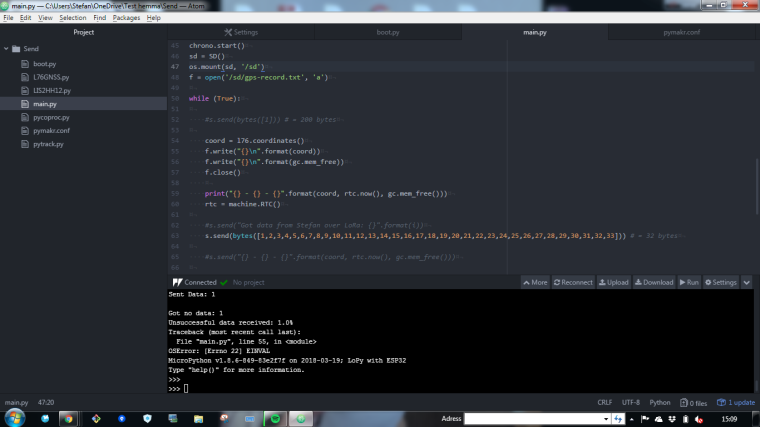
-
@stefan85e
what is your current code? Because attached is different than on screenshot from pymakr.
In pymakr you have an error because you open file before loop
but in the loop you close file and in another iteration it can not acces it and then you got an error on line55look at
f.flush() -
Also you have not checked if
coord = l76.coordinates()return something it can containNone
Hello! It looks like you're interested in this conversation, but you don't have an account yet.
Getting fed up of having to scroll through the same posts each visit? When you register for an account, you'll always come back to exactly where you were before, and choose to be notified of new replies (either via email, or push notification). You'll also be able to save bookmarks and upvote posts to show your appreciation to other community members.
With your input, this post could be even better 💗
Register Login