GPy with Hologram.io SIM
-
@tlanier said in GPy with Hologram.io SIM:
Is it possible that inserting the SIM in an Android phone somehow activated the SIM? I'm not sure why it started working.
It is possible that the SIM was not seated correctly. Now that I think of it, I should have had you run the AT+CCID command. This ensures that the modem is reading the unique identifier back from the SIM card. Sometimes if there is dirt or a loose SIM holder, this is a possibility. I'm sorry I didn't think to recommend that. Sometimes in an ongoing battle against getting connected, it's good to go through and do a checklist of things. We actually made a video/blog post about just that, after discussing this situation.
If I have time tomorrow, I'm thinking about trying to duplicate the connect() code in Python to try to see where it fails.
You mean you'll basically replicate the function that the C++ is doing? Where is this code located?
-
Attach/Connect Success!!!
I've now been able to attach to the tower and connect.
The program now crashes at either of these two lines:
s.connect(socket.getaddrinfo('www.google.com', 443)[0][-1])
or
s.send(b"GET / HTTP/1.0\r\n\r\n")OSError: -29312 was one error I got
Unfortunately, somehow the unit is now stuck on the "lte = LTE(carrier="verizon")" line which executes when I restart and it hangs forever. CTRL+C does not abort the program, power down/up does not fix, reloading Visual Studio Code does not fix, reinstalling Pymakr does not fix.
I don't think my problems in the past were caused by the SIM card not being inserted properly because I think the code throws an exception if it does not detect a SIM plugged in. Unfortunately I can't test that theory now because of the problem above, but I do remember seeing code that checks the SIM.
Here's a link to the GitHub site where you can view the code.
GitHubThe "esp32\mods\modlte.c" is one place to start looking for clues I think. Notice that major changes to this module were made yesterday.
import pycom import socket import ssl import sys import time from network import LTE BLACK = 0x000000 WHITE = 0xFFFFFF RED = 0xFF0000 GREEN = 0x00FF00 BLUE = 0x0000FF YELLOW = 0xFFFF00 # send AT command to modem and return response as list def at(cmd): print("modem command: {}".format(cmd)) r = lte.send_at_cmd(cmd).split('\r\n') r = list(filter(None, r)) print("response={}".format(r)) return r def blink(rgb, n): for i in range(n): pycom.rgbled(rgb) time.sleep(0.25) pycom.rgbled(BLACK) time.sleep(0.1) ##################################################################### print("CAT M1 Test - V0.5 - 4/20/18") print("disable MicroPython control of LED") pycom.heartbeat(False) pycom.rgbled(WHITE) print("instantiate LTE object") lte = LTE(carrier="verizon") print("delay 4 secs") time.sleep(4.0) if lte.isattached(): try: print("LTE was already attached, disconnecting...") if lte.isconnected(): print("disconnect") lte.disconnect() except: print("Exception during disconnect") try: if lte.isattached(): print("detach") lte.dettach() except: print("Exception during dettach") try: print("resetting modem...") lte.reset() except: print("Exception during reset") print("delay 5 secs") time.sleep(5.0) # enable network registration and location information, unsolicited result code at('AT+CEREG=2') # print("full functionality level") at('AT+CFUN=1') time.sleep(1.0) # using Hologram SIM at('AT+CGDCONT=1,"IP","hologram"') print("attempt to attach cell modem to base station...") # lte.attach() # do not use attach with custom init for Hologram SIM at("ATI") time.sleep(2.0) i = 0 while lte.isattached() == False: # get EPS Network Registration Status: # +CEREG: <stat>[,[<tac>],[<ci>],[<AcT>]] # <tac> values: # 0 - not registered # 1 - registered, home network # 2 - not registered, but searching... # 3 - registration denied # 4 - unknown (out of E-UTRAN coverage) # 5 - registered, roaming r = at('AT+CEREG?') try: r0 = r[0] # +CREG: 2,<tac> r0x = r0.split(',') # ['+CREG: 2',<tac>] tac = int(r0x[1]) # 0..5 print("tac={}".format(tac)) except IndexError: tac = 0 print("Index Error!!!") # get signal strength # +CSQ: <rssi>,<ber> # <rssi>: 0..31, 99-unknown r = at('AT+CSQ') # extended error report # r = at('AT+CEER') # if lte.isattached(): # print("Modem attached (isattached() function worked)!!!") # break # if (tac==1) or (tac==5): # print("Modem attached!!!") # break i = i + 5 print("not attached: {} secs".format(i)) if (tac != 0): blink(BLUE, tac) else: blink(RED, 1) time.sleep(5) at('AT+CEREG?') print("connect: start a data session and obtain an IP address") lte.connect(cid=3) i = 0 while not lte.isconnected(): i = i + 1 print("not connected: {}".format(i)) blink(GREEN, 1) time.sleep(1.0) print("connected!!!") pycom.rgbled(BLUE) s = socket.socket() s = ssl.wrap_socket(s) s.connect(socket.getaddrinfo('www.google.com', 443)[0][-1]) s.send(b"GET / HTTP/1.0\r\n\r\n") print(s.recv(4096)) s.close() lte.disconnect() lte.dettach() # end of test, Red LED print("end of test") while True: blink(YELLOW,1) time.sleep(1.0) -
I now have control of the GPy again. Word to the wise. Do NOT execute "sys.stdin.read()" to try to clear the keyboard input because it will lock the system.
-
@tlanier said in GPy with Hologram.io SIM:
Attach/Connect Success!!!
Awesome!
I verified it's working on mine as well, thank you for sharing the code
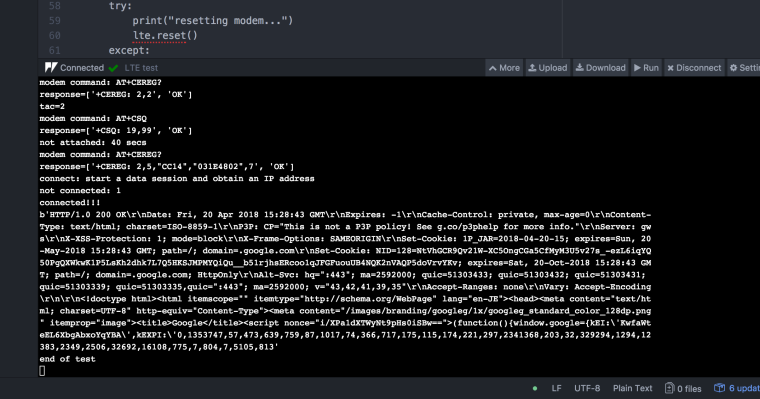
-
Were you able to download data from google or did it crash?
I'm waiting my mandatory 180 secs to post on the forum again. There's got to be a better way to prevent SPAM.
-
@tlanier Could you define "Crash"? Like did the REPL return? No, it's still stuck at the "end of test" message like in that image. But if I CTRL+C, I'm able to escape to the REPL.
-
It WORKED!!!
The problem I'm having now is after I run the program once successfully the program will hang in the "lte=LTE(carrier="verizon") line at the start of the program. Unfortunately you can't reset the modem without instantiating the LTE object and instantiating the object is what gets hung up. There needs to be some command to say let's start all over and reset everything.
-
The program is now connecting to google.com successfully. I'm still having trouble with the unit locking up on the LTE(carrier="verizon") line at times. The chip/development environment gets in a crazy mode where I have to reset/power down/restart Visual Studio Code in unknown combinations to regain control of the chip.
The Hologram.io dashboard is TERRIFIC!!! You can see data usage and the actual data that passes across the network. I love it!!!
import pycom import socket import ssl import sys import time from network import LTE BLACK = 0x000000 WHITE = 0xFFFFFF RED = 0xFF0000 GREEN = 0x00FF00 BLUE = 0x0000FF YELLOW = 0xFFFF00 # send AT command to modem and return response as list def at(cmd): print("modem command: {}".format(cmd)) r = lte.send_at_cmd(cmd).split('\r\n') r = list(filter(None, r)) print("response={}".format(r)) return r def blink(rgb, n): for i in range(n): pycom.rgbled(rgb) time.sleep(0.25) pycom.rgbled(BLACK) time.sleep(0.1) ##################################################################### print("CAT M1 Test - V0.6 - 4/20/18") # input("") # r = input("Enter anything to abort...") # allow opportunity to stop program # if r != "": # sys.exit(0) print("disable MicroPython control of LED") pycom.heartbeat(False) pycom.rgbled(WHITE) print("instantiate LTE object") lte = LTE(carrier="verizon") print("delay 4 secs") time.sleep(4.0) print("reset modem") try: lte.reset() except: print("Exception during reset") print("delay 5 secs") time.sleep(5.0) if lte.isattached(): try: print("LTE was already attached, disconnecting...") if lte.isconnected(): print("disconnect") lte.disconnect() except: print("Exception during disconnect") try: if lte.isattached(): print("detach") lte.dettach() except: print("Exception during dettach") try: print("resetting modem...") lte.reset() except: print("Exception during reset") print("delay 5 secs") time.sleep(5.0) # enable network registration and location information, unsolicited result code at('AT+CEREG=2') # print("full functionality level") at('AT+CFUN=1') time.sleep(1.0) # using Hologram SIM at('AT+CGDCONT=1,"IP","hologram"') print("attempt to attach cell modem to base station...") # lte.attach() # do not use attach with custom init for Hologram SIM at("ATI") time.sleep(2.0) i = 0 while lte.isattached() == False: # get EPS Network Registration Status: # +CEREG: <stat>[,[<tac>],[<ci>],[<AcT>]] # <tac> values: # 0 - not registered # 1 - registered, home network # 2 - not registered, but searching... # 3 - registration denied # 4 - unknown (out of E-UTRAN coverage) # 5 - registered, roaming r = at('AT+CEREG?') try: r0 = r[0] # +CREG: 2,<tac> r0x = r0.split(',') # ['+CREG: 2',<tac>] tac = int(r0x[1]) # 0..5 print("tac={}".format(tac)) except IndexError: tac = 0 print("Index Error!!!") # get signal strength # +CSQ: <rssi>,<ber> # <rssi>: 0..31, 99-unknown r = at('AT+CSQ') # extended error report # r = at('AT+CEER') # if lte.isattached(): # print("Modem attached (isattached() function worked)!!!") # break # if (tac==1) or (tac==5): # print("Modem attached!!!") # break i = i + 5 print("not attached: {} secs".format(i)) if (tac != 0): blink(BLUE, tac) else: blink(RED, 5) time.sleep(2) at('AT+CEREG?') print("connect: start a data session and obtain an IP address") lte.connect(cid=3) i = 0 while not lte.isconnected(): i = i + 1 print("not connected: {}".format(i)) blink(GREEN, 1) time.sleep(1.0) print("connected!!!") pycom.rgbled(BLUE) s = socket.socket() s = ssl.wrap_socket(s) print("get www.google.com address") addr = socket.getaddrinfo('www.google.com', 443) print(addr) print("connect to {}".format(addr[0][-1])) s.connect(addr[0][-1]) print("GET 50 bytes from google") s.send(b"GET / HTTP/1.0\r\n\r\n") print(s.recv(50)) # receive 50 bytes print("close socket") s.close() try: lte.disconnect() except: print("Exception during disconnect") try: lte.dettach() except: print("Exception during dettach") # end of test, Red LED print("end of test") while True: blink(GREEN,5) time.sleep(1.0) -
@tlanier I have made the same observation about the unit locking up, I am using the WDT to take care of that, hoping that they will solve the issue in the near future. It does not happen that often, see my other post : https://forum.pycom.io/topic/3073/lte-analysis-of-connectivity . Glad to see you got it working in the end!
-
@chrisgammell said in GPy with Hologram.io SIM:
I verified it's working on mine as well, thank you for sharing the code
Out of curiosity, did you rebuild your firmware from the changes just made to the code on Github?
-
Question: did you rebuild your firmware from the changes just made to the code on Github?
No, that's why I asked the questions:
-
When can the next update be expected?
-
How will we be notified that the update is available (the web site just has a link to the update program with no version number displayed)?
-
-
Has there been any additional progress on this issue?
If not, is it possibly due to carrier="verizon" and using a hologram SIM effectively being mutually exclusive (emphasis on “effectively”).
My understanding is that the carrier assignment optimizes the modem configuration for operation on a specific cellular network (Verizon in this case). However, operating on the Verizon network as a Verizon customer vs operating on their network through a MVNO may be very different. The most obvious is being on a home network vs roaming. In addition to functional implications, are there additional constraints based on Hologram’s contractual relationship with Verizon that may be playing a role in this issue? If I recall correctly from an old Hologram discussion, network operators like Verizon impose constraints on VMNO users such as requiring different timeouts on data connections.
-
@rwall If it requires that we do something other than set the APN, I assume that the development process baked in some special magic to get around some restriction on the Verizon side of things (understandable if it was due to the relatively new Sequans chipset). I would be curious if any other SIMs have been tried other than ours and Verizon's. For now, I'm left at the same stage as others of "waiting for updates from the LTE team".
I had missed Nathan's question about rebuilding the firmware. I did not, I simply used the latest block of code that tlanier had posted. I verified it connected to the Verizon tower and to our cloud and then got pulled away onto something else.
Fun new feature on our dashboard, you can see live usage data and tower location for pro plan stuff.
-
Last weekend I drove the device from LaGrange, GA to Fairhope, AL (about 270 miles) . During the trip I spot checked CAT M1 connectivity. It worked everywhere except when I reached Fairhope where it did not work even though I had 3-4 bars on my cell phone (which also uses Verizon). We are still looking for a coverage map from the carrier detailing where CAT M1 coverage should be expected.
-
@tlanier, thanks for the update. Do the results from your road trip mean that your system is no longer locking up on the LTE(carrier="verizon") line? If yes, can you share how it was resolved?
-
I did not experience any lock ups during the trip. Basically I would occasionally plug the unit into the car's USB port and run the test program posted on 4/20/18. I experienced the lock ups when developing the test program trying to find something that would work. I think the exception handling code added helped. As soon as we determine that coverage is good enough, I will do more extensive programming with the unit. Also I was hoping to get some feedback as to when the code changes to the cell connectivity code made on GitHub would be available for download and testing.
-
The example (dated 4/20/2018) works for me when the modem connects to an AT&T service. It never works if the modem decides to connect to a Verizon service. I am using a GPy and a Hologram SIM.
I can tell which service because the Hologram dashboard shows the service for a specific session.
For AT&T, the modem waits to attach for about 10-20 sec. While waiting to attach, the signal quality starts at
+CSQ: 99,99(RSSI known) and transitions to+CSQ: 20,99(RSSi known). The registration state starts at+CEREG: 2,0and changes to+CEREG: 2,2. The modem then transitions to attached, then connects, and works like a charm.For Verizon, the modem never attaches (I let it loop for an hour once). While waiting to attach, the signal quality will oscillate between
+CSQ: 99,99(RSSI unknown) to+CSQ: 20,99(RSSi known) roughly ever loop. The registration state starts at+CEREG: 2,0and then changes to+CEREG: 2,4Anybody got thoughts?
Note: the example I used has date 4/20/2018 in the code and is posted by @tlanier. I did not use the 4/15/2018 version in his/her original post.
-
To get the program to work, I had to set the carrier to "verizon" in the LTE function call
lte = LTE(carrier="verizon")
Hologram states that their SIM works with multiple carriers. I don't understand how that works if I'm having to specify the carrier in the initialization.
We need Pycom and Hologram to clarify what is the correct method to initialize the LTE object and what carriers can we expect to connect to.
-
@tlanier Yes, I used
lte = LTE(carrier='verizon')and can only connect to the local AT&T service. -
I've noticed that setting a carrier other than
verizonsuch asLTE(carrier='at&t')orLTE(carrier='standard')results in my modem not being able to connect to any carrier, ever. Setting the carrier back toverizondoes not fix it. A reset does not fix it. A power cycle does not fix it. The only way I've found that fixes this problem is to re-flash the modem firmware.I really don't see why this is even a constructor argument. Looking at the source code for
modlte.c, it looks like it is setting the test conformance mode using the AT commandAT+SQNCTMin the INIT phase of the modem. The AT manual for this modem specifically cautions for this command that "The change will be effective after the device’s reboot." I don't see a device reboot occurring in the code. It looks like thecarrierargument is modifying a modem setting that won't take effect until a modem reboot.This is an undocumented part of the
LTEAPI.''' Changing carrier from the current setting in the modem. The carrier value is stored through power cycle by the modem. If the carrier setting is changed then a reset needs to follow for the value to take effect. ''' lte = LTE(carrier=NEW_VALUE) lte.reset() # cycle modem for new carrier to take effect # ... now use the object as normal...

Hello! It looks like you're interested in this conversation, but you don't have an account yet.
Getting fed up of having to scroll through the same posts each visit? When you register for an account, you'll always come back to exactly where you were before, and choose to be notified of new replies (either via email, or push notification). You'll also be able to save bookmarks and upvote posts to show your appreciation to other community members.
With your input, this post could be even better 💗
Register Login