GPy with Hologram.io SIM
-
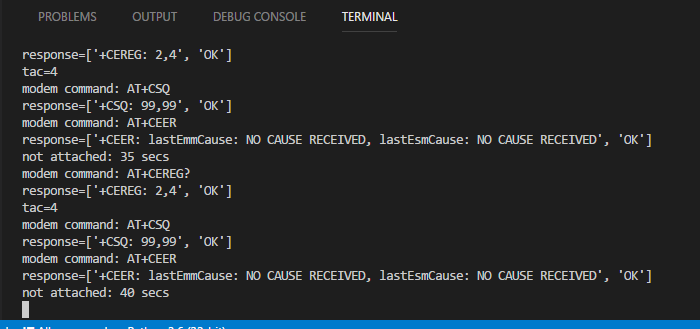
Here's what I'm getting now after increasing the delay to 5 secs in loop with the AT+CEER command. I updated the image to show the correct time counter.
-
@tlanier
Thanks. Unfortunately it's not very helpful in this situation but keep the CEER in the code if you do get a valid CSQ again it may show a reject cause.It might be the case that the modem is connecting but being rejected by the network for some reason and then we'll know why...
-
Hologram tech support suggested plugging the SIM into an unlocked cell phone for testing.
When we plug the SIM into an unlocked Samsung S5 phone, "TMobile-Hologram" shows up in the Available Network Operators.
When we try to go to a web page (google.com), we get an off line error page.
We were able to send a text message to the Samsung S5 from the Hologram Dashboard.
I'm not sure what this really proves since we're trying to use the SIM to attach to Verizon's CAT-M1 network.
-
@tlanier said in GPy with Hologram.io SIM:
When we try to go to a web page (google.com), we get an off line error page.
Umm that should work, you should be able to load Google.com. Do you have data left?
-
The Hologram dashboard shows I have used 104 bytes of a 1MB - Developer Plan. I assume the usage is due to the SMS message that was sent successfully.
Interesting discovery (not sure what it means):
In the Logs section of the dashboard under "Message sent from GPy"
DATA: Socket error: timed out
RAW VIEW:
{"success":true,"data":{"id":5792718,"logged":"2018-04-17 19:33:13.876522","orgid":2262,"deviceid":164756,"record_id":"2b868012-4276-11e8-a470-0242ac120002","device_metadata":"{}","data":"{"received": "2018-04-17T19:33:13.798433", "authtype": "deviceid", "tags": ["DEVICE_164756", "API_RESP"], "device_name": "GPy (30674)", "source": 164756, "messageid": "2cb19d53-4ff4-415a-b3b2-7606267d8325", "record_id": "2b868012-4276-11e8-a470-0242ac120002", "data": "U29ja2V0IGVycm9yOiB0aW1lZCBvdXQ=", "device_id": 164756}","matched_rules":[],"tags":["API_RESP","DEVICE_164756"]}}DATA: Socket error: [Errno 111] Connection refused
RAW VIEW:
{"success":true,"data":{"id":5804366,"logged":"2018-04-18 18:41:10.684172","orgid":2262,"deviceid":164756,"record_id":"10604cb0-4338-11e8-bb29-0242ac120002","device_metadata":"{}","data":"{"received": "2018-04-18T18:41:10.361416", "authtype": "deviceid", "tags": ["DEVICE_164756", "API_RESP"], "device_name": "GPy (30674)", "source": 164756, "messageid": "b72e25a1-8c12-4235-b463-71f03544bf74", "record_id": "10604cb0-4338-11e8-bb29-0242ac120002", "data": "U29ja2V0IGVycm9yOiBbRXJybm8gMTExXSBDb25uZWN0aW9uIHJlZnVzZWQ=", "device_id": 164756}","matched_rules":[],"tags":["API_RESP","DEVICE_164756"]}} -
My hardware guy got the antenna vendor (San Jose Technology, Inc.) to send us a spec for the Penta Band PCB Antenna Model: EPH-502 that we are using.
The spec shows:
Frequency: 704~960; 1710~2690MHz
-
@tlanier
Ok that's fine then - and different from what was listed on the website. -
@tlanier If you're seeing these messages on the dashboard it means your phone (assuming that was the phone) is able to authenticate on our network. I think it might be another red herring though, unless you want to debug why they phone isn't connecting as well.
-
We really don't care about the phone. We were just trying to prove the SIM was functional.
The code in the GPy tried one time to run the detach function at the beginning of the program and failed. It turns out the detach function is misspelled.
Manual entry @ 6.2.26 LTE
lte.dettach()
Detach should only have one "t".
Why the lte.isattached() function returned True one time is unknown. It occurred after the laptop had gone to sleep and was reawakened.
-
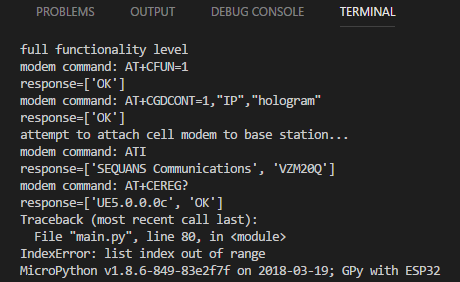
I think I've just proved that there may be a bug in the lte.send_at_cmd() command. Internally the function must time out if it does not receive an "OK" response from the modem after a period of time. Your timeout may be too short.
See the response to the "ATI" command shown below. The program error'ed out because it was expecting a different response from the AT+CEREG? command. Instead it got the trailing remains of the previous ATI command.
I believe you should clear the input buffer before sending any AT command to the modem to help prevent such a problem.
-
I accidentally sent a message to Chris which I meant to send to you concerning the possible bug with the lte.send_at_cmd() function. I assume you will see it; I couldn't figure out how to redirect the message to a different person.
-
One time the GPy got into a state where lte.isattached() was returning True at the start of the program. When the lte.connect() was called an exception was thrown:
OSError: the requested operation failed
After resetting the chip, things are back like they were before (unable to attach).
It's beginning to look like I may need to put try/except blocks around all calls to the LTE class. I'm not sure if this is what the designers of the LTE module intend for programmers to do.
lte.isattached() returned True but lte.connect() threw an exception
Again, this has only happened once.
-
I am now able to attach to the cell tower consistently!
response=[''+CEREG: 2,5,"AE02","02A99403",7', 'OK', '+CEREG: 5,"AE02","02A99403",7']
When the lte.connect() method is called, the program crashes with the following exception:
OSError: the requested operation failed
Notes:
-
In browsing the source code this morning I noticed Daniel posted a significant update to the modlte.c code. Do we have any idea when this update might be published for testing?
-
On the web site there is no indication of firmware versions and history. How do we know when a new update is available to download?
-
At some point the LTE documentation should be updated to indicate which method calls might throw exceptions. For instance the dettach() method can throw an mpexception_os_operation_failed exception. Maybe at the python level we should assume any LTE method call may throw an exception.
-
Problems can occur when a modem command is sent but your timeout is too short and the modem command returns before the modem has finished responding. When the next modem command is sent, the response contains the tailing fragment of the response from the previous command. Adding a delay between sending commands does keep the problem from propagating to the second command (the result received from the first command is invalid since it was aborted prematurely). Maybe the send_at_cmd() should have an optional second parameter that allows the caller to specify the timeout.
-
The dettach() method should probably be renamed detach().
-
Is there any reason to believe I should update the modem firmware at this time, or should I wait for Daniel's patches to be published?
-
-
Did something change? Or did it just start working? Or maybe i'm not following the thread? Did you end up swapping antennas or was it something in the code?
I'm still at the same point with the lte.connect() function, but Jose said the LTE team is looking at that. I found out from my co-worker that it's possible to hook into the modem UART pins, so I might try throwing some other commands via that tomorrow.
-
After seeing the major changes being made on GitHub this morning when I was studying the code, I had decided to just wait until they were published. I setup my laptop and the GPy in my office (where the signal is actually weaker) just to copy the software changes to my desktop. The attach just started working. I don't think I changed anything from yesterday. I had been playing with adding a delay of 2 secs before trying to attach, but that had no affect yesterday. I took the delay out today and it still attached without a problem. Very strange and no we did not swap the antenna. It turns out the antenna I'm using is within specs.
Is it possible that Hologram did something to activate my account with Verizon? Is it possible that inserting the SIM in an Android phone somehow activated the SIM? I'm not sure why it started working.
Tomorrow I will post my updated code. I didn't bring it home with me tonight.
If I have time tomorrow, I'm thinking about trying to duplicate the connect() code in Python to try to see where it fails. Now that I know the source code is on GitHub, that may generate some ideas of how to debug what is going on. All the code is in C/C++, so the question is whether I can duplicate the same thing in Python to troubleshoot the problem. I really haven't looked at it close enough yet.
There are various places in the C/C++ code where exceptions are thrown for various reasons. I think one of the fundamental problems the programmer has is how long should you wait for the modem to respond to a command before timing out. Once a timeout occurs bad things can happen since the program may then try to talk to the modem with another command and the modem is still processing and returning results for the previous command. You've gotta timeout at some point, but if you do so too soon things get out of sync.
-
@tlanier said in GPy with Hologram.io SIM:
Is it possible that inserting the SIM in an Android phone somehow activated the SIM? I'm not sure why it started working.
It is possible that the SIM was not seated correctly. Now that I think of it, I should have had you run the AT+CCID command. This ensures that the modem is reading the unique identifier back from the SIM card. Sometimes if there is dirt or a loose SIM holder, this is a possibility. I'm sorry I didn't think to recommend that. Sometimes in an ongoing battle against getting connected, it's good to go through and do a checklist of things. We actually made a video/blog post about just that, after discussing this situation.
If I have time tomorrow, I'm thinking about trying to duplicate the connect() code in Python to try to see where it fails.
You mean you'll basically replicate the function that the C++ is doing? Where is this code located?
-
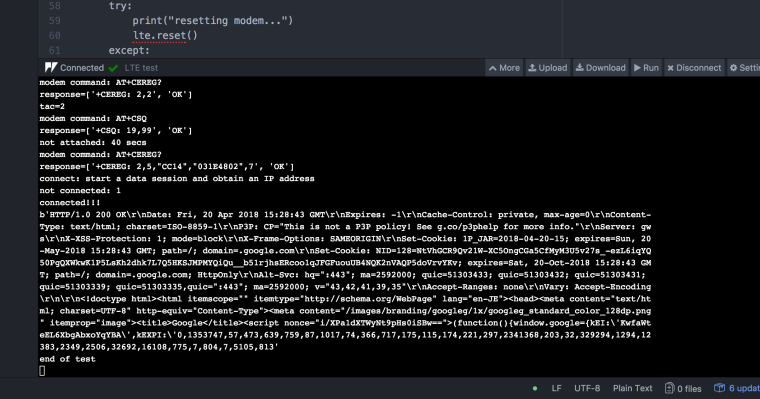
Attach/Connect Success!!!
I've now been able to attach to the tower and connect.
The program now crashes at either of these two lines:
s.connect(socket.getaddrinfo('www.google.com', 443)[0][-1])
or
s.send(b"GET / HTTP/1.0\r\n\r\n")OSError: -29312 was one error I got
Unfortunately, somehow the unit is now stuck on the "lte = LTE(carrier="verizon")" line which executes when I restart and it hangs forever. CTRL+C does not abort the program, power down/up does not fix, reloading Visual Studio Code does not fix, reinstalling Pymakr does not fix.
I don't think my problems in the past were caused by the SIM card not being inserted properly because I think the code throws an exception if it does not detect a SIM plugged in. Unfortunately I can't test that theory now because of the problem above, but I do remember seeing code that checks the SIM.
Here's a link to the GitHub site where you can view the code.
GitHubThe "esp32\mods\modlte.c" is one place to start looking for clues I think. Notice that major changes to this module were made yesterday.
import pycom import socket import ssl import sys import time from network import LTE BLACK = 0x000000 WHITE = 0xFFFFFF RED = 0xFF0000 GREEN = 0x00FF00 BLUE = 0x0000FF YELLOW = 0xFFFF00 # send AT command to modem and return response as list def at(cmd): print("modem command: {}".format(cmd)) r = lte.send_at_cmd(cmd).split('\r\n') r = list(filter(None, r)) print("response={}".format(r)) return r def blink(rgb, n): for i in range(n): pycom.rgbled(rgb) time.sleep(0.25) pycom.rgbled(BLACK) time.sleep(0.1) ##################################################################### print("CAT M1 Test - V0.5 - 4/20/18") print("disable MicroPython control of LED") pycom.heartbeat(False) pycom.rgbled(WHITE) print("instantiate LTE object") lte = LTE(carrier="verizon") print("delay 4 secs") time.sleep(4.0) if lte.isattached(): try: print("LTE was already attached, disconnecting...") if lte.isconnected(): print("disconnect") lte.disconnect() except: print("Exception during disconnect") try: if lte.isattached(): print("detach") lte.dettach() except: print("Exception during dettach") try: print("resetting modem...") lte.reset() except: print("Exception during reset") print("delay 5 secs") time.sleep(5.0) # enable network registration and location information, unsolicited result code at('AT+CEREG=2') # print("full functionality level") at('AT+CFUN=1') time.sleep(1.0) # using Hologram SIM at('AT+CGDCONT=1,"IP","hologram"') print("attempt to attach cell modem to base station...") # lte.attach() # do not use attach with custom init for Hologram SIM at("ATI") time.sleep(2.0) i = 0 while lte.isattached() == False: # get EPS Network Registration Status: # +CEREG: <stat>[,[<tac>],[<ci>],[<AcT>]] # <tac> values: # 0 - not registered # 1 - registered, home network # 2 - not registered, but searching... # 3 - registration denied # 4 - unknown (out of E-UTRAN coverage) # 5 - registered, roaming r = at('AT+CEREG?') try: r0 = r[0] # +CREG: 2,<tac> r0x = r0.split(',') # ['+CREG: 2',<tac>] tac = int(r0x[1]) # 0..5 print("tac={}".format(tac)) except IndexError: tac = 0 print("Index Error!!!") # get signal strength # +CSQ: <rssi>,<ber> # <rssi>: 0..31, 99-unknown r = at('AT+CSQ') # extended error report # r = at('AT+CEER') # if lte.isattached(): # print("Modem attached (isattached() function worked)!!!") # break # if (tac==1) or (tac==5): # print("Modem attached!!!") # break i = i + 5 print("not attached: {} secs".format(i)) if (tac != 0): blink(BLUE, tac) else: blink(RED, 1) time.sleep(5) at('AT+CEREG?') print("connect: start a data session and obtain an IP address") lte.connect(cid=3) i = 0 while not lte.isconnected(): i = i + 1 print("not connected: {}".format(i)) blink(GREEN, 1) time.sleep(1.0) print("connected!!!") pycom.rgbled(BLUE) s = socket.socket() s = ssl.wrap_socket(s) s.connect(socket.getaddrinfo('www.google.com', 443)[0][-1]) s.send(b"GET / HTTP/1.0\r\n\r\n") print(s.recv(4096)) s.close() lte.disconnect() lte.dettach() # end of test, Red LED print("end of test") while True: blink(YELLOW,1) time.sleep(1.0) -
I now have control of the GPy again. Word to the wise. Do NOT execute "sys.stdin.read()" to try to clear the keyboard input because it will lock the system.
-
@tlanier said in GPy with Hologram.io SIM:
Attach/Connect Success!!!
Awesome!
I verified it's working on mine as well, thank you for sharing the code
-
Were you able to download data from google or did it crash?
I'm waiting my mandatory 180 secs to post on the forum again. There's got to be a better way to prevent SPAM.

Hello! It looks like you're interested in this conversation, but you don't have an account yet.
Getting fed up of having to scroll through the same posts each visit? When you register for an account, you'll always come back to exactly where you were before, and choose to be notified of new replies (either via email, or push notification). You'll also be able to save bookmarks and upvote posts to show your appreciation to other community members.
With your input, this post could be even better 💗
Register Login