Welcome to the Pycom forum Forum
    • \[\[global:header.categories\]\]
    • \[\[global:header.recent\]\]
    • \[\[global:header.tags\]\]
    • \[\[global:header.popular\]\]
    • Login

    Explore Pybytes | Official Documentation | Report a Firmware Bug/Issue | GitHub

    Firmware Update

    Scheduled Pinned Locked Moved WiPy 2&3
    19 Posts 4 Posters 4.7k Views 4 Watching
    Loading More Posts
    • Oldest to Newest
    • Newest to Oldest
    • Most Votes
    Reply
    • Reply as topic
    Log in to reply
    This topic has been deleted. Only users with topic management privileges can see it.
    • M Offline
      Meide
      last edited by

      Hi,
      I am trying to uptade WiPy 2.0 to the latest version and I encounter some problems.
      I am using the "Pycom software update, I am following the instruction (turn off the WiPy, connect the port..) and then they ask me to choose a port, but I have no choice availabe in the menu... So I continue and click on update and that say me that the update failed...
      Can you tell me if I am doing something wrong or if there are another steps to add to this one.
      I am using windows 7.
      I you need more information, don't hesitate to ask me.

      1 Reply Last reply Reply Quote 1
      • L Offline
        livius
        last edited by

        Do you use extension board? If not then how do you connect your WiPy to computer?
        By some converter UART/USB?

        think about people first, then computers

        1 Reply Last reply Reply Quote 0
        • M Offline
          Meide
          last edited by

          I have the extension board so I connect the device with USB cable

          L 1 Reply Last reply Reply Quote 0
          • L Offline
            livius @Meide
            last edited by

            @Meide
            go to Windows Device Manager and look what you have in COM&LPT
            Look there when you have WiPy connected and when it is not - then you got what device is for your WiPY. Especially if it is recognized (no question mark and unknown device)

            think about people first, then computers

            1 Reply Last reply Reply Quote 0
            • M Offline
              Meide
              last edited by

              When I connect the Wipy, it looks like nothing is connected. I think the Wipy isn't recognized by my computer.
              I've checked my drivers but there are all up to date. What can I do to solve that ?

              1 Reply Last reply Reply Quote 0
              • L Offline
                livius
                last edited by

                when you connect it than some led turn on for you?
                maybe your expansion board not working
                you can connect your WiPy2 like i do
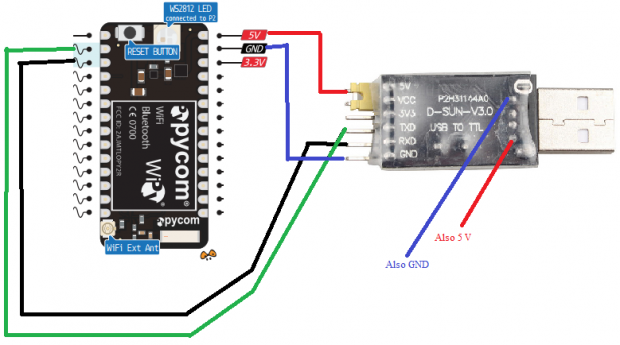
                alt text

                think about people first, then computers

                1 Reply Last reply Reply Quote 0
                • M Offline
                  Meide
                  last edited by Meide

                  That's what I have when I connect the Wipy !
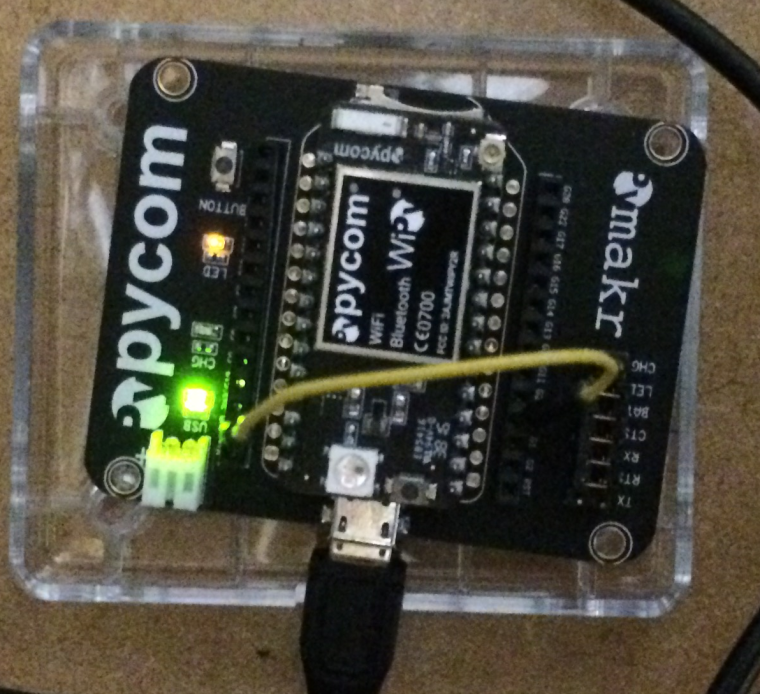
                  0_1479894698279_IMG_1276.png

                  1 Reply Last reply Reply Quote 0
                  • FridaF Offline
                    Frida
                    last edited by

                    You are missing a jumper on TX, is it in the bag it comes in.

                    1 Reply Last reply Reply Quote 0
                    • M Offline
                      Meide
                      last edited by

                      I have no jumper in TX and also in CHG, do you think the error can come from that ? What those jumpers are for ?

                      R 1 Reply Last reply Reply Quote 0
                      • FridaF Offline
                        Frida
                        last edited by

                        TX and RX are for communication via USB.

                        1 Reply Last reply Reply Quote 0
                        • L Offline
                          livius
                          last edited by

                          i do not see details on your picture - is the wire connected with second pin on the left and 4 pin on the right?
                          but maybe try first without the wire
                          and look if your Windows see it
                          and check if your usb port work on computer plugging some flash disc

                          think about people first, then computers

                          1 Reply Last reply Reply Quote 0
                          • M Offline
                            Meide
                            last edited by

                            Ok so, I added a jumper on TX and tried again. Same problem as before, I can't see the device on the device manager.
                            The wire is well connected between G23 and GND if it was your question.
                            Put the wire or not don't change anything, my computer doesn't see the WiPy in both cases.
                            And my usb port work with an USB key without problem ..
                            Any other idea ?

                            L 1 Reply Last reply Reply Quote 0
                            • R Offline
                              rskoniec @Meide
                              last edited by

                              @Meide said in Firmware Update:

                              I have no jumper in TX and also in CHG, do you think the error can come from that ? What those jumpers are for ?

                              I think this is a good question, that's why I've created new topic https://forum.pycom.io/topic/310/expansion-board-2-0-feature-selection-jumpers

                              The machine is working as good as it's code.

                              R 1 Reply Last reply Reply Quote 0
                              • R Offline
                                rskoniec @rskoniec
                                last edited by

                                @rskoniec said in Firmware Update:

                                @Meide said in Firmware Update:

                                I have no jumper in TX and also in CHG, do you think the error can come from that ? What those jumpers are for ?

                                I think this is a good question, that's why I've created new topic https://forum.pycom.io/topic/310/expansion-board-2-0-feature-selection-jumpers

                                I've just noticed that @cappy2112 created such topic https://forum.pycom.io/topic/143/documentation-for-expansion-board-2-0-jumper-settings over three weeks ago, but without any respond.

                                The machine is working as good as it's code.

                                1 Reply Last reply Reply Quote 0
                                • L Offline
                                  livius @Meide
                                  last edited by

                                  @Meide
                                  it is not visible or it show as "unknow device" ?
                                  and what port have you on computer USB2.0, USB3.0 or old USB1.1?
                                  Try with another port if you have - especially on back side if ypur ports are also on the front

                                  think about people first, then computers

                                  1 Reply Last reply Reply Quote 0
                                  • M Offline
                                    Meide
                                    last edited by

                                    It's not visible at all.
                                    I have usb 2.0.
                                    I am working on a laptop and I tried in all the 3 usb ports I have, same result for all of them

                                    1 Reply Last reply Reply Quote 0
                                    • FridaF Offline
                                      Frida
                                      last edited by

                                      Have you tried another USB cable?

                                      1 Reply Last reply Reply Quote 1
                                      • M Offline
                                        Meide
                                        last edited by

                                        I tried to change the cable and ..... IT WORKS !!
                                        My computer finally recognized the device and I could make the Update.
                                        Thank you for all your help :D :D

                                        0_1479905706550_Untitled.png

                                        1 Reply Last reply Reply Quote 0
                                        • M Offline
                                          Meide
                                          last edited by Meide

                                          And for those that interest, the connection works also without the TX Jumper

                                          1 Reply Last reply Reply Quote 0

                                          Hello! It looks like you're interested in this conversation, but you don't have an account yet.

                                          Getting fed up of having to scroll through the same posts each visit? When you register for an account, you'll always come back to exactly where you were before, and choose to be notified of new replies (either via email, or push notification). You'll also be able to save bookmarks and upvote posts to show your appreciation to other community members.

                                          With your input, this post could be even better 💗

                                          Register Login
                                          • 1 / 1
                                          • First post
                                            Last post

                                          Pycom on Twitter

                                          Pycom