Ping-Pong Example Reset
-
Greetings,
I am currently using two Lopy1.0 one which is plugged into a breadboard and the other attached to a pytrack. I am currently running the code you see below. Pretty much the basic Ping-Pong example. I have a question regarding that when this example Node_A hangs, due to saturation or some other natural reason, so my Node_A, which is always listening, just can never see the node_B 'Ping' . It won't find it again until I reset the Node_B which sends just the ping. What is that reset doing in Node_B? Intuitively I would have thought the Node_A would need to be reset, like if there was a buffer issue, however resetting Node_A has no effect and it continues to not see the 'Ping'
(Side note: With the Timestamp from lora.stats(), where is that data coming from/how to decode that into meaningful data?)Node_A (Just listens and reports data)
import socket
import time
import pycom


#NODE A

# Please pick the region that matches where you are using the device:
# Asia = LoRa.AS923
# Australia = LoRa.AU915
# Europe = LoRa.EU868
# United States = LoRa.US915
lora = LoRa(mode=LoRa.LORA, frequency = 915000000, region=LoRa.US915)
s = socket.socket(socket.AF_LORA, socket.SOCK_RAW)
s.setblocking(False)

pycom.heartbeat(False)
pycom.rgbled(0x007f00) # green

#TX_power is the value that is set on this chip not received.
while True:
    if s.recv(64) == b'Ping':
        #print("Sending pong")
        data = lora.stats()
        print("Stats %s" % data)
        pycom.rgbled(0x0000ff) # blue
        time.sleep(.5)
        pycom.rgbled(0x00ff00) # green
        #s.send('Pong')
    #time.sleep(1)
Node_B just sends
import socket import time import pycom #NODE B # Please pick the region that matches where you are using the device: # Asia = LoRa.AS923 # Australia = LoRa.AU915 # Europe = LoRa.EU868 # United States = LoRa.US915 lora = LoRa(mode=LoRa.LORA, frequency = 915000000, region=LoRa.US915, tx_power = 20) s = socket.socket(socket.AF_LORA, socket.SOCK_RAW) s.setblocking(False) pycom.heartbeat(False) pycom.rgbled(0x007f00) # green while True: s.send('Ping') time.sleep(5) pycom.rgbled(0x0000ff) # blue time.sleep(1) pycom.rgbled(0x00ff00) # green -
@burgeh I have noticed initially some trouble to run that simple test, and just tried to do it again. I've seen some diverging behaviour:
- in one attempt, the Node A stopped showing received permanently
. in a second attempt it stopped for a while and then it recovered - in a third attempt, out of 400 messages of node B, one was skipped at node A
It tried that because I wanted to tell, if at the time, node A does not get any messages any more, node B is still sending. But I could not create the first event any more.
- in one attempt, the Node A stopped showing received permanently
-
I've noticed these inconsistencies as well, I've had node A receiving the message for 4 to 5 hours and then just stop, I'll reset and it will stop after 10 minutes. Does the s socket (something with the recv) need something to be cleared if it only receives part of a message, that way it can recover?
-
@burgeh I do not know. According to your tests, it is related to the sending device, that's why I wanted to tell, whether the device is still sending. If yes, either the content of could have changed (not "Ping"), or some other frequency was used, or ...... But I could net get a stable fault condition.
-
@robert-hh Sorry misinterpreted that a little bit. Yes the node_B is still sending from what I can tell. Looking at the code it still flashes blue and green. However, looking at it now maybe the s.send is in some error state and may be just failing (but the code would still blink).
-
@burgeh The flashing just shows that the loop still continues. That's what I assumed, because of the print statement in the loop. But I wanted to see if still the RF signal is present.
-
@robert-hh What would you suggest I use to detect if it is still present? I don't have a spectrum analyzer on hand.
-
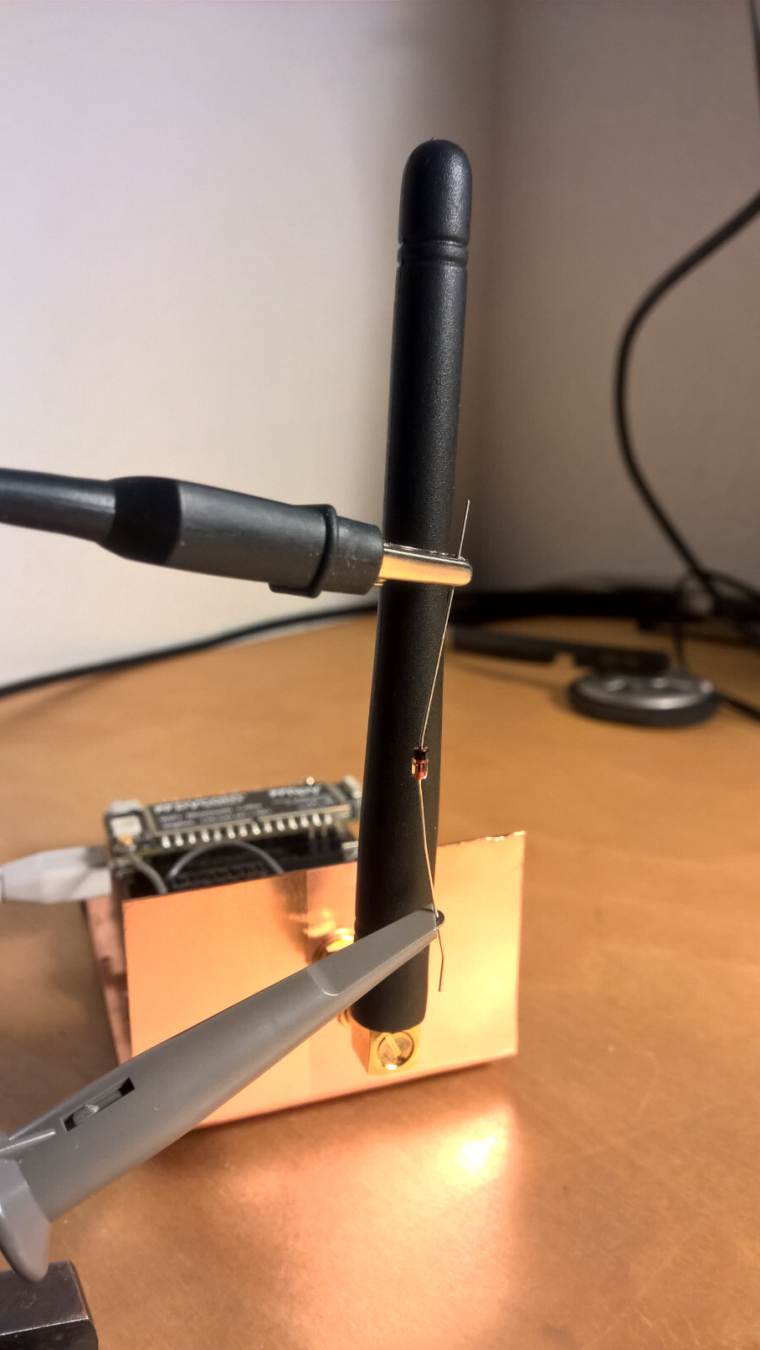
@burgeh If you have an oscilloscope and a diode, you can use that, like shown in the picture below. The diode shown is a 1N4148, but a Schottky diode (e.g. BAR11) gives a stronger signal. The bandwidth of the oscilloscope does not matter, since the RF signal is rectified. It picks up the current, that's why in the picture the diode is at he bottom of the quarter wave antenna. For the PyCom antenna, you get the strongest signal with the diode body 4 cm away from the tip. If just shows the presence of RF, not the frequency.
-
@robert-hh What exactly should I look for? Won't 60Hz drown out such a low power signal? Also the signal is at 916 MHz I don't think many scopes (including mine) can go up that high. I have a schottky 1N5817 and did some basic testing to see if anything shows up...pretty inconclusive, doesn't change if the system is on or off it seems.
-
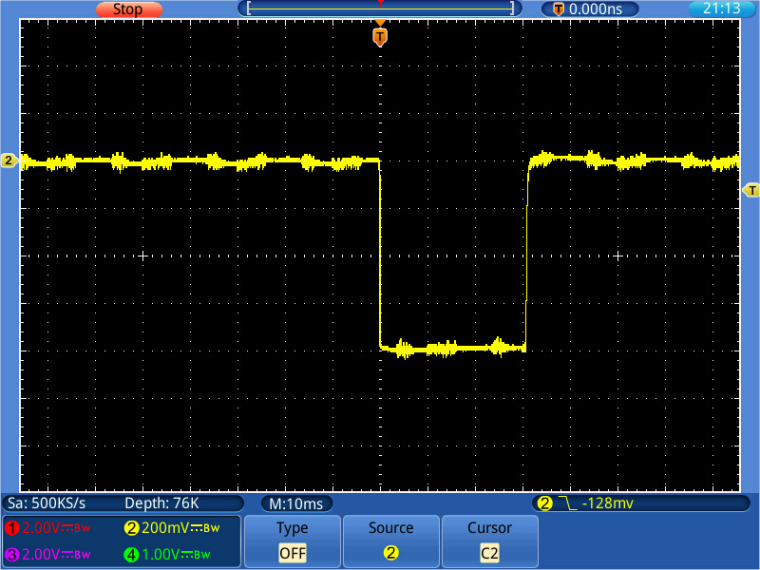
@burgeh A 1N5817 might be too slow (capacitance 110pF). You would see a DC voltage when the device is sending. Below is a picture of the "Ping" Sending from lopy_b.py script. The Diode used is a 1N4148 (small signal, silicon, capacitance 4 pf). The level is 800mV,. With a fast schottky diode (BAR 11, capacitance 1.2 pF) I have seen up to 1.5V, so the noise does not matter. If the Anode of the diode is at GND, you have a negative pulse, if the anode is at the tip, a positive pulse. I used the x10 probe.
-
@robert-hh Using a 1N4148 this is what I keep getting. I'm using a foreign oscilloscope, but I believe I have it set like yours (10ms/div, 100mv/div. I also set triggers both rising and falling edge around +-50mV and get nothing. Below are some images ( had issues with the normal insert on here). How close are you to your node A?
Osc. when just reading http://tinypic.com/r/wjuzbq/9
-
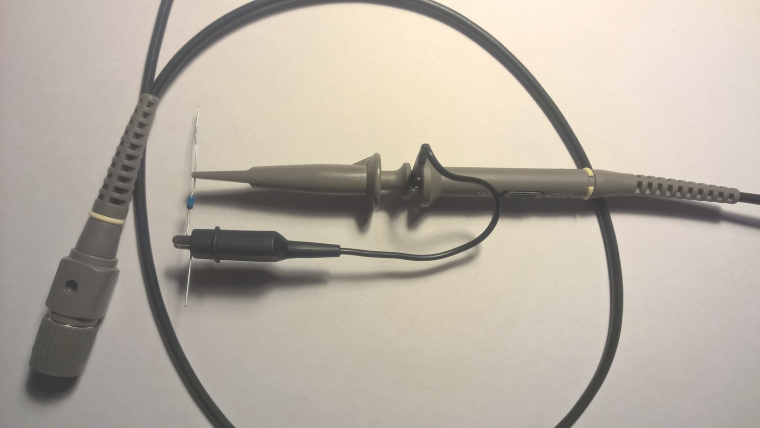
@burgeh The diode must be immediately on the surface of the antenna, like shown on the picture. The Oscilloscope is fine for the purpose. The probe is not. You should use a proper 10:1 oscilloscope probe with low capacitance. At 10:1 it should be around 3 pF. They normally come bundled with the oscilloscope. If pictures are too large, you cannot upload them. Therefore I scale them down first.
Edit: Siglent is a good brand. LeCroy relabels Siglent devices for their budget series. -
@robert-hh Yeah I figured those cables could be an issue, I don't have the original set, I'll find some better probes and report my findings. Thanks thus far for the help!
-
@robert-hh I finally got a new probe, and I was able to confirm on an oscilloscope that it is no longer sending the 'Ping' after awhile.
-
This post is deleted!

Hello! It looks like you're interested in this conversation, but you don't have an account yet.
Getting fed up of having to scroll through the same posts each visit? When you register for an account, you'll always come back to exactly where you were before, and choose to be notified of new replies (either via email, or push notification). You'll also be able to save bookmarks and upvote posts to show your appreciation to other community members.
With your input, this post could be even better 💗
Register Login