FiPy Socket Connection Issue (Verizon LTE)
-
I've got an issue where my FiPy cannot seem to open a socket connection on LTE. It works correctly on WiFi. Below is my code. the sequence of wifi() followed by google() succeeds. The sequence of connect() followed by google() fails at the ss.connect().
I've updated the FiPy firmware and modem firmware to the latest.
I'm using a Verizon SIM card in the US. It appears that I have a valid LTE connection as the DNS lookup performed by getaddrinfo succeeds.
import socket
import time
from network import LTE
import ssl
import machine
from network import WLAN
wlan = WLAN(mode=WLAN.STA)

lte = LTE()

def connect():
    print('lte.attach()', end='')
    lte.attach()
    while not lte.isattached():
        print('.', end='')
        time.sleep(0.25)
    print('Connecting to LTE network', end='')
    lte.connect()
    while not lte.isconnected():
        print('.', end='')
        time.sleep(0.25)
    print('LTE is connected')

def disconnect():
    lte.disconnect();
    lte.dettach();

def at(s):
    print(lte.send_at_cmd(s))

def google():
    s = socket.socket()
    ss = ssl.wrap_socket(s)
    i = socket.getaddrinfo('www.google.com', 443)[0][-1]
    print('Connecting to socket...')
    ss.connect(i)
    print('Send...')
    ss.send(b"GET / HTTP/1.0\r\n\r\n")
    print(ss.recv(4096))
    print('Close...')
    ss.close()

def wifi():
    wlan.init(mode=WLAN.STA, antenna=WLAN.INT_ANT)
    nets = wlan.scan()
    for net in nets:
        if net.ssid == 'Test':
            print('Network found!')
            wlan.connect(net.ssid, auth=(net.sec, 'Test1234'), timeout=5000)
            while not wlan.isconnected():
                #machine.idle() # save power while waiting
                print('.', end='')
                time.sleep(0.5)
            print('WLAN connection succeeded!')
            break
Any ideas?
connect()
lte.attach()..........................Connecting to LTE network.LTE is connected
>>> google()
Connecting to socket...
Traceback (most recent call last):
  File "<stdin>", line 1, in <module>
  File "main.py", line 49, in google
OSError: -1
Firmware version info:
Upgrade completed!
Here's the current firmware version:
UE5.0.0.0c
LR5.1.1.0-33988
OK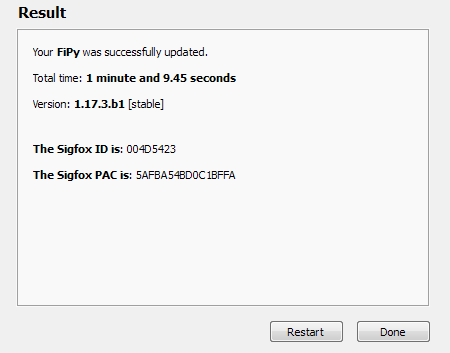
-
@marike
Can you try a non-SSL connection? Does that help? -
@jmarcelino No, that doesn't help:
Connecting on COM37...
MicroPython v1.8.6-849-83e2f7f on 2018-03-19; FiPy with ESP32
Type "help()" for more information.
>>>
>>> connect()
lte.attach().............Connecting to LTE network.LTE is connected
>>> s = socket.socket()
>>> s.connect(socket.getaddrinfo('www.micropython.org', 80)[0][-1])
Traceback (most recent call last):
  File "<stdin>", line 1, in <module>
OSError: -1
>>>
With my tests when I establish a network connection using wifi, both SSL and non SSL connections work:
>>> wifi() Network found! ................WLAN connection succeeded! >>> m = socket.socket() >>> m.connect(socket.getaddrinfo('www.micropython.org', 80)[0][-1]) >>> m.close() >>> google() Connecting to socket... Send... b'HTTP/1.0 200 OK\r\nDate: Fri, 25 May 2018 21:26:00 GMT\r\nExpires: -1\r\nCache-Control: private, max-age=0\r\nContent-Type: text/html; charset=ISO-8859-1\r\nP3P: CP="This is not a P3P policy! See g.co/p3phelp for more info."\r\nServer: gws\r\nX-XSS-Protection: 1; mode=block\r\nX-Frame-Options: SAMEORIGIN\r\nSet-Cookie: 1P_JAR=2018-05-25-21; expires=Sun, 24-Jun-2018 21:26:00 GMT; path=/; domain=.google.com\r\nSet-Cookie: NID=131=mW-1wvCRrJflp3M55yaXa9U9nArH8BMxRzUjeiTjbrbhCmXsfzilV0Ovo6ariBt7tAQg5o2CEhMahFD2FK6AT5b_t_-YMGVbsbBlas03nAuazTZ_G-2atJYg2U9-WlaV; expires=Sat, 24-Nov-2018 21:26:00 GMT; path=/; domain=.google.com; HttpOnly\r\nAlt-Svc: hq=":443"; ma=2592000; quic=51303433; quic=51303432; quic=51303431;quic=51303339; quic=51303335,quic=":443"; ma=2592000; v="43,42,41,39,35"\r\nAccept-Ranges: none\r\nVary: Accept-Encoding\r\n\r\n<!doctype html><html itemscope="" itemtype="http://schema.org/WebPage" lang="en"><head><meta content="Search the world\'s information, including webpages, images, videos and more. Google has many special features to help you find exactly what you\'re looking for." name="description"><meta content="noodp" name="robots"><meta content="text/html; charset=UTF-8" http-equiv="Content-Type"><meta content="/logos/doodles/2018/celebrating-james-wong-howe-5981428998209536-l.png" itemprop="image"><meta content="Celebrating James Wong Howe" property="twitter:titl' Close... >>> -
-
I tried that and it crashes on lte.connect(cid=3):
>>> connect()
lte.attach().........................................................................................Connecting to LTE networkTraceback (most recent call last):
  File "<stdin>", line 1, in <module>
  File "main.py", line 19, in connect
OSError: the requested operation failed
I also tried manually:
Connecting on COM37...
MicroPython v1.8.6-849-83e2f7f on 2018-03-19; FiPy with ESP32
Type "help()" for more information.
>>>
>>> import socket
>>>
>>> import time
>>>
>>> from network import LTE
>>> lte = LTE()
>>> lte.attach()
>>> lte.isattached()
True
>>> lte.connect(cid=3)
Traceback (most recent call last):
  File "<stdin>", line 1, in <module>
OSError: the requested operation failed
>>>
And specifying the carrier and band:
>>> Disconnected. Click here to reconnect.
Connecting on COM37...

>>> import socket
>>> from network import LTE
>>> lte = LTE(carrier="Verizon")
>>> lte.attach(band=13)
>>> lte.isattached()
True
>>> lte.connect(cid=3)
Traceback (most recent call last):
  File "<stdin>", line 1, in <module>
OSError: the requested operation failed
>>>
Note, each of these attempts was carried out after completely power cycling the modem.
-
I don't know if this is related, but I can only send one AT command before things crash and I need to power cycle the modem. Note, this is after connecting. Before connecting, things seem to be ok (at least, I can send multiple commands):
Connecting on COM37... >>> connect() lte.attach()...............Connecting to LTE network....LTE is connected >>> at('AT+CNUM') +CNUM: "Line 1","+1<redacted>",145 OK >>> at('AT+COPS?') Traceback (most recent call last): File "<stdin>", line 1, in <module> File "main.py", line 58, in at OSError: the requested operation failed >>> -
I've got an update. Today, I tried updating to the latest Sequans firmware and experienced strange issues. I tried updating to the latest firmware, downgrading to earlier release firmware, still problematic. Leaving the modem at 1.17, I unplugged and left it alone for a while. A few hours later, reconnected and tried running the exact code in this thread. So, at this point, the FiPy firmware and modem firmware are identical to when I first experienced these issues. This time, everything worked. I could successfully open sockets, send receive data, etc.
This allows me to close out my evaluation of the FiPy modem. It seems there are still some major functional and reliability issues to be resolved from all parties, Monarch/Sequans, Pycom, and Verizon. I'll revisit this in the future and in the interim, drop in on the forums from time to time to see what current user experience has been.
-
This post is deleted! -
This post is deleted!
Hello! It looks like you're interested in this conversation, but you don't have an account yet.
Getting fed up of having to scroll through the same posts each visit? When you register for an account, you'll always come back to exactly where you were before, and choose to be notified of new replies (either via email, or push notification). You'll also be able to save bookmarks and upvote posts to show your appreciation to other community members.
With your input, this post could be even better 💗
Register Login