LoRaWAN TTN Uplinks Ok, no Downlinks. Channel issue? Help! ;)
-
Hello everyone, I have been poking at this project for the last couple of weeks and I'm about half way there now. My TTN app gets uplinks from my LoPy4 and responds with a couple of bits - but these bits never get to the device. Connecting via OTAA.
It took me a good while to get to this stage - it seems the official documentation from both PyCom and TTN is a bit out of date or lacking key information. I was able to get uplinks after I found a couple of forum posts that helped describe setting up LoRa channels. I think I just about understand this now, but I have largely constructed this by cutting and pasting from others, and I am particularly confused as to how the channels should be set up for downlinks in the EU - if anyone can help shed some light on this I would be grateful. I think it is something to do with downlink packets defaulting to RX2 - but a lot of the terminology is admittedly lost on me!!
For my application, downlinks actually don't matter - but I would like to see it working regardless.
Here is my code:
# LoPy4_files/boot.py

import pycom

pycom.heartbeat(False)
and
# LoPy4_files/main.py import time from network import LoRa import binascii import pycom from machine import Pin import socket import struct # no idea what this does - need to read up on it # Configure IO Pins: configPin = Pin('P21', Pin.IN, Pin.PULL_UP) # Pull low to exit to REPL LoRaPin = Pin('P22', Pin.IN, Pin.PULL_UP) # Pull low to enable LoRa #Set AppEUI and AppKey - use your values from the device settings --> https://console.thethingsnetwork.org/ dev_eui = binascii.unhexlify('***') app_eui = binascii.unhexlify('***') app_key = binascii.unhexlify('***') # initial read from IO pins: config = configPin() radio = LoRaPin() # In 'config mode' exit to the REPL, and print the LoRa DevEUI: if not config: print('Config Mode') lora = LoRa() print("DevEUI: %s" % (binascii.hexlify(lora.mac()).decode('ascii'))) # Otherwise, we probably want to activate LoRa: if not radio: pycom.rgbled(0x7f0000) #red lora = LoRa(mode=LoRa.LORAWAN, region = LoRa.EU868) # Remove all the non-default channels for i in range(3, 16): lora.remove_channel(i) print('Removed default channels') time.sleep(1) # Set EU ISM 868 channel plan for TTN Europe lora.add_channel(0, frequency=868100000, dr_min=0, dr_max=5) lora.add_channel(1, frequency=868300000, dr_min=0, dr_max=5) lora.add_channel(2, frequency=868500000, dr_min=0, dr_max=5) lora.add_channel(3, frequency=867100000, dr_min=0, dr_max=5) lora.add_channel(4, frequency=867300000, dr_min=0, dr_max=5) lora.add_channel(5, frequency=867500000, dr_min=0, dr_max=5) lora.add_channel(6, frequency=867700000, dr_min=0, dr_max=5) lora.add_channel(7, frequency=867900000, dr_min=0, dr_max=5) print('EU channels set') time.sleep(1) #Join TTN Network via OTAA lora.join(activation=LoRa.OTAA, auth=(dev_eui, app_eui, app_key), timeout=0, dr=0) # wait until the module has joined the network print('Trying to join TTN Network...') while not lora.has_joined(): pycom.rgbled(0x7f7f00) #yellow time.sleep(5) print('...') pass print('Network joined') pycom.rgbled(0x009999) #teal # Now let's send some data... # create a LoRa socket s = socket.socket(socket.AF_LORA, socket.SOCK_RAW) # set the LoRaWAN data rate s.setsockopt(socket.SOL_LORA, socket.SO_DR, 5) while lora.has_joined(): print('Sending some bits:', bytes([0x01, 0x02, 0x03])) # make the socket blocking s.setblocking(True) s.send(bytes([0x01, 0x02, 0x03])) time.sleep(1) print('Listening for bits:') s.setblocking(False) data = s.recv(64) print(data) time.sleep(30) print('Connection lost') -
You do not need to manually remove and add channels in the EU868 region - unless you are using a single channel nano-gateway - the LoPy starts with the default 3 channels (0,1,2) and the rest gets added by TTN on the OTAA reply.
I think TTN defaults to RX1 actually. What is the "Data" tab on your TTN application showing regarding the downlink?
-
@jmarcelino Hi jmarcelino - thanks for the reply, I will try cutting back the code in that case (I guess I can just comment out the channel set up) but I am pretty sure I had no luck until I set that up.
The Data panel in console is showing that following an Uplink, the Gateway responds on Port 1 Confirmed with bytes 0x04 0x05 0x06
I set this up but again, not really sure how to configure it
-
Yep, as it turns out there is no need to configure the channels after all - still no downlinks though.
-
@aidanrtaylor
Can you post a screenshot of your TTN console Data panel please showing the uplinks/donwlinks?I've upvoted your posts so you should be able to now.
Thanks
-
Hey I got some bits! It's pretty intermittent though, the device is still missing the majority of downlinks, that's the first successful packet I have seen though!
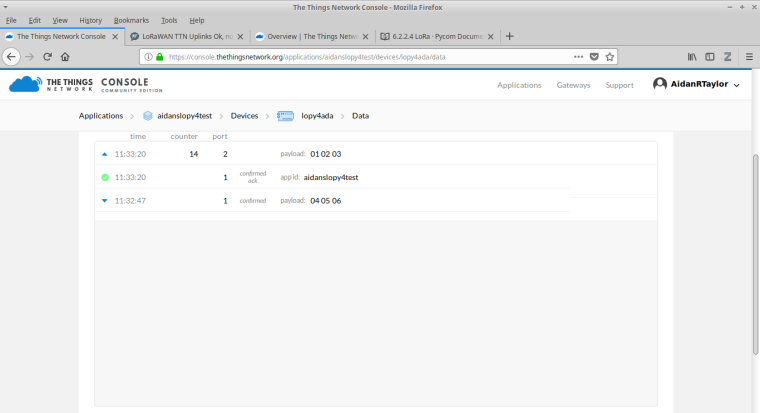
-
It's also missing most Uplinks now, whereas it was catching most with the previous code
-
@aidanrtaylor
Maybe the gateway you're using or have access to is single channel?Expand the received packets on the Data tab and look at the frequency used. If they're all on the same frequency then your gateway is probably single channel.
-
@jmarcelino I have access to the gateway - is it something I can check on there?
-
I can't consistently get packets up or down now that I have modified the code :( The original code only gets consistent uplinks. Is there anything else I have missed or 'fudged'?
I haven't been able to get another Downlink to expand.
# LoPy4_files/main.py import time from network import LoRa import binascii import pycom from machine import Pin import socket import struct # no idea what this does - need to read up on it # Configure IO Pins: configPin = Pin('P21', Pin.IN, Pin.PULL_UP) # Pull low to exit to REPL LoRaPin = Pin('P22', Pin.IN, Pin.PULL_UP) # Pull low to enable LoRa #Set AppEUI and AppKey - use your values from the device settings --> https://console.thethingsnetwork.org/ dev_eui = binascii.unhexlify('***') app_eui = binascii.unhexlify('***') app_key = binascii.unhexlify('***') # initial read from IO pins: config = configPin() radio = LoRaPin() # In 'config mode' exit to the REPL, and print the LoRa DevEUI: if not config: print('Config Mode') lora = LoRa() print("DevEUI: %s" % (binascii.hexlify(lora.mac()).decode('ascii'))) # Otherwise, we probably want to activate LoRa: if not radio: pycom.rgbled(0x7f0000) #red lora = LoRa(mode=LoRa.LORAWAN, region = LoRa.EU868) # # Remove all the non-default channels # for i in range(3, 16): # lora.remove_channel(i) # print('Removed default channels') # time.sleep(1) # # # Set EU ISM 868 channel plan for TTN Europe # lora.add_channel(0, frequency=868100000, dr_min=0, dr_max=5) # lora.add_channel(1, frequency=868300000, dr_min=0, dr_max=5) # lora.add_channel(2, frequency=868500000, dr_min=0, dr_max=5) # lora.add_channel(3, frequency=867100000, dr_min=0, dr_max=5) # lora.add_channel(4, frequency=867300000, dr_min=0, dr_max=5) # lora.add_channel(5, frequency=867500000, dr_min=0, dr_max=5) # lora.add_channel(6, frequency=867700000, dr_min=0, dr_max=5) # lora.add_channel(7, frequency=867900000, dr_min=0, dr_max=5) # # print('EU channels set') time.sleep(1) #Join TTN Network via OTAA lora.join(activation=LoRa.OTAA, auth=(dev_eui, app_eui, app_key), timeout=0, dr=0) # wait until the module has joined the network print('Trying to join TTN Network...') while not lora.has_joined(): pycom.rgbled(0x7f7f00) #yellow time.sleep(5) print('...') pass print('Network joined') pycom.rgbled(0x009999) #teal # Now let's send some data... # create a LoRa socket s = socket.socket(socket.AF_LORA, socket.SOCK_RAW) # set the LoRaWAN data rate s.setsockopt(socket.SOL_LORA, socket.SO_DR, 5) while lora.has_joined(): print('Sending some bits:', bytes([0x01, 0x02, 0x03])) # make the socket blocking s.setblocking(True) s.send(bytes([0x01, 0x02, 0x03])) time.sleep(0.5) print('Listening for bits:') s.setblocking(False) data = s.recv(64) print(data) time.sleep(30) print('Connection lost') -
@aidanrtaylor
Can you look at the received frequencies on the TTN console?What is your gateway?
-
@jmarcelino Hey - I am getting successful downlinks now. I reverted back to my original code, but I changed the parameters for socket.setsockopt, I changed the last field (data rate?) from 5 to 1 and I am getting consistent robust results now.
In answer to your questions - the Gateway doesn't belong to me but the owner gave me access to it for troubleshooting - I'm not sure which parameters would be relevant to you.
Anyway, on the console I can't get any useful information from the successful downlinks as far as I can tell. But the metadata on the received Uplinks is showing different frequencies for each result - so I guess we are good there.
Onwards and upwards! For reference this is the code I have ended up with:
# LoPy4_files/main.py import time from network import LoRa import binascii import pycom from machine import Pin import socket import struct # no idea what this does - need to read up on it # Configure IO Pins: configPin = Pin('P21', Pin.IN, Pin.PULL_UP) # Pull low to exit to REPL LoRaPin = Pin('P22', Pin.IN, Pin.PULL_UP) # Pull low to enable LoRa #Set AppEUI and AppKey - use your values from the device settings --> https://console.thethingsnetwork.org/ dev_eui = binascii.unhexlify('***') app_eui = binascii.unhexlify('***') app_key = binascii.unhexlify('***') # initial read from IO pins: config = configPin() radio = LoRaPin() # In 'config mode' exit to the REPL, and print the LoRa DevEUI: if not config: print('Config Mode') lora = LoRa() print("DevEUI: %s" % (binascii.hexlify(lora.mac()).decode('ascii'))) # Otherwise, we probably want to activate LoRa: if not radio: pycom.rgbled(0x7f0000) #red lora = LoRa(mode=LoRa.LORAWAN, region = LoRa.EU868) # Remove all the non-default channels for i in range(3, 16): lora.remove_channel(i) print('Removed default channels') time.sleep(1) # Set EU ISM 868 channel plan for TTN Europe lora.add_channel(0, frequency=868100000, dr_min=0, dr_max=5) lora.add_channel(1, frequency=868300000, dr_min=0, dr_max=5) lora.add_channel(2, frequency=868500000, dr_min=0, dr_max=5) lora.add_channel(3, frequency=867100000, dr_min=0, dr_max=5) lora.add_channel(4, frequency=867300000, dr_min=0, dr_max=5) lora.add_channel(5, frequency=867500000, dr_min=0, dr_max=5) lora.add_channel(6, frequency=867700000, dr_min=0, dr_max=5) lora.add_channel(7, frequency=867900000, dr_min=0, dr_max=5) print('EU channels set') time.sleep(1) #Join TTN Network via OTAA lora.join(activation=LoRa.OTAA, auth=(dev_eui, app_eui, app_key), timeout=0, dr=0) # wait until the module has joined the network print('Trying to join TTN Network...') while not lora.has_joined(): pycom.rgbled(0x7f7f00) #yellow time.sleep(5) print('...') pass print('Network joined') pycom.rgbled(0x009999) #teal # Now let's send some data... # create a LoRa socket s = socket.socket(socket.AF_LORA, socket.SOCK_RAW) # set the LoRaWAN data rate s.setsockopt(socket.SOL_LORA, socket.SO_DR, 1) while lora.has_joined(): print('Sending some bits:', bytes([0x01, 0x02, 0x03])) # make the socket blocking s.setblocking(True) s.send(bytes([0x01, 0x02, 0x03])) time.sleep(0.5) print('Listening for bits:') s.setblocking(False) data = s.recv(64) print(data) time.sleep(30) print('Connection lost') -
@jmarcelino if you use another backend with OTAA, how can we check in lopy code if the GW has sent the other channels? I programmed them on the GW but want to be sure they were deployed to the end device ;-)
-
@charly86
If you set (add_channel) the first three channels (EU868 only) to the same, but alternate, frequency you can verify if the gateway is picking that frequency up.lora.add_channel(0, frequency=FREQUENCY, dr_min=0, dr_max=5)
lora.add_channel(1, frequency=FREQUENCY, dr_min=0, dr_max=5)
lora.add_channel(2, frequency=FREQUENCY, dr_min=0, dr_max=5)Is that you mean? Or do you mean reassigning the RX2 window?
-
@jmarcelino thanks
In fact, I mean you said for TTN, OTAA download all usable channels send by the backend.But I want to be sure my LoPy received it and can use the 8 instead of forcing adding manually the 5 others on the LoPy Code
But I can see in GW log if is use the other frequencies -
@charly86
Oh OK so if you do more than 3 sends in quick succession it should use the extra channelsSet it with a low DR to make sure, i.e.:
s.setsockopt(socket.SOL_LORA, socket.SO_DR, 0)There isn't a function to check the current channel map in use so I think this is the simplest way.
-
@charly86 I see a problem at the moment with TTN, in that uplink packets using TCP show up at the Data tab of the console very late, wheres UDP packets pop up immediately. If the gateway is using TCP, the downlink messages may be sent too late,
-
@jmarcelino oh I see, thanks.
While writing, if after join I remove channel 0, 1 and 2 it should use the other? Should works for testing? -
@charly86
Because those are mandatory channels you can't remove the 3 default channels in EU868, you can only change their frequency (but the frequency can be the same for all three) -
@jmarcelino Hey, got it, thanks
As you suggested I'll write a prog to quick send data and looks on my backend for frequencies of received packet ;-)
Look like the faster way


Hello! It looks like you're interested in this conversation, but you don't have an account yet.
Getting fed up of having to scroll through the same posts each visit? When you register for an account, you'll always come back to exactly where you were before, and choose to be notified of new replies (either via email, or push notification). You'll also be able to save bookmarks and upvote posts to show your appreciation to other community members.
With your input, this post could be even better 💗
Register Login