New development firmware release v1.19.0.b1
-
Hello everyone,
We have finally released the very first development firmware v1.19.0.b1
Important: This firmware uses a different file system that is not compatible with the file system of the stable version 1.18.0 and there is no migration. All scripts on your device will be lost when switching between the stable and development firmware!
To flash the new firmware, please choose Type: development in the firmware update tool (make sure you're using the latest version as the firmware packages rely on the new script engine in the firmware updater!)
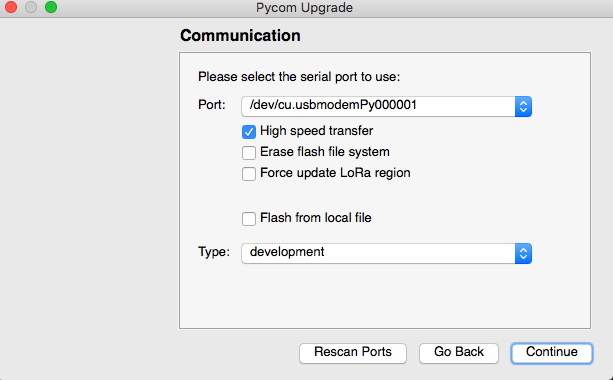
Other than the new filesystem, which should be a lot more resilient when the device resets while a file is open for writing, this version has been updated with the micropython 1.9.4 core (in comparison, the current stable release is based on micropython 1.8.6-849). This will likely mean a lot of scripts will not work out of the box as there have been some changes.
The firmware team (I'm really just the "release" guy) is still working on the updated documentation and getting the source code ready for release, and more information should become available soon.
Until then feel free to give this release a try... it's certainly not perfect which is why it's a development release. My goal is to have a release like this on a weekly basis, most likely on Fridays. The idea is to give you a preview of what we're working on.
Looking forward to reading your feedback...
-
A few things to note:
Most of the
readall()functions such as in uart have been removed as usingread()without arguments does exactly the same. Please update your scripts accordingly.The function
os.mkfs()has been replaced withos.fsformat(). To format the internal file system, useos.fsformat('/flash')andos.fsformat('/sd')to format SD cards (card needs to be mounted as '/sd')To mount the SD card, use this code:
from machine import SD sd = SD() fs = os.mkfat(sd) os.mount(fs, '/sd') -
Re: New firmware release v1.19.0.b1
Hi all,
In this development releases we also added light sleep funtionality, it is more graceful sleep mode than deep sleep where digital peripherals, most of the RAM, and CPUs are clock-gated, and supply voltage is reduced. Upon exit from light sleep, peripherals and CPUs resume operation, their internal state is preserved. you can read more about Sleep modes in esp32 here .To Enter light sleep mode you can use API:
machine.sleep(time in ms)if no arguments given module will sleep till next reset unless a wakeup source is configured before going to sleep.Please Note that:
1- APImachine_pin_deepsleep_wakeupwas renamedmachine_pin_sleep_wakeupas now you can use it for configuring wakeup source for both light and deep sleep.2- when Light sleep mode Wifi, bluetooth and LoRa are disabled and currently connection is not restored after wakeup (you have to restore it manually with scripting), we are currently working on automatically restoring Connection after light sleep wakeup.
Thanks, waiting for your feedback :)
Wahdan
-
-
Further to this thread:
https://forum.pycom.io/topic/3207/uasyncio-support
does the the new dev release include uasyncio support?
-
Which file system used? Is it readable on WINDOWS/LINUX?
-
@bmarkus said in New development firmware release v1.19.0.b1:
Which file system used? Is it readable on WINDOWS/LINUX?
We're now using LittleFS for the internal flash file system in the development firmware rather than FatFS. SD cards keep using FatFS. There is a Fuse wrapper available.
Christian Ehlers
-
@soulsurfer Truly hope this has made it in.
-
@xykon said in New development firmware release v1.19.0.b1:
@bmarkus said in New development firmware release v1.19.0.b1:
Which file system used? Is it readable on WINDOWS/LINUX?
We're now using LittleFS for the internal flash file system in the development firmware rather than FatFS. SD cards keep using FatFS. There is a Fuse wrapper available.
Thanks, I will try it. LittleFS looks good, however lack of timestamp can be an issue in certain applications, even if in many cases it is not important and device is not time synced.
-
@bmarkus said in New development firmware release v1.19.0.b1:
Thanks, I will try it. LittleFS looks good, however lack of timestamp can be an issue in certain applications, even if in many cases it is not important and device is not time synced.
We are more concerned about users loosing all their code on the device because the file system got corrupted and reformatted during boot. If you need an fs with timestamps, you can connect an external SD card which still uses FatFS (so you can update the content on a PC).
-
@iwahdan
Any eletric current measurement already made on this light sleep mode ? -
Hi @rcolistete , yes in light sleep mode the current consumption on a Lopy is 3.5 mA with RTC peripherals ON
-
@xykon I looked into LittleFS and it supports custom attributes per file/folder. So I think timestamps can be implemented. Is there any plan to do so?
-
@sympatron said in New development firmware release v1.19.0.b1:
@xykon I looked into LittleFS and it supports custom attributes per file/folder. So I think timestamps can be implemented. Is there any plan to do so?
I will ask the developer who implemented LittleFS to look into that. It would help if you could provide a use case where this is relevant.
-
@xykon I don't have a specific use case. I just wanted to point out that it would not be too hard to implement, because @bmarkus said it might be an issue for some people.
For us it is a lot more important when this version will be available on GitHub. Since we use a custom firmware we cannot really use the new features until I can merge them with our fork.
-
@iwahdan what is the assumed current category consumption in light sleep mode?
-
Hi @gregcope for light sleep current consumption is 3.5 mA
-
@iwahdan machine.sleep(time): the time seem to be ms, not us.
-
@robert-hh yes it is a mistake in my post, I’ve corrected it
Thanks -
This post is deleted!



Hello! It looks like you're interested in this conversation, but you don't have an account yet.
Getting fed up of having to scroll through the same posts each visit? When you register for an account, you'll always come back to exactly where you were before, and choose to be notified of new replies (either via email, or push notification). You'll also be able to save bookmarks and upvote posts to show your appreciation to other community members.
With your input, this post could be even better 💗
Register Login