Raw LoRa questions
-
Hi,
I've just started my journey with LoRa. First what i wanted to test this example from PyCom documentation:
https://docs.pycom.io/chapter/tutorials/lora/lora-mac.html
Its Raw LoRa mode. I have to FiPys (example is for LoPys). I have some related questions:
-Can I use this code (link) to FiPy without changes ? If not is there any example for FiPy?
-How and where i can see the result of this code ? They seas : "Run the code below on the 2 LoPy modules and you will see the word 'Hello' being received on both sides." But should I have additional tool to receive those messages ?
-Both FiPy should have exactly the same code uploaded ? -
- yes, you can use that code on a FiPy as well.
- it is just an example code. The result is the word "Hello" printed by both devices on the respective terminals
- yes, you can run the same code on both FiPys. Actually, if there is some other device around which sends a message at that default frequency of 868MHz you might get that too.
Please use the devices with the proper antennas, and do not put them too close to each other. The distance should be at least 1m. And yes, the antenna orientation matters. Normally, it shall be vertical. But for your tests it should just be the same.
-
@robert-hh Thanks for rapid answer !
As for antennas - sure I know that without antenna I can damage the radio so I i always keep them connected :)Main think for me is to go deeper with showing the result - If I'm understand correctly:
-I put one FiPy more than 1m distance from another - i supply it via USB charger
-Second FiPy is connected to VSCode serial termianal ? Should i already see "hello' on terminal lines ? -
@szyba91 Yes, if the code is running fine, then you should see hello on that terminal. There are other examples, like this one:
https://github.com/pycom/pycom-libraries/tree/master/examples/lopy-lopy
Where Node-B runs as pure sender and Node-A receives and then sends.
This one is also a simple example:
https://github.com/pycom/pycom-libraries/tree/master/examples/loraNanoGateway -
@robert-hh What have i done:
-First i compile the code from PyCom documentation
-I've upload the code to first FiPy then sceond one using the V3 Board.
-Then I've putted one of FipYs to V2 Board(just to supply it by cell phone charger) and I've place it inn some distance to FiPy which i have connected to PC)-No reaction on (>>>) same on PuttY. Distance between FiPys is 2,5m antennas on vertical polarisation.
I think the code has been uploaded correctly because the LED changes its previous behavior.The same think I've done with this code
https://github.com/pycom/pycom-libraries/blob/master/examples/loraNanoGateway/node/main.pyAnd also can't see nothing on terminal.
Maybe i must set the FiPy in some way to recieve signal from anotherr ? This another FiPy must be also connected to PC or is it enough with phone charger ? -
@szyba91 I tried the code form the documentation on two LoPy4, on two FiPy and a FiPy/loPy combination, and all worked fine.
You have to be sure that the code is really started. If it is running and does not receive anything, it will still print lines of:
b''
indicating a timeout. -
@szyba91 Just a note: After you have uploaded the code, you must perform a hard reset of the device - push the reset button. Otherwise the LoRa chip will not work.
P.S.: I upvoted a few of your comments, such that you can reply faster on the board. -
@robert-hh Thank you. Maybe I'm doing the wrong think that is so silly that we've missed. Lets switch back to code form PyCom documentaton. Scrren shoot of my VS Code ( I removed comments just to see more from terminals output:
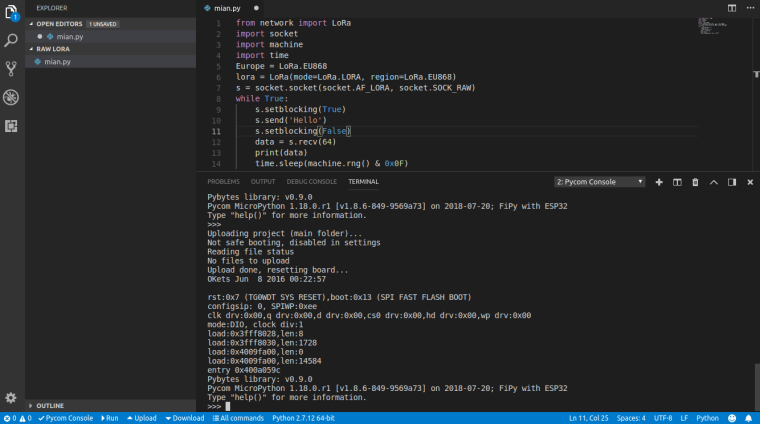
I can't even see the b' ' it seams that the radio is inactive ? -
@szyba91 I think vscode and the pycom plugin is the culprit. Better upload the script to the device using ftp (e.g. filezilla) and use a simple terminal emulator. You already called it mian.py, to avoid name clash. Once the device is uploaded and the terminal is active, push reset, and then, at the REPL prompt enter
import mian.
At the stand-alone device the script should be called main.py, or you add the statement ' import mian' to main.py, to ensure automatic start after boot. -
@robert-hh I will try to use this filezilla. Mabye today eavning (i had to go unfortunatally).
Just te be sure: Is my file structure in VS Code correct? As for main.py I've done (i think) exactly what PyCom seas in manual.
How do we understand stand-alone device. I've just created the mian.py with this folder.
I'm now confused becouse I use the same method for fimple programs like RGB led and i worked.
Could you provide same detailed information ? -
@szyba91 I cannot judge the file structure in VSCode. Ido not use that program. The file structure on the Lopy should be:
/flash
/flash/cert
/flash/lib
/flash/sys
/flash/boot.py
/flash/main.py
/flash/other_files_and_dirs_of_yours
.... -
@robert-hh Hello again, i was absence for a few days. I'm trying to set FTP serever like you siad but I've first obsticle.
To set FTP server first i have to connect to WLAN (WiFi) right? To do so i have to upload this example code using my router SSID etc.
https://docs.pycom.io/chapter/tutorials/all/wlan.html
So to use what you sid about FTP I have to use VSCode first to upload first code ?
-
@szyba91 You have to edit the script and insert the SSID and Password of your access point. Alternatively, since the xxPy device creates an access point itself, you can connect your computer to that access point. The default IP address is 192.168.4.1^, some info is at https://docs.pycom.io/chapter/gettingstarted/programming/FTP.html
-
@robert-hh Ok. I've created folder with file main.py In This file I have below code:
nets = wlan.scan()
for net in nets:
if net.ssid == 'mywifi':
print('Network found!')
wlan.connect(net.ssid, auth=(net.sec, 'mywifikey'), timeout=5000)
while not wlan.isconnected():
machine.idle() # save power while waiting
print('WLAN connection succeeded!')
breakI'm uploding this using VSCode but nothing happens. Now i came up with some idea. The same think i had with LoRa Raw, I've putted the code into main.py.
Maybe I have to create diferent file structre with boot? The examples from pycom docuentation are not so detaild. -
@szyba91 You do not have to scan for a network, if you know if it exists. Just add something like the below to your main.py file:
import machine
from network import WLAN
wlan = WLAN(mode=WLAN.STA) # Set WLAN to STA mode

if not wlan.isconnected():
    # change the line below to match your network ssid, security and password
    wlan.connect('mywifi', auth=(WLAN.WPA2, 'mywifikey'), timeout=5000)
    while not wlan.isconnected():
        print(".", end="")
        machine.sleep(1)
Edit: I do not know about folder structures within VSC, Atom or any other bloatware and bug hiders like that. I prefer to use simple tools where I know what I'm doing and what is happening.
-
Hello everyone, a question regarding this issue, I would like to know if someone has tried to connect a Lopy with raw Lora to a Multitech Conduit gateway as it comes from the factory or would they not be compatible?

Hello! It looks like you're interested in this conversation, but you don't have an account yet.
Getting fed up of having to scroll through the same posts each visit? When you register for an account, you'll always come back to exactly where you were before, and choose to be notified of new replies (either via email, or push notification). You'll also be able to save bookmarks and upvote posts to show your appreciation to other community members.
With your input, this post could be even better 💗
Register Login