Trouble with deepsleep example
-
I'm new to micropython and have been struggleing to get my device to wake up from deepsleep. I was expected it to do something, then go to sleep for x seconds and then restart the main.py program.
I am running a FiPy with firmware version 1.18.0.r1 with a 2.0 expansion board. I'm trying to figure out how to get deepsleep to work. I started with the deepsleep example from the library. When I run that, I get the following error:
File "main.py:, line 7, in <module>
File "/flash/lib/deepsleep.py", line 157, in get_wake_status
File "/flash/lib/deepsleep.py", line 81, in peek
Index error: bytes index out of range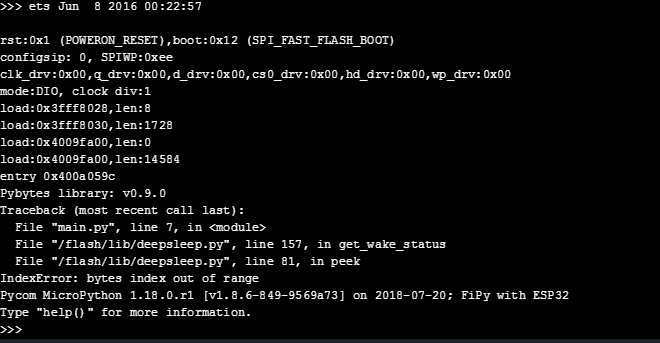
I could not figure out those errors, and have searched on help forums for a few hours today.
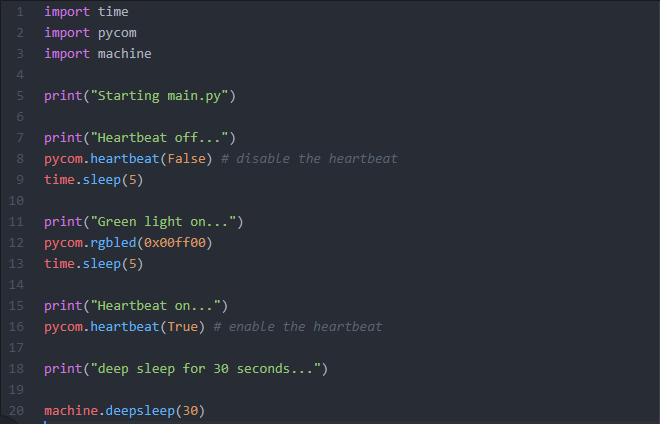
I also tried using a code that utilized machine.deepsleep. I wrote a simple code that just turns the LED on. It goes to sleep, but never wakes up. I must be missing something here.
Here is my code:
-
@matt the deepsleep.py library is required when you use the Deep Sleep shield, which is a workaround for some of the older modules which had a high power draw issue in deep sleep.
You don’t need it with a FiPy.
However I don’t see where you load it. Are you sure your main.py is actually the one you posted?
-
@matt your code looks ok.
But, why do you upload /lib/deepsleep.py?????
You should not need to do this.
The machine library is already embedded in the device ROM.
This might be your problem.I am using deepsleep successfully on a LoPy4.
You should not need to put anything in /flash/lib.
-
@jcaron @tuftec
Oops, I meant to say that I added the /lib/deepsleep.py when I was following the deepsleep example (from the github library). I didn't realize that was only for the work around.I was trying to use machine.deepsleep, with the /lib/deepsleep.py in the library even though its not imported. I just now deleted it our per suggestion by jcaron and tuftec, and reset the FiPy... unfortunately it still seems to do the same thing. It runs all of the main.py and then appear to just go into deepsleep and doesn't wake up.
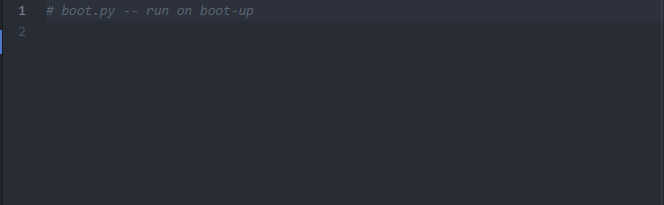
Do I need anything special in the boot.py? Here is what I have (which is nothing):
-
When your code comes out of deepsleep it should just reboot.
I have seen funny issues when trying to use the heartbeat function.
I would suggest you just turn it off and leave it off. That is what I do.Peter.
-
@tuftec
I just tried your suggestion. I turned off the heartbeat function and left it off and then I uploaded the revised main.py code and rebooted. Still no luck. It turns the green LED on and then off, then then goes to sleep and just stays asleep.I'm at a loss about what to do. I'd really like to get it working.
-
So I think I figured out how to get it working. I used an external 5v power source that I built and powered it through the Vin and Gnd GPIO pins on the expansion board. (Whereas before, I was leaving it connected to my computer using Atom so I could read the print command outputs on the command line screen.)
Is this similar to other peoples' experiences? .. that machine.deepsleep, and maybe certain other commands, will only work when using a separate 5v power source and not connected to a computer?
-
Interesting.
I have not tried only powering via USB.I have always connected a seperate 5V supply to replicate the exact arrangement for my end solution. You also need the extra current to make the radio components work correctly.
Good find.
Peter.
-
This post is deleted! -
@Erick-Falcon Why did you post that here? It is not related to the topic.

Hello! It looks like you're interested in this conversation, but you don't have an account yet.
Getting fed up of having to scroll through the same posts each visit? When you register for an account, you'll always come back to exactly where you were before, and choose to be notified of new replies (either via email, or push notification). You'll also be able to save bookmarks and upvote posts to show your appreciation to other community members.
With your input, this post could be even better 💗
Register Login