AS923 Class C not working?
-
I ran into a problem trying to use class C on AS923.
Class A works like expected, but when I change to class C, I cannot receive anything. The joining procedure works fine.
This is my declaration:
   global lora
   lora = LoRa(mode=LoRa.LORAWAN, power_mode=LoRa.ALWAYS_ON, region=LoRa.AS923, device_class=LoRa.CLASS_C)
socket and Hello message:
pycom.rgbled(0x141400)
	# create a LoRa socket
	global lsock
	lsock = socket.socket(socket.AF_LORA, socket.SOCK_RAW)
	lsock.setsockopt( socket.SOL_LORA, socket.SO_DR, 2 ) # datarate
	lsock.setblocking(False)

	#send Hello packet
	print('sending Hello')
	lsock.setsockopt(socket.SOL_LORA, socket.SO_CONFIRMED, 1 )
	model = 0
	if 'model' in settings.dic:
		model = settings.dic['model']
	send( bytes([ CMD_HI , 3, settings.PROTO_VERSION, settings.SW_VERSION, model ]) )
This is how I wait for a message:
lsock.settimeout(10)
	lsock.setsockopt( socket.SOL_LORA, socket.SO_CONFIRMED, 0 )
	print('waiting for data')
	while(True):
		try:
			data, port = lsock.recvfrom(128)
			proto_handler_multi(data, port)
		except TimeoutError:
			send(bytes([0x01,0x00]))
			#print('still waiting...')
			continue
The gateway (a CloudGate) receives the message and sends messages when I want to but I don't see anything happening on the LoPy. Anyone ran into this issue before?
-
What lorawan server are you using ? You can see downlink packets on your lora gateway ?
-
I am Using a CloudGate and create the packets on the gateway itself. I can see the packets being sent, but nothing received on the LoPy. When I changed to EU HW and changed my code to EU868, it worked normally.
When I send from the LoPy to the gateway, I also see the packets of my LoPy.
Also Class A functions normally. It looks like it's not listening in Class C when using AS923. How can I confirm this? -
@harald You may want to check the region-related files in the source code to see if there's anything obvisouly different on the topic for AS923.
I have to admit I don't even know how channel/data rate selection works for class C downlinks... I suppose there must be default channels, and some MAC commands to change that?
What type of join are you using? OTAA or ABP?
-
@jcaron said in AS923 Class C not working?:
I have to admit I don't even know how channel/data rate selection works for class C downlinks... I suppose there must be default channels, and some MAC commands to change that?
Channel plan is the same for Class A and Class C devices, difference is how downlink delivered. Class A devices listen continously on RX2 channel after RX1 window closed followed by uplink, so you can send downlink any time. Class C is also used for Multicast but as far as I know it is not implemented by PyCom.
-
@jcaron
I'm using OTAA and can see the joining works like it should. -
@harald. Please can you send your complete code to support (support@pycom.io) ? Class C in the AS923 region works. Please see the pic below:
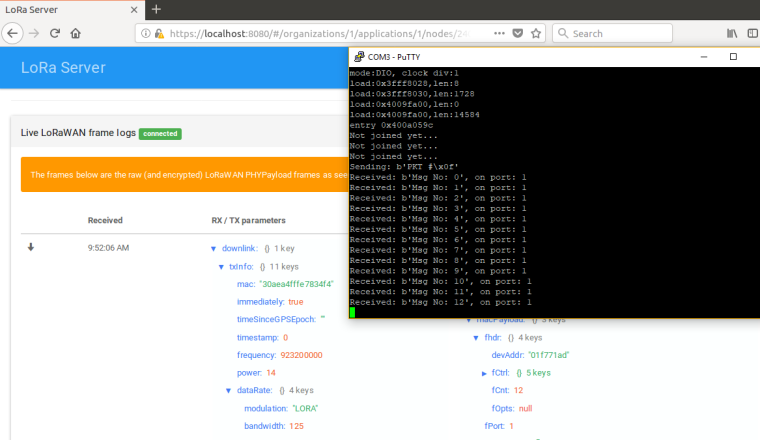
-
The files have been sent! Thanks for looking into this! I will update this thread once the code is fully functional.
-
Can you tell what is wrong with this code then:
from network import LoRa
import socket
import binascii
import settings
import sys
import time
import pycom

LORA_FREQUENCY = 923000000
LORA_FREQ_ADD =  20000
LORA_GW_DR = "SF10BW125"
LORA_NODE_DR = 2

# initialize LoRa in LORAWAN mode.
# Please pick the region that matches where you are using the device:
# Asia = LoRa.AS923
# Australia = LoRa.AU915
# Europe = LoRa.EU868
# United States = LoRa.US915
lora = LoRa(mode=LoRa.LORAWAN, region=LoRa.AS923, device_class=LoRa.CLASS_C)

# create an OTA authentication params
dev_eui = binascii.unhexlify('70b3d5499da97f9c')
app_eui = binascii.unhexlify('ADA4DAE3AC12676B')
app_key = binascii.unhexlify('11B0282A189B75B0B4D2D8C7FA38548B')

# set the 3 default channels to the same frequency (must be before sending the OTAA join request)
print('Adding channels')
lora.add_channel(0, frequency=923200000, dr_min=0, dr_max=5)


#join a network using OTAA
print('Joining...')
lora.join(activation=LoRa.OTAA, auth=(dev_eui, app_eui, app_key), timeout=0, dr=LORA_NODE_DR)
#lora.join(activation=LoRa.OTAA, auth=(dev_eui, app_eui, app_key), timeout=0)


# wait until the module has joined the network
while not lora.has_joined():
    time.sleep(2.5)
    print('Not joined yet...')

print('Joined')

# remove all the non-default channels
print('Removing other channels')
for i in range(1, 16):
    lora.remove_channel(i)

# create a LoRa socket
s = socket.socket(socket.AF_LORA, socket.SOCK_RAW)

# set the LoRaWAN data rate
s.setsockopt(socket.SOL_LORA, socket.SO_DR, LORA_NODE_DR)

#test set unconfirmed.
s.setsockopt(socket.SOL_LORA, socket.SO_CONFIRMED, 0)

# make the socket blocking
s.setblocking(False)

time.sleep(5.0)

pkt = b'PKT #' + bytes([i])
print('Sending:', pkt)
s.send(pkt)
time.sleep(4)

print('Listening...')
while True:
    rx, port = s.recvfrom(256)
    if rx:
        print('Received: {}, on port: {}'.format(rx, port))
    time.sleep(1)

Hello! It looks like you're interested in this conversation, but you don't have an account yet.
Getting fed up of having to scroll through the same posts each visit? When you register for an account, you'll always come back to exactly where you were before, and choose to be notified of new replies (either via email, or push notification). You'll also be able to save bookmarks and upvote posts to show your appreciation to other community members.
With your input, this post could be even better 💗
Register Login