Welcome to the Pycom forum Forum
    • \[\[global:header.categories\]\]
    • \[\[global:header.recent\]\]
    • \[\[global:header.tags\]\]
    • \[\[global:header.popular\]\]
    • Login

    Explore Pybytes | Official Documentation | Report a Firmware Bug/Issue | GitHub

    Cannot install the Pycom Firmware Update

    Scheduled Pinned Locked Moved Issues & Bugs
    win10update tools
    11 Posts 5 Posters 1.4k Views 5 Watching
    Loading More Posts
    • Oldest to Newest
    • Newest to Oldest
    • Most Votes
    Reply
    • Reply as topic
    Log in to reply
    This topic has been deleted. Only users with topic management privileges can see it.
    • J Offline
      Jiemde Pybytes Beta
      last edited by

      Hi, recently I update my Windows 7 pro into Windows 10 and....
      The firmware update tools don't work !
      I've trying to reinstall it but Windows show an error during the install.
      Is there a solution ?
      Thanks for reply with solution
      Jiemde

      1 Reply Last reply Reply Quote 0
      • C Offline
        cmisztur
        last edited by

        Can you show a picture of the error?

        1 Reply Last reply Reply Quote 0
        • J Offline
          Jiemde Pybytes Beta
          last edited by

          Hi Cmisztur, here is the picture of the error,
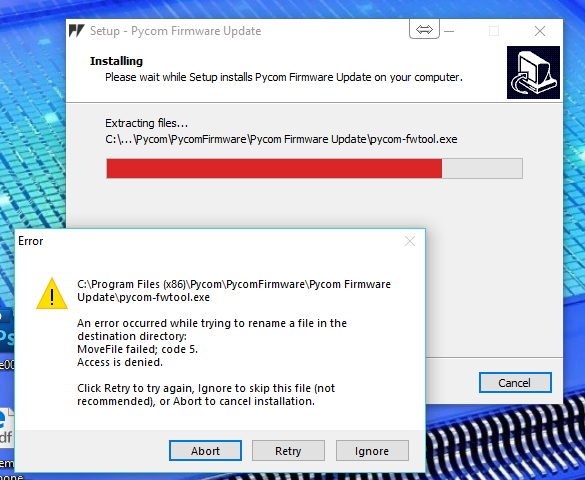
          0_1540364633106_92537cc2-4e8b-46c6-9e2e-38c96c7e18d0-image.png

          Thanks for help

          Jiemde

          C S 2 Replies Last reply Reply Quote 0
          • C Offline
            cmisztur @Jiemde
            last edited by

            @jiemde What if you run the installer AS ADMIN?

            J 1 Reply Last reply Reply Quote 1
            • J Offline
              Jiemde Pybytes Beta @cmisztur
              last edited by

              Hi @cmisztur it remain the same!
              My antivirus is Avira and I've also try to install with Avira desabling.
              See in an antivirus scan session that there is "HEUR" in the fwtools.exe !
              Did you know that kind of problem ?

              regards

              jiemde

              danD 1 Reply Last reply Reply Quote 0
              • danD Offline
                dan @Jiemde
                last edited by dan

                Hi @jiemde, could you try whitelisting the installer/firmware updater in your antivirus software? Some apps flag the updater because it downloads the firmware from the internet and that "can be suspicious". If that doesn't help, could you try deleting the Pycom folder in your Program Files?

                J 2 Replies Last reply Reply Quote 0
                • J Offline
                  Jiemde Pybytes Beta @dan
                  last edited by

                  Hi @dan,
                  Whitelisting the file in the Avira exeptions do nothing ! and deleting the Pycom folder don't resolve the problem too !
                  trying to download the file on an other pc and see if the problem is already there.

                  Jiemde

                  1 Reply Last reply Reply Quote 0
                  • J Offline
                    Jiemde Pybytes Beta @dan
                    last edited by

                    Hi @dan, just for info, downloading and install the file with an other PC is working :)).

                    Trying to transfert the file on the "faultly" pc don't work " access denied" ! but executing the .exe on the usb key is running well
                    Will investigate further
                    Jiemde

                    1 Reply Last reply Reply Quote 0
                    • S Offline
                      santorcuato @Jiemde
                      last edited by

                      @jiemde Hi, have you found a solution? I'm stopped into the same problem, w10 and Avira.

                      Thanks in advance.

                      Rom

                      P 2 Replies Last reply Reply Quote 0
                      • P Offline
                        Paul Thornton @santorcuato
                        last edited by

                        @santorcuato Youll have to either disable the antivirus for the brief install period. or whitelist the installer.

                        As mention it seems avira is flagging the tool as potentially dangerous based on heuristics (a guess based on the application's behaviour) incorrectly.

                        1 Reply Last reply Reply Quote 0
                        • P Offline
                          Paul Thornton @santorcuato
                          last edited by

                          @santorcuato Found a simple guide on how to add exceptions for programs. https://blog.avira.com/exceptions-avira-antivirus-3-steps/

                          1 Reply Last reply Reply Quote 0

                          Hello! It looks like you're interested in this conversation, but you don't have an account yet.

                          Getting fed up of having to scroll through the same posts each visit? When you register for an account, you'll always come back to exactly where you were before, and choose to be notified of new replies (either via email, or push notification). You'll also be able to save bookmarks and upvote posts to show your appreciation to other community members.

                          With your input, this post could be even better 💗

                          Register Login
                          • 1 / 1
                          • First post
                            Last post

                          Pycom on Twitter

                          Pycom