New Firmware Release Candidate v1.20.0
-
@einarj
There are some eDRX-related commands as well:- eDRX Read Dynamic Parameters: +CEDRXRDP
- eDRX Setting: +CEDRXS
- Specific eDRX Settings: +SQNEDRX
I have no idea if PSM/eDRX commands are implemented and working as expected because I did not test them yet.
@iwahdan @Paul-Thornton
In my opinion Pycom should provide statement regarding readiness of PSM/eDRX features implemented in the modem's firmware because without these features it is not possible to develop battery-powered solutions with reasonable long battery life-time which is the main purpose of NB-IoT.
There should also be tutorial available in the documentation because of importance of these features. -
@danielm said in New Firmware Release Candidate v1.20.0.rc0:
@iwahdan @Paul-Thornton
In my opinion Pycom should provide statement regarding readiness of PSM/eDRX features implemented in the modem's firmware because without these features it is not possible to develop battery-powered solutions with reasonable long battery life-time which is the main purpose of NB-IoT.
There should also be tutorial available in the documentation because of importance of these features.I will try to post more details about PSM/eDRX as soon as possible. Generally the standard 3GPP AT commands should be used using
lte.send_at_command(). However in order to tell the modem to go into PSM/eDRX mode,lte.deinit(dettach=False)should be called. The wrong spelling ofdettachaside, the modem checks the state of the flow control pins to see if it is OK to go into low power mode. Thedeinitcommand releases the flow control pins thus allowing the modem to go into the configured sleep mode.In regards to the release candidate, after uploading v1.20.0.rc2 earlier today, which includes the latest Sequans firmware updater and Pybytes scripts, I have realised an error was made in
pycom_config.hthat causes the fs_type flag to be stored at an incorrect position. This is also the reason why the setting from the firmware updater is ignored. I have already uploaded a correction to therelease-candidatebranch as I had issues updating the perviously usedv1.20.0.rc0branch. I will upload a new version shortly but wanted to give people a heads-up to check the file system type in the firmware updater when updating. This should only affect people who used the commands I posted above to manually switch the fs_type with thepycom_bootmgrcommand. -
@xykon
Yesterday I did some tests with PSM-related AT commands.
Is seems that following commands should sent before attaching (after first boot). Of course timer values of '+CPSMS' may be adapted.self.lte.send_at_cmd('AT+CPSMS=1,,,"01000001","00000001"') self.lte.send_at_cmd('AT+CEREG=4')After successful attach '+CEREG?' returns Active time and Periodic TAU values allocated by the network which may be identical to requested values (this is the case in NB-IoT network of Slovak Telekom) but in other networks they may be limited by the network.
It seems that '+CPSMS' command has to be called after consequent boots from deep-sleep (with LTE already attached) as well.
-
@xykon
Two comments:- please rename branch "release-candiate" -> "release-candidate"
- I had to install pyserial package manually, before I was getting this error:
# make BOARD=GPY TARGET=boot
Use make SECURE=on [optionally SECURE_KEY ?= secure_boot_signing_key.pem] to enable Secure Boot and Flash Encryption mechanisms.
Use make V=1 or set BUILD_VERBOSE in your environment to increase build verbosity.
BASE Variant
mkdir -p build/GPY/release/bootloader/
CC bootloader/bootloader.c
CC bootloader/bootmgr.c
CC bootloader/mperror.c
CC bootloader/gpio.c
CC bootloader/flash_qio_mode.c
AR build/GPY/release/bootloader/bootloader.a
LINK xtensa-esp32-elf-gcc *** -nostdlib -Wl,-Map=build/GPY/release/bootloader/bootloader.map -Wl,--no-check-sections -u call_user_start_cpu0 -Wl,-static -Wl,--undefined=uxTopUsedPriority -Wl,--gc-sections -T esp32.bootloader.ld -T esp32.rom.ld -T esp32.peripherals.ld -T esp32.bootloader.rom.ld -T esp32.rom.spiram_incompatible_fns.ld *** -Wl,--start-group -Lbootloader/lib -Lbootloader -Lbuild/GPY/release/bootloader -L/root/micropython_esp32/pycom-esp-idf/components/esp32/ld -L/root/micropython_esp32/pycom-esp-idf/components/esp32/lib -llog -lcore -lbootloader_support -lspi_flash -lsoc -lmicro-ecc -lgcc -lstdc++ -lgcov build/GPY/release/bootloader/bootloader.a -Wl,--end-group -Wl,-EL -o build/GPY/release/bootloader/bootloader.elf
   text    data     bss     dec     hex filename
  19086    1992      40   21118    527e build/GPY/release/bootloader/bootloader.elf
IMAGE build/GPY/release/bootloader/bootloader.bin
Traceback (most recent call last):
  File ".../micropython_esp32/pycom-esp-idf/components/esptool_py/esptool/esptool.py", line 35, in <module>
    import serial.tools.list_ports as list_ports
ImportError: No module named tools.list_ports
application.mk:552: recipe for target 'build/GPY/release/bootloader/bootloader.bin' failed
make: *** [build/GPY/release/bootloader/bootloader.bin] Error 1
Environment: Ubuntu 16.04.3 LTS 64-bit
-
@xykon
Deep-sleep current on G01 with v1.20.0.rc3 built today from source:import machine machine.deepsleep()Result: 7uA OK
import machine
import network
lte=network.LTE()
lte.deinit()
machine.deepsleep()
Result: 29mA Not OK!
Both tests are included in this graph:
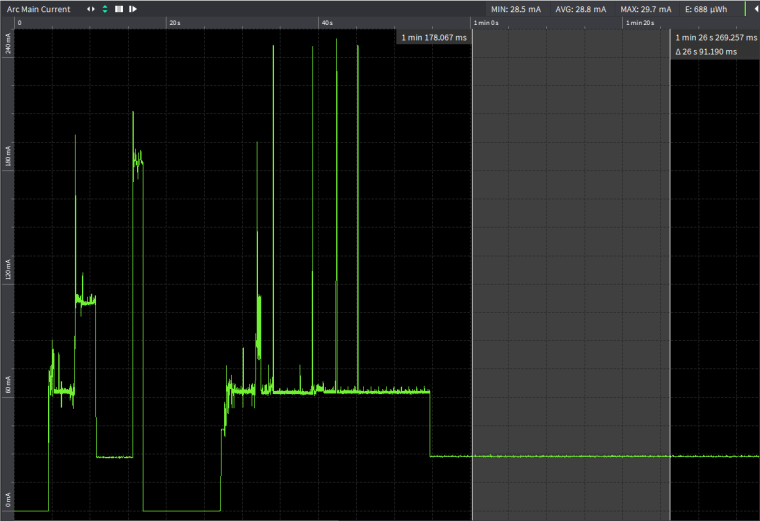
Edit: Tested with FiPy on custom board (no FTDI or other peripherals) powered with 3.75V from Otii Arc.
Results are almost the same as for G01!- 22uA for the first test code (includes quiescent current of voltage regulator)
- 27mA for the second test code.
Same results if LTE is attached between init and deinit.
The modem starts attach after first lte.isattached() is called!
It can be clearly verified when monitoring consumption with Otii Arc or similar tool. -
rtc.synced() continue to return false when rtc.ntp_sync("pool.ntp.org") sync the date&time. I'm using v1.20.0.rc3 built today from source:
-
@danielm said in New Firmware Release Candidate v1.20.0.rc0:
self.lte.send_at_cmd('AT+CPSMS=1,,,"01000001","00000001"')
Tried again with AT+CPSMS, but it seems to give me an error with the 1.20.0.rc2. On the first run, it works fine, but after waking up from a deep sleep it gives me an exception when calling the deinit() method:
lte.deinit(dettach=False)
Traceback (most recent call last):
File "main.py", line 90, in <module>
OSError: the requested operation failed
Pycom MicroPython 1.20.0.rc2 [v1.9.4-ecfa670] on 2018-12-17; GPy with ESP32 -
@einarj
Which module are you using for testing? Can you successfully achieve desired deep-sleep current levels? -
@danielm I'm using the GPy. The only way of achieving desired deep-sleep current levels is when i do a "lte.deinit(dettach=True)" and have the GPy alone without any expansion board or PySense/PyTrack
-
-
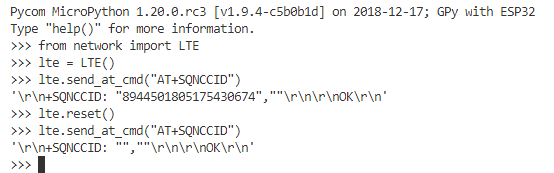
The reset command does not put the modem in the same state that pressing the reset button does.
-
@serafimsaudade A fix for this should be in the next RC.
-
@danielm I've conducted some more testing now. If I enable PSM and eDRX, the commands are accepted the first time after power up. After the deep sleep period, the attach is already there, so the connection and sending of data is as fast as expected. But, when the lte.deinit(dettach=False) runs, I get an OSError. This prevents trying out the deep sleep functionality. (1.20.0.rc3)
The power usage of the LTE-modem is quite high and the GPy is averaging around 200mA for the first run after a power up.
Also, the deinit-method is quite slow. When using PSM, it should be possible to send the socket data with a flag indicating that the modem can release after a successful send, and the deinit-method shouldn't be necessary.I wrote my own library for a uBlox SARA-N210 breakout module and hooked it up to a LoPy. To handle the deep sleep, I used a PySense and powered the uBlox-modem on the sensor power output.
Using basically the same setup, I'm issuing the same PSM and eDRX commands, but I'm also using a flag when sending the message, telling the modem to release after a successful send.This gives me some interesting results, and I hope it maybe can work as a benchmark for what results I'm also expecting for the Sequans LTE-modem
The ON-cycle (after the first run when waiting for an initial attach):
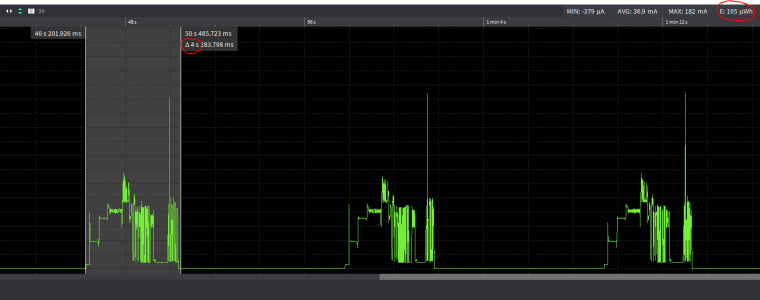
Wakeup of the lopy, wakeup of the LTE-modem, sending the data, make the PySense go back to sleep and waiting for the uBlox-modem going back to sleep, takes only 4 seconds and uses around 165uWh. Average power draw is around 36.9mAThe deep sleep cycle:
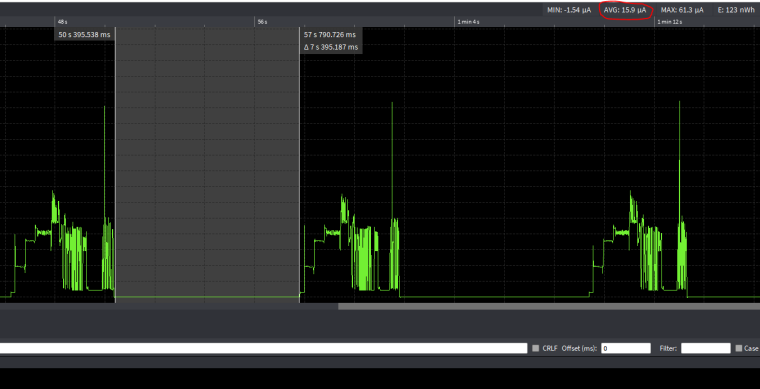
Getting the expected result of 15.9uA with 11uA draw from the PySense + 4-5uA from the uBlox LTE modem when in PSM mode -
@einarj
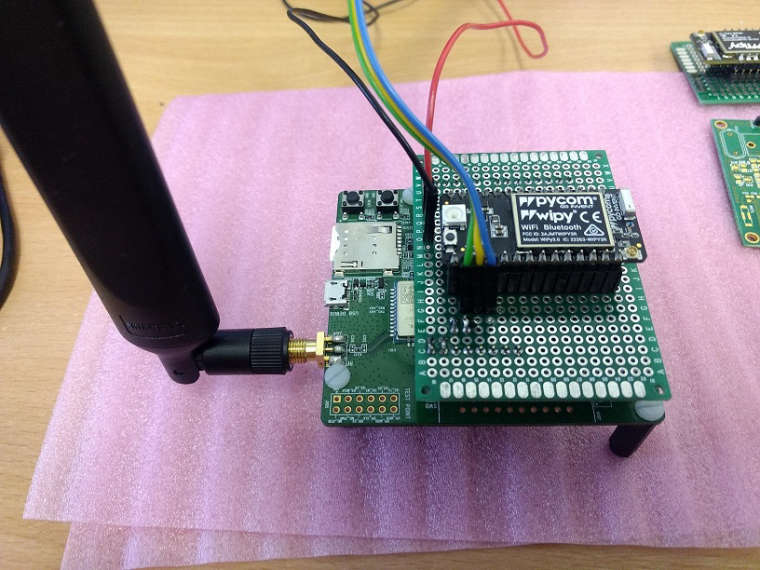
By release flag you mean RAI - Release Assistance Indicator? 165uWh per active cycle is pretty impressive. I would say on par with LoRa/LoRaWAN based solutions if not better.Because of the state of cellular support in Pycom products (after they are available on the market for more than a year) yesterday I started to implement similar solution - WiPy 3.0 with Quectel BC66 based on Mediatek MT2625. I do not have any power figures yet as I am currently working on basic library implementation.
If this solution will be working well it will also be pretty cost-efficient and future-proof as the modem also supports Rel.14/NB2.
I would also like to test BC66 with ESP32-WROOM running micropyhton.org ESP32 port which currently implements only basic features but could be suficient for simple sensors. This would lead to even more cost-efficient solution (for simple battery powered devices).
Edit: BC66 contains OpenCPU functionality which allows to run application code directly on the module but development in this environment seems like return to dark ages. Would be worth in case of manufacturing really big series of super-simple devices. The module does not even require voltage regulator when powered directly from battery.
-
@danielm I don't think it is RAI, but a release indicator flag that ublox has implemented in the socket send command, which tells the modem it can gi to PSM based on the PSM settings.
Nice work! Guess there will be plenty of alternatives when it comes to modems. But, as you say, they must also be a little user friendly.
-
@iwahdan
Interesting discovery:-
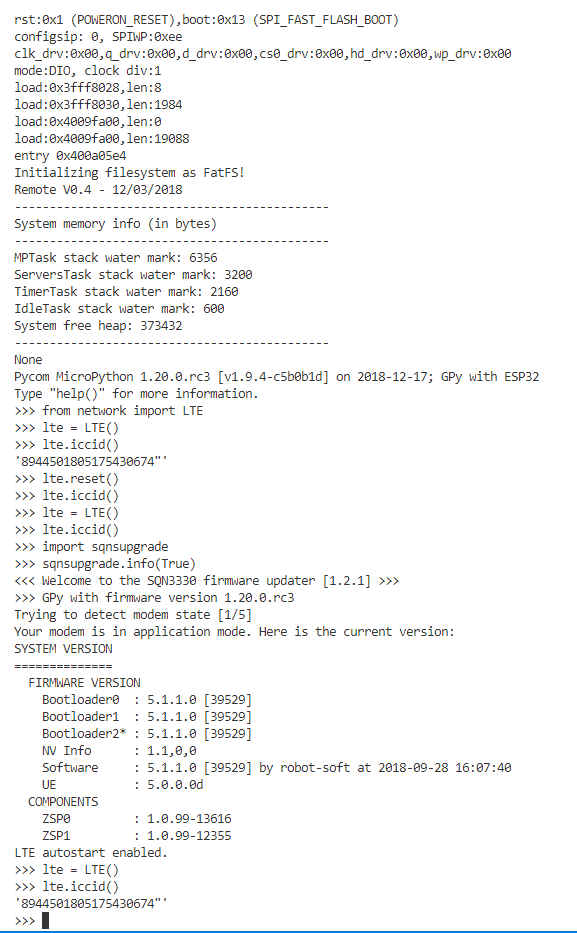
As noted earier after a lte.reset() method call, the lte.iccid() method no longer returns a value.
-
The sqnsupgrade.info(True) method call resets the modem to a state where the lte.iccid() method returns a correct value.
-
In other words the sqnsupgrade.info(True) seems to do something to the modem state that lte.reset() does not.
I don't pretend to understand what the ramifications of this are, but I thought it was worth noting. I know of no other software command that will restore the modem to a state where the lte.iccid() method works.
-
-
@iwahdan
I've now discovered what looks like a better way to enable the iccid() method to work after a reset.-
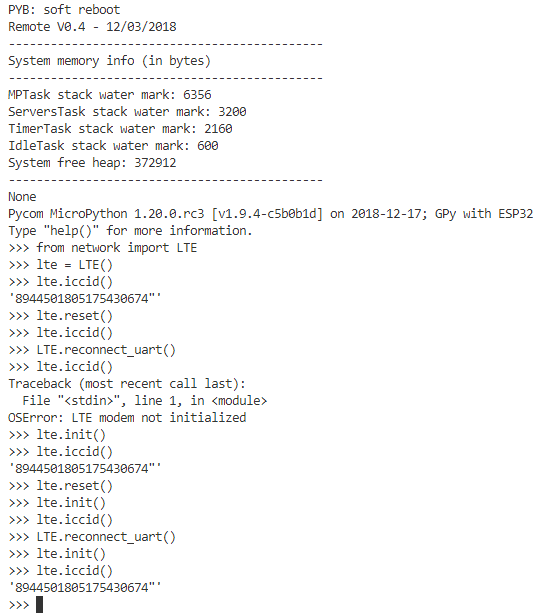
lte.reset()
-
lte.iccid() does not work
-
LTE.reconnect_uart()
-
lte.init()
-
lte.iccid() then works!
My guess is that other methods may not function correctly after a reset() without calling the LTE.reconnect_uart() method, but that is just speculation.
-
-
A new version 1.20.0.rc4 is now available with the following updates:
Co-Authored-By: @iwahdan
mods/modusocket: use getaddrinfo() instead of n_gethostbyname() in mod_usocket_getaddrinfo()
esp32/modusocket:Add mpy API to get/set DNS servers ipv4 addr
mods/machrtc: Add optional parameter backup_server to specify two NTP servers
esp32: Fixes in order to get the LoRaWAN US915 certification passing
esp32/frozen: updated MQTTMsgHandler.py
esp32/pycom_config: fix typosCo-Authored-By: @robert-hh
help: Simplify and extend help()
mods/machspi.c: Fix the bug in spi.read()
esp32/micropython: correction to keyboard interrupts exposureUpdate IDF libraries to pycom-esp-idf/idf_v3.1 ebff2ed
mods/machrtc: Fixrtc.synced()Fix typo in get_idf_libs.py
Example1: Set primary and secondary (backup) ntp server.
from machine import RTC
rtc = RTC()
rtc.ntp_sync('pool.ntp.org', backup_server='ntp.ubuntu.com')
rtc.synced()
Example2: Check and update name server configuration
import socket # Check configured name servers socket.dnsserver() ==> ('8.8.8.8', '8.8.8.8') # Check primary name server (index: 0) socket.dnsserver(0) ==> (0, '8.8.8.8') # Set primary name server (index: 0) socket.dnsserver(0, '10.0.0.1') # Set secondary name server (index: 1) socket.dnsserver(1, '192.168.1.1') socket.dnsserver(0) ==> (0, '10.0.0.1') socket.dnsserver() ==> ('10.0.0.1', '192.168.1.1') -
Have you changed someting in _thread or i2c as well?
up to ec2 I had huge problems with i2c and a pytrack.
Under rc3 it was more stable when serializing i2c with a lock. But deepsleep failed once without visible i2c exception.Now it runs for some hours without a problem on a LoPy and WiPi3. I hope you have done a great job. Not that I have a lot of bad luck and and miss allways the issue.;)
-
@crumble said in New Firmware Release Candidate v1.20.0.rc0:
Have you changed someting in _thread or i2c as well?
Maybe it's the updated IDF libraries... I haven't changed anything in the source code related to that functionality.
Hello! It looks like you're interested in this conversation, but you don't have an account yet.
Getting fed up of having to scroll through the same posts each visit? When you register for an account, you'll always come back to exactly where you were before, and choose to be notified of new replies (either via email, or push notification). You'll also be able to save bookmarks and upvote posts to show your appreciation to other community members.
With your input, this post could be even better 💗
Register Login