New Firmware Release Candidate v1.20.0
-
@serafimsaudade said in New Firmware Release Candidate v1.20.0.rc0:
But when I try format to littleFS. It don't work.
Please try the following:
import pycom
pycom.bootmgr(fs_type=pycom.LittleFS, reset=True)
This will update the configuration to use LittleFS instead of FatFS. The board will reset automatically.
Similarly you can switch back to FatFS:
import pycom
pycom.bootmgr(fs_type=pycom.FAT, reset=True)
Note: When switching between LittleFS and FatFS, the flash file system will be re-formatted thus erasing all content.
-
When using the Pycom Upgrade software for linux. When I chose LittleFS, the pycom finish the upgrade and start with FatFs
-
Tks, that works :)
-
Now I'm having another problem :/.
When I call rtc.ntp_sync(pool.ntp.org) func the rtc get the correct time and date but the rtc.synced() never return True.Using the 1.19.0.b5 fw this problem disappear.
-
@iwahdan The Exposed Keyboard Interrupts Control to Micropython does not work. Reason:
The API changes the persistent flags, but the code in machuart.c and telnet.c looks at the non-persistent flags. IMHO, these non-persistent flags are not required, because it is a user script which modifies the flags and can set it back. At the REPL loop in pyexec.c, these flags are anyhow reset to the default state, once REPL gets control again. So better use the mechanism of the initial PR. -
Hello @robert-hh, sorry I misunderstood your initial PR, somehow I thought there was a need to control keyboard interrupts in normal REPL, which why I had to do these modifications for it to work.
I agree with you, your PR is then sufficient and no further modifications needed, will correct this shortly -
@iwahdan Why is PSM and eDRX not used when running deinit(dettach=False)?
-
@einarj
I did not perform any tests with those features yet but I think you must set requested mode and related timers by AT commands, e.g.:Power Saving Mode Setting:
+CPSMS=[<mode>[,<Requested_Periodic-RAU>[,<Requested_GPRSREADYtimer>[,<Requested_PeriodicTAU>[,<Requested_Active-Time>]]]]] -
@danielm I've tried, but it doesn't seem to have any effect. I can see it's being disabled by default in the LTE init, so I've set the command manually after that. The PSM should,in theory, cause the LTE modem go into PSM mode right after the data is sent, but that doesn't seem to happen. Maybe it's becsuse the the flag for going into PSM is not being passes to the modem. But, PSM is useless if you don't cannot setup eDRX. The modem gives me an error if I try the setting specified in the AT-command specs. Do you know if the vendor has implemented these features into the FW?
-
@einarj
There are some eDRX-related commands as well:- eDRX Read Dynamic Parameters: +CEDRXRDP
- eDRX Setting: +CEDRXS
- Specific eDRX Settings: +SQNEDRX
I have no idea if PSM/eDRX commands are implemented and working as expected because I did not test them yet.
@iwahdan @Paul-Thornton
In my opinion Pycom should provide statement regarding readiness of PSM/eDRX features implemented in the modem's firmware because without these features it is not possible to develop battery-powered solutions with reasonable long battery life-time which is the main purpose of NB-IoT.
There should also be tutorial available in the documentation because of importance of these features. -
@danielm said in New Firmware Release Candidate v1.20.0.rc0:
@iwahdan @Paul-Thornton
In my opinion Pycom should provide statement regarding readiness of PSM/eDRX features implemented in the modem's firmware because without these features it is not possible to develop battery-powered solutions with reasonable long battery life-time which is the main purpose of NB-IoT.
There should also be tutorial available in the documentation because of importance of these features.I will try to post more details about PSM/eDRX as soon as possible. Generally the standard 3GPP AT commands should be used using
lte.send_at_command(). However in order to tell the modem to go into PSM/eDRX mode,lte.deinit(dettach=False)should be called. The wrong spelling ofdettachaside, the modem checks the state of the flow control pins to see if it is OK to go into low power mode. Thedeinitcommand releases the flow control pins thus allowing the modem to go into the configured sleep mode.In regards to the release candidate, after uploading v1.20.0.rc2 earlier today, which includes the latest Sequans firmware updater and Pybytes scripts, I have realised an error was made in
pycom_config.hthat causes the fs_type flag to be stored at an incorrect position. This is also the reason why the setting from the firmware updater is ignored. I have already uploaded a correction to therelease-candidatebranch as I had issues updating the perviously usedv1.20.0.rc0branch. I will upload a new version shortly but wanted to give people a heads-up to check the file system type in the firmware updater when updating. This should only affect people who used the commands I posted above to manually switch the fs_type with thepycom_bootmgrcommand. -
@xykon
Yesterday I did some tests with PSM-related AT commands.
Is seems that following commands should sent before attaching (after first boot). Of course timer values of '+CPSMS' may be adapted.self.lte.send_at_cmd('AT+CPSMS=1,,,"01000001","00000001"') self.lte.send_at_cmd('AT+CEREG=4')After successful attach '+CEREG?' returns Active time and Periodic TAU values allocated by the network which may be identical to requested values (this is the case in NB-IoT network of Slovak Telekom) but in other networks they may be limited by the network.
It seems that '+CPSMS' command has to be called after consequent boots from deep-sleep (with LTE already attached) as well.
-
@xykon
Two comments:- please rename branch "release-candiate" -> "release-candidate"
- I had to install pyserial package manually, before I was getting this error:
# make BOARD=GPY TARGET=boot
Use make SECURE=on [optionally SECURE_KEY ?= secure_boot_signing_key.pem] to enable Secure Boot and Flash Encryption mechanisms.
Use make V=1 or set BUILD_VERBOSE in your environment to increase build verbosity.
BASE Variant
mkdir -p build/GPY/release/bootloader/
CC bootloader/bootloader.c
CC bootloader/bootmgr.c
CC bootloader/mperror.c
CC bootloader/gpio.c
CC bootloader/flash_qio_mode.c
AR build/GPY/release/bootloader/bootloader.a
LINK xtensa-esp32-elf-gcc *** -nostdlib -Wl,-Map=build/GPY/release/bootloader/bootloader.map -Wl,--no-check-sections -u call_user_start_cpu0 -Wl,-static -Wl,--undefined=uxTopUsedPriority -Wl,--gc-sections -T esp32.bootloader.ld -T esp32.rom.ld -T esp32.peripherals.ld -T esp32.bootloader.rom.ld -T esp32.rom.spiram_incompatible_fns.ld *** -Wl,--start-group -Lbootloader/lib -Lbootloader -Lbuild/GPY/release/bootloader -L/root/micropython_esp32/pycom-esp-idf/components/esp32/ld -L/root/micropython_esp32/pycom-esp-idf/components/esp32/lib -llog -lcore -lbootloader_support -lspi_flash -lsoc -lmicro-ecc -lgcc -lstdc++ -lgcov build/GPY/release/bootloader/bootloader.a -Wl,--end-group -Wl,-EL -o build/GPY/release/bootloader/bootloader.elf
   text    data     bss     dec     hex filename
  19086    1992      40   21118    527e build/GPY/release/bootloader/bootloader.elf
IMAGE build/GPY/release/bootloader/bootloader.bin
Traceback (most recent call last):
  File ".../micropython_esp32/pycom-esp-idf/components/esptool_py/esptool/esptool.py", line 35, in <module>
    import serial.tools.list_ports as list_ports
ImportError: No module named tools.list_ports
application.mk:552: recipe for target 'build/GPY/release/bootloader/bootloader.bin' failed
make: *** [build/GPY/release/bootloader/bootloader.bin] Error 1
Environment: Ubuntu 16.04.3 LTS 64-bit
-
@xykon
Deep-sleep current on G01 with v1.20.0.rc3 built today from source:import machine machine.deepsleep()Result: 7uA OK
import machine
import network
lte=network.LTE()
lte.deinit()
machine.deepsleep()
Result: 29mA Not OK!
Both tests are included in this graph:
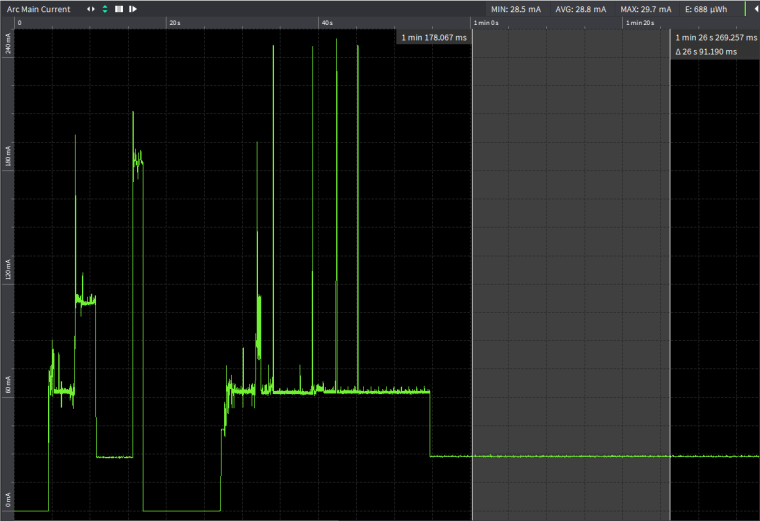
Edit: Tested with FiPy on custom board (no FTDI or other peripherals) powered with 3.75V from Otii Arc.
Results are almost the same as for G01!- 22uA for the first test code (includes quiescent current of voltage regulator)
- 27mA for the second test code.
Same results if LTE is attached between init and deinit.
The modem starts attach after first lte.isattached() is called!
It can be clearly verified when monitoring consumption with Otii Arc or similar tool. -
rtc.synced() continue to return false when rtc.ntp_sync("pool.ntp.org") sync the date&time. I'm using v1.20.0.rc3 built today from source:
-
@danielm said in New Firmware Release Candidate v1.20.0.rc0:
self.lte.send_at_cmd('AT+CPSMS=1,,,"01000001","00000001"')
Tried again with AT+CPSMS, but it seems to give me an error with the 1.20.0.rc2. On the first run, it works fine, but after waking up from a deep sleep it gives me an exception when calling the deinit() method:
lte.deinit(dettach=False)
Traceback (most recent call last):
File "main.py", line 90, in <module>
OSError: the requested operation failed
Pycom MicroPython 1.20.0.rc2 [v1.9.4-ecfa670] on 2018-12-17; GPy with ESP32 -
@einarj
Which module are you using for testing? Can you successfully achieve desired deep-sleep current levels? -
@danielm I'm using the GPy. The only way of achieving desired deep-sleep current levels is when i do a "lte.deinit(dettach=True)" and have the GPy alone without any expansion board or PySense/PyTrack
-
-
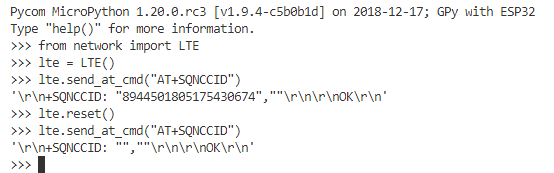
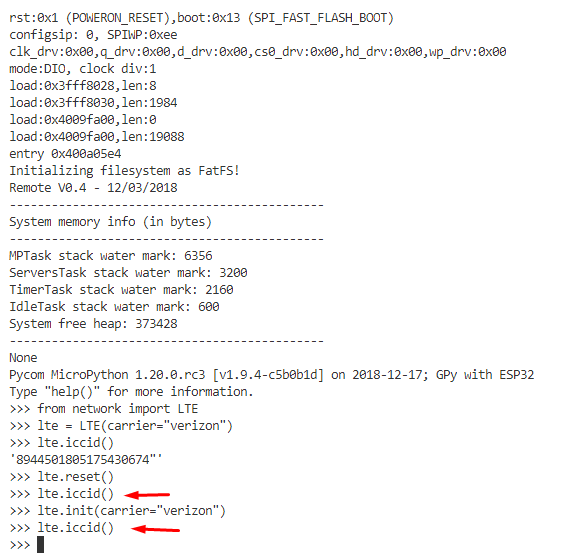
The reset command does not put the modem in the same state that pressing the reset button does.

Hello! It looks like you're interested in this conversation, but you don't have an account yet.
Getting fed up of having to scroll through the same posts each visit? When you register for an account, you'll always come back to exactly where you were before, and choose to be notified of new replies (either via email, or push notification). You'll also be able to save bookmarks and upvote posts to show your appreciation to other community members.
With your input, this post could be even better 💗
Register Login