PyScan User Push Button
-
Hi Everyone,
I'm totally new to all this, so please bear with me.
I've got a PyScan Expansion Board with a lopy4 mounted. It all works great but I'm trying to figure out how to use the push button on the expansion board. Ultimately I want to use it to wake from deep sleep... but right now I'd be really happy if I could just read it!
In an attempt to try and discover what it was connected to, I wrote the code below. Alas it didn't help as I cant see any change when pressing the button.
Any and all help very much appreciated :)
from machine import Pin

while True:
    time.sleep(0.2)
    p_inP2 = Pin('P2', mode=Pin.IN, pull=Pin.PULL_UP)
    p_inP3 = Pin('P3', mode=Pin.IN, pull=Pin.PULL_UP)
    p_inP4 = Pin('P4', mode=Pin.IN, pull=Pin.PULL_UP)
    p_inP6 = Pin('P6', mode=Pin.IN, pull=Pin.PULL_UP)
    p_inP8 = Pin('P8', mode=Pin.IN, pull=Pin.PULL_UP)
    p_inP9 = Pin('P9', mode=Pin.IN, pull=Pin.PULL_UP)
    p_inP10 = Pin('P10', mode=Pin.IN, pull=Pin.PULL_UP)
    p_inP13 = Pin('P13', mode=Pin.IN, pull=Pin.PULL_UP)
    p_inP14 = Pin('P14', mode=Pin.IN, pull=Pin.PULL_UP) #THIS ONE??
    p_inP15 = Pin('P15', mode=Pin.IN, pull=Pin.PULL_UP)
    p_inP16 = Pin('P16', mode=Pin.IN, pull=Pin.PULL_UP)
    p_inP17 = Pin('P17', mode=Pin.IN, pull=Pin.PULL_UP)
    p_inP18 = Pin('P18', mode=Pin.IN, pull=Pin.PULL_UP)
    p_inP19 = Pin('P19', mode=Pin.IN, pull=Pin.PULL_UP)
    p_inP20 = Pin('P20', mode=Pin.IN, pull=Pin.PULL_UP)
    p_inP21 = Pin('P21', mode=Pin.IN, pull=Pin.PULL_UP)
    p_inP23 = Pin('P23', mode=Pin.IN, pull=Pin.PULL_UP)
    print('Button Values %(a)s %(b)s %(c)s %(d)s %(e)s %(f)s %(g)s %(h)s xx %(i)s %(j)s %(k)s %(l)s %(m)s %(n)s %(o)s %(p)s %(q)s' %  {'a': p_inP2(), 'b': p_inP3(), 'c': p_inP4(), 'd': p_inP6(), 'e': p_inP8(), 'f': p_inP9(), 'g': p_inP10(), 'h': p_inP13(), 'i': p_inP14(), 'j': p_inP15(), 'k': p_inP16(), 'l': p_inP17(), 'm': p_inP18(), 'n': p_inP19(), 'o': p_inP20(), 'p': p_inP21(), 'q': p_inP23()})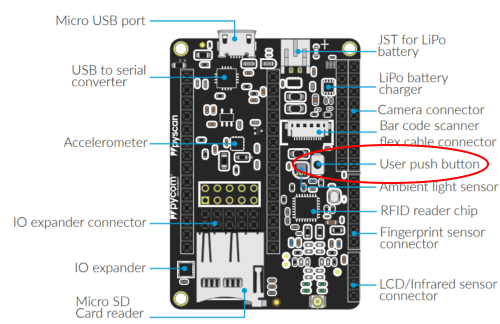
-
Here is a script that works for my WiPy with PyTrack board to wake the device from deep sleep when the button is pushed
import machine   #machine library
machine.pin_deepsleep_wakeup(['P14'], machine.WAKEUP_ALL_LOW, False) #set up interrupt
machine.deepsleep(10*1000)    #deep sleep for 10s
'P14' is the pin that corresponds to the user push button on the PyTrack. Let me know if anything else needs clarification!
-
@alexpul I tried my program on pin 14 and it doesn't seem to work.
Please see this video: https://youtu.be/5bzFqIPVkRk
I hover my finger over the button (but I don't press it) and you can see the value for P14 change. When I remove my finger there is some lag and it changes back to 0.
When I press the user button with my pen there is no change in the value.
What might be happening is that P14 is connected to a light sensor?
Please help! Is my unit defective?
-
@greengrouch said in PyScan User Push Button:
Please help! Is my unit defective?
- Remove the "h"s from hhhmode. The parameter is called mode.
- Move the pin init out of the loop.
- If this does not work try Pin.PULL_DOWN instead of Pin.PULL_UP
-
@greengrouch Nothing is defective. It is just that the Input wire picks up noise induced by your finger. P14 is an input only pin, and it does not support the PULL option. From what it looks like, there seems to be no external PULL resistor on the board. Checking it with a DMM at my PySense, it seems not to have any external PULL, and no direct connection to P14. Powering just the PySense reveals 3.3V at the switch, but not level change at P14 (or any other pin) when pushing the switch. So let's assume that the User button is connected to the PIC.
On a PyTrack, the switch is connected to P14, and it seems to have an external Pull-up resistor.
Since PYCOM IS TOO SHY TO PUBLISH THE SCHEMATICS, even of the expansion boards, I can only guess. @Paul-Thornton, maybe you could check whether and how the user button is connected.B,.t.w. What happened to the promise of Daniel to publish the PIC software?
-
@robert-hh thanks for the reply - I'm totally lost as to how this push button was intended to work, it feels like it should be super simple!
Would really help if someone from PYCOM could help out / @Paul-Thornton
HELP!
-
Hey, Had a look into this. It looks to be a case of terrible naming on the sheet. That button should not actually do anything but put it in firmware update mode.
-
@GreenGrouch Try to move the line "p_inP14 = Pin ..." before the while instruction

Hello! It looks like you're interested in this conversation, but you don't have an account yet.
Getting fed up of having to scroll through the same posts each visit? When you register for an account, you'll always come back to exactly where you were before, and choose to be notified of new replies (either via email, or push notification). You'll also be able to save bookmarks and upvote posts to show your appreciation to other community members.
With your input, this post could be even better 💗
Register Login