Welcome to the Pycom forum Forum
    • \[\[global:header.categories\]\]
    • \[\[global:header.recent\]\]
    • \[\[global:header.tags\]\]
    • \[\[global:header.popular\]\]
    • Login

    Explore Pybytes | Official Documentation | Report a Firmware Bug/Issue | GitHub

    Pymesh updates

    Scheduled Pinned Locked Moved Firmware
    loraenhancementpymesh
    73 Posts 13 Posters 12.8k Views 18 Watching
    Loading More Posts
    • Oldest to Newest
    • Newest to Oldest
    • Most Votes
    Reply
    • Reply as topic
    Log in to reply
    This topic has been deleted. Only users with topic management privileges can see it.
    • catalinC Offline
      catalin @robert-hh
      last edited by

      @robert-hh, I'm not sure how it works in Android, rights for using Bluetooth and localisation should be given to the Pymesh app (iOS asks when app is first time started).
      Localisation right is required as GPS coords are sent to the node when BLE connection is established; and somehow BLE usage is linked to localisation services, too; honestly I did not investigated this.

      Catalin,

      Have you checked out our docs for the answer? (Now with an easy search function) https://docs.pycom.io
      Check out our newly revamped device management platform, Pybytes! https://pybytes.pycom.io/

      robert-hhR 1 Reply Last reply Reply Quote 1
      • robert-hhR Offline
        robert-hh @catalin
        last edited by

        @catalin Thank. That was the trick.

        1 Reply Last reply Reply Quote 0
        • E Offline
          eranroll
          last edited by

          @catalin Hi,

          I have being experiencing the same crashes as @robert-hh when using LoRa MESH with FiPy-1.20.0.rc8, and I know that LoRa MESH has been removed from new development builds such as FiPy-1.20.0.rc13.
          I would like to know if a stable LoRa MESH version is planned anytime soon, or perhaps even a more stable development version?

          1 Reply Last reply Reply Quote 0
          • DanneD Offline
            Danne
            last edited by

            First of all, let me thank you for this excellent project!
            Pymesh paves way for many very interesting projects!

            I have started on a project using a pymesh network, it's a simple network with LoPy4 nodes and WiFi access points with web-servers allowing people to find each other and then send encrypted messages over the Loramesh. I want to add batteries and solar-cells to the mesh nodes to make this project completely off-grid.

            Cellphone  <- HTTP over WiFi -> LoPy4 <-> LoRa Mesh
            

            Questions for @catalin:

            • Which firmware would you recommend for the early development of products using mesh? Should I wait for the upcoming release?
            • I would like a version of the firmware with source-code to be able to debug things like "InstrFetchProhibited". The latest version of the Firmware (https://github.com/pycom/pycom-micropython-sigfox) does not include the OpenThread in pycom-esp-idf https://github.com/pycom/pycom-esp-idf . Is there a developer branch that I can get access to, if so which? I don't mind it being under development or if it crashes as long as I can build it and investigate further :)

            Sincerely,

            Daniel

            catalinC 1 Reply Last reply Reply Quote 0
            • catalinC Offline
              catalin @Danne
              last edited by

              @Danne @eranroll
              For the moment we have removed the open-source Pymesh components from the public repositories, and also from the binary releases.
              We prepared a process to release binary Pymesh releases, but the licensing is not yet set.
              Honestly, we're not sure if we'll release open-source, depends on the licensing process.

              I intend next week to release here binaries for Lopy4 and Fipy, which would work with scripts from here.

              Catalin,

              Have you checked out our docs for the answer? (Now with an easy search function) https://docs.pycom.io
              Check out our newly revamped device management platform, Pybytes! https://pybytes.pycom.io/

              DanneD robert-hhR E 3 Replies Last reply Reply Quote 1
              • DanneD Offline
                Danne @catalin
                last edited by

                @catalin Thanks for the reply!

                Open-source would be nice!

                Looking forward to the upcoming release!

                Best,

                Daniel

                1 Reply Last reply Reply Quote 0
                • robert-hhR Offline
                  robert-hh @catalin
                  last edited by

                  @catalin wouldn't it possible to put that closed stuff in a binary lib which will be linked when one builds the firmware?

                  1 Reply Last reply Reply Quote 0
                  • T Offline
                    thinginnovations
                    last edited by

                    For Lopy4 release, will this work on the L01 modules as this has the same flash and ram as the Lopy4 or will it be only limited to the L04 OEM modules?

                    Thanks

                    Andrew

                    robert-hhR 1 Reply Last reply Reply Quote 0
                    • robert-hhR Offline
                      robert-hh @thinginnovations
                      last edited by

                      @thinginnovations You should expect that the LoPy4 firmware will only work on the L04 module (SX1276 chip) and the LoPy1 firmware will work on the L01 module, making however use of the larger RAM and flash. Similar to the WiPy firmware which works on both WiPy2 and WiPy3.

                      T 1 Reply Last reply Reply Quote 0
                      • T Offline
                        thinginnovations @robert-hh
                        last edited by

                        @robert-hh That is providing Pycom build the firmware for the LoPy and include the LoRa Mesh functionality.

                        Andrew

                        1 Reply Last reply Reply Quote 0
                        • E Offline
                          eranroll @catalin
                          last edited by

                          @catalin Thanks for the reply! I was able to load the tar files you had uploaded using the PyCom Firmware Updater.
                          However, I am not sure I follow its purpose. LoRa Mesh communication will start working on boot? From that point forward messaging over the LoRa Mesh network is done only using the Mesh CLI?

                          I am able to run a main.py file of lib/pymesh for example, but only after a few CTRL+C which stop the MESH THREAD.

                          catalinC 1 Reply Last reply Reply Quote 0
                          • catalinC Offline
                            catalin @eranroll
                            last edited by

                            hi @eranroll
                            Yes, indeed before I've frozen main.py, just for demo purpose.
                            Now (just now, I've updated binaries), the Pymesh is a frozen library, and using a nice main.py you can play with Pymesh features.

                            Catalin,

                            Have you checked out our docs for the answer? (Now with an easy search function) https://docs.pycom.io
                            Check out our newly revamped device management platform, Pybytes! https://pybytes.pycom.io/

                            E 1 Reply Last reply Reply Quote 1
                            • T Offline
                              thinginnovations
                              last edited by

                              Just seen there is some new firmware for FiPy and Lopy4, are you going to create a version for use on L01 modules?

                              Thanks

                              Andrew

                              catalinC 1 Reply Last reply Reply Quote 1
                              • catalinC Offline
                                catalin @thinginnovations
                                last edited by

                                Thanks @thinginnovations for pointing L01 modules.
                                For now there are some build errors, I'll check with the team.
                                When solved, I'll put them next to Lopy4 and Fipy: https://github.com/pycom/pymesh_apps

                                Catalin,

                                Have you checked out our docs for the answer? (Now with an easy search function) https://docs.pycom.io
                                Check out our newly revamped device management platform, Pybytes! https://pybytes.pycom.io/

                                1 Reply Last reply Reply Quote 1
                                • DanneD Offline
                                  Danne
                                  last edited by

                                  With the new firmware:
                                  On the line:

                                  self.lora.Mesh()
                                  

                                  in Loramesh I get:

                                  Guru Meditation Error: Core  0 panic'ed (LoadProhibited). Exception was unhandled.
                                  ...
                                  

                                  Any possibility of getting access to the FW source? Would be fun to debug this, and I got at least 5 Lopy4 boards that are unusable right now with this problem...

                                  catalinC 1 Reply Last reply Reply Quote 1
                                  • catalinC Offline
                                    catalin @Danne
                                    last edited by

                                    Sorry, @Danne, can't release source-code, for now.

                                    So, using https://github.com/pycom/pymesh_apps/blob/master/custom_fw_bin/LoPy4.tar.gz , then having just this small code (no other scripts running):

                                    from network import LoRa
                                    lora = LoRa(mode=LoRa.LORA, region=LoRa.EU868, frequency = 863000000, bandwidth=LoRa.BW_500KHZ, sf=7)
                                    mesh = lora.Mesh()
                                    

                                    Do you still have error?

                                    Next, you could try only this main.py: https://github.com/pycom/pymesh_apps/blob/master/pymesh_micropy_scripts/main.py

                                    Catalin,

                                    Have you checked out our docs for the answer? (Now with an easy search function) https://docs.pycom.io
                                    Check out our newly revamped device management platform, Pybytes! https://pybytes.pycom.io/

                                    DanneD 1 Reply Last reply Reply Quote 0
                                    • E Offline
                                      eranroll @catalin
                                      last edited by

                                      @catalin Thanks for the quick response!
                                      I have started to work with the binaries you had uploaded, and all of sudden I get this exception over and over again:

                                      Guru Meditation Error: Core 0 panic'ed (LoadProhibited). Exception was unhandled.
                                      Core 0 register dump:
                                      PC : 0x400930de PS : 0x00060033 A0 : 0x80092689 A1 : 0x3ffbb3a0
                                      A2 : 0x3ffbb3f0 A3 : 0x3ffbb3c0 A4 : 0x00000020 A5 : 0x3ffc413c
                                      A6 : 0x00000002 A7 : 0x3ffbb800 A8 : 0x00000000 A9 : 0x3ffb4d38
                                      A10 : 0x3ffbb414 A11 : 0x3ffc4144 A12 : 0x3ffb4d38 A13 : 0x3ffb4d30
                                      A14 : 0x00000001 A15 : 0x3ffbb6f0 SAR : 0x0000000a EXCCAUSE: 0x0000001c
                                      EXCVADDR: 0x0000000c LBEG : 0x4009873c LEND : 0x40098747 LCOUNT : 0x00000000

                                      Backtrace: 0x400930de:0x3ffbb3a0 0x40092686:0x3ffbb3c0 0x40093fb5:0x3ffbb3f0 0x40094302:0x3ffbb5c0 0x40093c1a:0x3ffbb600 0x40093e6e:0x3ffbb620 0x4008394a:0x3ffbb640 0x40090eb5:0x3ffbb700 0x40092c14:0x3ffbb720 0x40092bca:0x00000000

                                      Any idea what might be the problem?

                                      catalinC 1 Reply Last reply Reply Quote 1
                                      • catalinC Offline
                                        catalin @eranroll
                                        last edited by catalin

                                        hi @eranroll

                                        (Sorry, I have not saved the .elf, to debug the previous error)

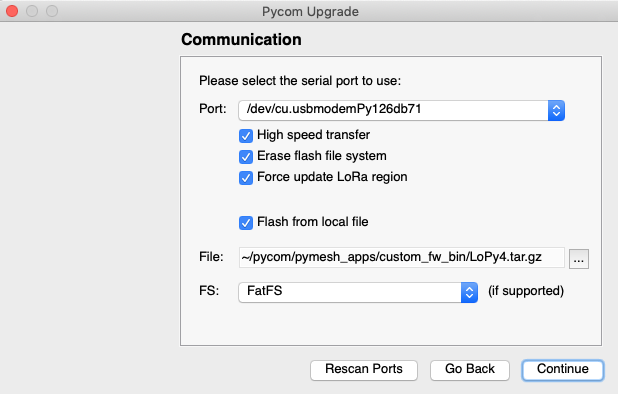
                                        Please try to re-load this v1.20.1.r1 release, also try also Erasing Flash file system and Force update LoRa region like:
                                        Screenshot 2019-10-22 at 15.34.42.png

                                        Next, just try this simple code:

                                        from network import LoRa
                                        lora = LoRa(mode=LoRa.LORA, region=LoRa.EU868, frequency = 863000000, bandwidth=LoRa.BW_500KHZ, sf=7)
                                        mesh = lora.Mesh()
                                        

                                        Next, you could try only this main.py: https://github.com/pycom/pymesh_apps/blob/master/pymesh_micropy_scripts/main.py

                                        Catalin,

                                        Have you checked out our docs for the answer? (Now with an easy search function) https://docs.pycom.io
                                        Check out our newly revamped device management platform, Pybytes! https://pybytes.pycom.io/

                                        DanneD 1 Reply Last reply Reply Quote 1
                                        • DanneD Offline
                                          Danne @catalin
                                          last edited by Danne

                                          @catalin said in Pymesh updates:

                                          from network import LoRa
                                          lora = LoRa(mode=LoRa.LORA, region=LoRa.EU868, frequency = 863000000, bandwidth=LoRa.BW_500KHZ, sf=7)
                                          mesh = lora.Mesh()

                                          Sorry been busy for some days. Today I did flash it with the https://github.com/pycom/pymesh_apps/blob/master/custom_fw_bin/LoPy4.tar.gz

                                          Then used the code above and still the following :

                                          Rebooting...
                                          ets Jun  8 2016 00:22:57
                                          
                                          rst:0xc (SW_CPU_RESET),boot:0x13 (SPI_FAST_FLASH_BOOT)
                                          configsip: 0, SPIWP:0xee
                                          clk_drv:0x00,q_drv:0x00,d_drv:0x00,cs0_drv:0x00,hd_drv:0x00,wp_drv:0x00
                                          mode:DIO, clock div:1
                                          load:0x3fff8020,len:8
                                          load:0x3fff8028,len:2164
                                          load:0x4009fa00,len:19944
                                          entry 0x400a05e8
                                          Guru Meditation Error: Core  0 panic'ed (LoadProhibited). Exception was unhandled.
                                          Core 0 register dump:
                                          PC      : 0x40090fa8  PS      : 0x00060033  A0      : 0x40092c33  A1      : 0x3ffbb700
                                          A2      : 0x3ffc42bc  A3      : 0x7fffffff  A4      : 0x00050023  A5      : 0xc8bc0000
                                          A6      : 0x3ffdd8c8  A7      : 0x00000000  A8      : 0x3ffc412c  A9      : 0x00003ffd
                                          A10     : 0x00000001  A11     : 0x3ffb4d38  A12     : 0x00000000  A13     : 0x00000005
                                          A14     : 0x3ffc4030  A15     : 0x3ffc4134  SAR     : 0x00000014  EXCCAUSE: 0x0000001c
                                          EXCVADDR: 0x00004009  LBEG    : 0x00000000  LEND    : 0x00000000  LCOUNT  : 0x00000000
                                          
                                          Backtrace: 0x40090fa8:0x3ffbb700 0x40092c30:0x3ffbb720 0x40092be6:0x00000000
                                          

                                          rolling fast... :)

                                          Going to try the other main now...

                                          1 Reply Last reply Reply Quote 1
                                          • DanneD Offline
                                            Danne @catalin
                                            last edited by

                                            @catalin I followed the instructions given to @eranroll and me... and erased the flash file system and did update LoRa-region when flashing the new firmware that you linked

                                            This is what I got when I tried this one:
                                            https://github.com/pycom/pymesh_apps/blob/master/pymesh_micropy_scripts/main.py

                                            Final error reading /flash/pymesh_config.json file!
                                             Exception: [Errno 2] ENOENT
                                            Can't find /flash/pymesh_config.json , or can't be parsed as json; Set default settings and reset
                                            Default settings: {'debug': 5, 'Pymesh': {'key': '112233'}, 'autostart': True, 'LoRa': {'sf': 7, 'region': 5, 'freq': 863000000, 'bandwidth': 2}, 'ble_api': True, 'ble_name_prefix': 'PyGo '}
                                            Set MAC in config file as  8121069065130701253
                                            MAC ok 8121069065130701253
                                            Default settings: {'ble_api': True, 'autostart': True, 'ble_name_prefix': 'PyGo ', 'debug': 5, 'LoRa': {'sf': 7, 'region': 5, 'freq': 863000000, 'bandwidth': 2}, 'MAC': 8121069065130701253, 'Pymesh': {'key': '112233'}}
                                            write_config force restart
                                            ets Jun  8 2016 00:22:57
                                            
                                            rst:0x5 (DEEPSLEEP_RESET),boot:0x13 (SPI_FAST_FLASH_BOOT)
                                            configsip: 0, SPIWP:0xee
                                            clk_drv:0x00,q_drv:0x00,d_drv:0x00,cs0_drv:0x00,hd_drv:0x00,wp_drv:0x00
                                            mode:DIO, clock div:1
                                            load:0x3fff8020,len:8
                                            load:0x3fff8028,len:2164
                                            load:0x4009fa00,len:19944
                                            entry 0x400a05e8
                                            MAC ok 8121069065130701253
                                            Settings: {'ble_api': True, 'MAC': 8121069065130701253, 'autostart': True, 'debug': 5, 'LoRa': {'sf': 7, 'region': 5, 'freq': 863000000, 'bandwidth': 2}, 'ble_name_prefix': 'PyGo ', 'Pymesh': {'key': '112233'}}
                                            Guru Meditation Error: Core  0 panic'ed (LoadProhibited). Exception was unhandled.
                                            Core 0 register dump:
                                            PC      : 0x40090fa8  PS      : 0x00060033  A0      : 0x40092c33  A1      : 0x3ffd6730
                                            A2      : 0x3ffc42bc  A3      : 0x7fffffff  A4      : 0x00050023  A5      : 0xc8bc0000
                                            A6      : 0x3ffdd8c8  A7      : 0x00000000  A8      : 0x3ffc412c  A9      : 0x00003ffd
                                            A10     : 0x00000001  A11     : 0x3ffb4d38  A12     : 0x00000000  A13     : 0x00000005
                                            A14     : 0x3ffc4030  A15     : 0x3ffc4134  SAR     : 0x00000012  EXCCAUSE: 0x0000001c
                                            EXCVADDR: 0x00004009  LBEG    : 0x40098758  LEND    : 0x40098763  LCOUNT  : 0xffffffff
                                            
                                            Backtrace: 0x40090fa8:0x3ffd6730 0x40092c30:0x3ffd6750 0x40092be6:0x000000fe
                                            
                                            Guru Meditation Error: Core  0 panic'ed (LoadProhibited). Exception was unhandled.
                                            Core 0 register dump:
                                            PC      : 0x400930fa  PS      : 0x00060033  A0      : 0x800926a5  A1      : 0x3ffd63d0
                                            A2      : 0x3ffd6420  A3      : 0x3ffd63f0  A4      : 0x00000020  A5      : 0x3ffc412c
                                            A6      : 0x00000002  A7      : 0x3ffd68d0  A8      : 0x00003ffd  A9      : 0x3ffdf7f4
                                            A10     : 0x3ffd6438  A11     : 0x3ffc4134  A12     : 0x3ffdf7f4  A13     : 0x3ffe3130
                                            A14     : 0x00000001  A15     : 0x3ffd6720  SAR     : 0x0000000a  EXCCAUSE: 0x0000001c
                                            EXCVADDR: 0x00004009  LBEG    : 0x40098758  LEND    : 0x40098763  LCOUNT  : 0x00000000
                                            
                                            Backtrace: 0x400930fa:0x3ffd63d0 0x400926a2:0x3ffd63f0 0x40093fd1:0x3ffd6420 0x4009431e:0x3ffd65f0 0x40093c36:0x3ffd6630 0x40093e8a:0x3ffd6650 0x4008395e:0x3ffd6670 0x40090fa5:0x3ffd6730 0x40092c30:0x3ffd6750 0x40092be6:0x000000fe
                                            
                                            Re-entered core dump! Exception happened during core dump!
                                            Rebooting...

                                            
                                            catalinC 1 Reply Last reply Reply Quote 1

                                            Hello! It looks like you're interested in this conversation, but you don't have an account yet.

                                            Getting fed up of having to scroll through the same posts each visit? When you register for an account, you'll always come back to exactly where you were before, and choose to be notified of new replies (either via email, or push notification). You'll also be able to save bookmarks and upvote posts to show your appreciation to other community members.

                                            With your input, this post could be even better 💗

                                            Register Login
                                            • 1
                                            • 2
                                            • 3
                                            • 4
                                            • 2 / 4
                                            • First post
                                              Last post

                                            Pycom on Twitter

                                            Pycom