FiPy upload failed
-
Hello, I was using FiPy+Pysense. It worked well in the beginning but from Saturday afternoon there was issue with uploading, as shown the information below:
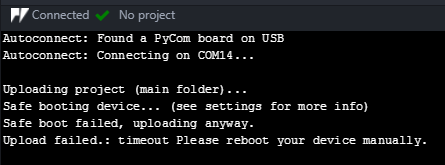
Uploading project (main folder)...
Safe booting device... (see settings for more info)
Safe boot failed, uploading anyway.
Upload failed.: timeout Please reboot your device manually.I changed another FiPy and uploaded the same code and it worked well again.
More information about my work over Saturday. I was debugging uart and the code I used was
from machine import UART uart = UART(1, 115200) # init with given baudrate uart.init(115200, bits=8, parity=None, stop=1) # init with given parameters uart.write('hello')@robert-hh indicated "The UART used for REPL (and thus for the serial connection to Atom) is UART0, connected to the pins P0 and P1. You skript uses UART1, which is connected by default to P3 and P4."
Because I was using uart1, would it be possible the previous FiPy is damaged? Anything I can do here? Many thanks. -
@justin No. Just trying to use UART1 does not damage the device.
-
@robert-hh Thanks. Could you then give me some hints on how I can make it work again? It was working for a long time but stopped uploading successfully since Saturday afternoon.
-
@justin You could try to start over by re-installing the firmware. When doing so, check th option for erasing the flash.
-
@robert-hh OK. Will try it tomorrow.
Just a curious question, is the firmware only for pysense/pytrack/expansion board? Or is there also firmware for FiPy/LoPy? I had this feeling when I was reading the information in the link of https://docs.pycom.io/pytrackpysense/installation/firmware.html
but not sure if I understand it correctly. -
@justin I was talking about the FiPy firmware. The expansion and sensor board have a separate firmware. Before reloading the FiPy, you could try to connect it using a pure terminal emulator like Putty (windows) or screen (OS X and Linux). Using that it is easier to tell the state of the FiPy. It avoids the potential trouble caused by pymakr.
-
Hello Robert, I tried to find out how to update the FiPy firmware and couldn't find the link. Could you kindly point one for me?
@robert-hh said in FiPy upload failed:Before reloading the FiPy, you could try to connect it using a pure terminal emulator like Putty (windows) or screen (OS X and Linux). Using that it is easier to tell the state of the FiPy. It avoids the potential trouble caused by pymakr.
In addition, is there a link on how to use putty to detect the state of the FiPy? Many thanks.
-
@justin if you get a REPL prompt in Putty and can enter commands, then the FiPy interface is OK. You have to disable flow control in the Putty serial interface settings. Try something like Ctrl-D, which should reboot the device. Ctrl-B should show the firmware revision. Or enter just any Python statement, like:
print("Hello World") -
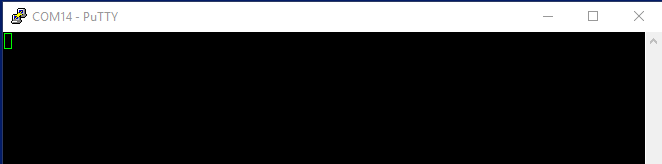
@robert-hh hello Robert, I tried following your instruction. However, I was not able to type in the Putty window. This is how the putty window looks like.
-
@justin This is what I got when I opened Atom.
-
@justin In Putty, what happens after connection, when you push the reset button on the LoPy?
-
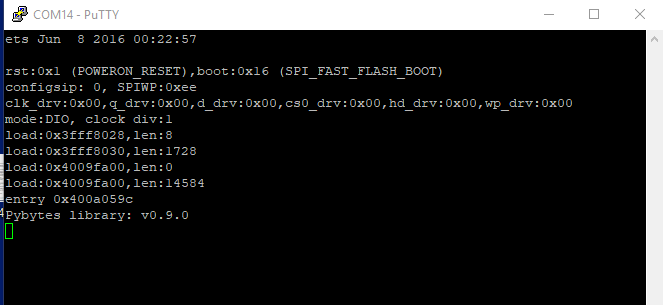
@robert-hh Please see the screenprint below. I was still not able to type.
-
@justin That looks like a physically sane device. It indicates the pybytes firmware. I do not know if that is what you wanted. If not, use the pycom updater to install the regular firmware.
-
@robert-hh That's weird. I was not able to upload using Atom. I am sure the pysense is ok as I tested it with another fipy which can perform upload normally.
-
@justin Atom is not the right tool for firmware update of the Fipy. You have to use the Pycom Updater: https://pycom.io/wp-content/uploads/2018/08/pycom_firmware_update_1.15.1 (1).exe.zip
-
@robert-hh Many thanks Robert. I have just done the firmware update for the FiPy and it is working normally now. I was confused in the beginning about the firmware for the Pysense and firmware for the FiPy. Many thanks for the patient explanation.

Hello! It looks like you're interested in this conversation, but you don't have an account yet.
Getting fed up of having to scroll through the same posts each visit? When you register for an account, you'll always come back to exactly where you were before, and choose to be notified of new replies (either via email, or push notification). You'll also be able to save bookmarks and upvote posts to show your appreciation to other community members.
With your input, this post could be even better 💗
Register Login