Welcome to the Pycom forum Forum
    • \[\[global:header.categories\]\]
    • \[\[global:header.recent\]\]
    • \[\[global:header.tags\]\]
    • \[\[global:header.popular\]\]
    • Login

    Explore Pybytes | Official Documentation | Report a Firmware Bug/Issue | GitHub

    TEROS 12 and SDI-12

    Scheduled Pinned Locked Moved MicroPython
    teros12sdi-12
    41 Posts 7 Posters 6.0k Views 8 Watching
    Loading More Posts
    • Oldest to Newest
    • Newest to Oldest
    • Most Votes
    Reply
    • Reply as topic
    Log in to reply
    This topic has been deleted. Only users with topic management privileges can see it.
    • T Offline
      tttadam @tuftec
      last edited by

      @tuftec what kind of external hardver are we talking about?

      1 Reply Last reply Reply Quote 0
      • robert-hhR Offline
        robert-hh @tttadam
        last edited by

        @tttadam There was a discussion about that in the past on this forum: https://forum.pycom.io/topic/1924/sdi-12

        T 1 Reply Last reply Reply Quote 1
        • T Offline
          tvetter1976 @tttadam
          last edited by

          @tttadam
          Then you can use the seriel input and you don't need sdi 12. Just power on the the sensor and it will send the data one time.

          1 Reply Last reply Reply Quote 1
          • P Offline
            Pesien
            last edited by

            I´m working on a library to comunicate with SDI-12 sensors using a GPIO pin, but I have a problem with the pulses_get function because it seems to have a limit, so I can only read a max of 200 bits or 20 bytes for the SDI-12 sensor.

            I posted it here: https://forum.pycom.io/topic/4829/does-pulses_get-function-have-a-200-bit-limitation-when-reading

            Apart from that, It works.

            T 1 Reply Last reply Reply Quote 1
            • T Offline
              tuftec
              last edited by

              Try this link.
              http://www.sdi-12.org/current_specification/SDI-12_version-1_4-Jan-10-2019.pdf

              The h/W interface cct is towards the end of the document.

              1 Reply Last reply Reply Quote 1
              • T Offline
                tttadam @thinginnovations
                last edited by

                @thinginnovations Nope, I don't have any SDI 12 interface hardver, I hoped that I can use it directly with pycom without anything in the middle.

                1 Reply Last reply Reply Quote 0
                • T Offline
                  tttadam @Pesien
                  last edited by

                  @Pesien I think the github link in your forum thread is written in C.
                  how should I use it with micropyton board?

                  P 1 Reply Last reply Reply Quote 0
                  • T Offline
                    tttadam @robert-hh
                    last edited by

                    @robert-hh Yes I already saw that, but on my sensor there is only 3 wire (gnd, 5v and data)
                    And looks like in these example code there is 2 data wire.

                    robert-hhR 1 Reply Last reply Reply Quote 0
                    • robert-hhR Offline
                      robert-hh @tttadam
                      last edited by

                      @tttadam The sensor in that link is a 3 wire device, but a RS485 adapter is used to connect it to the Pycom board. You do not have to do that, but that choice combines level shifting and connecting RX and TX to the sensor.
                      In any case, you need some kind of electronic adaptation, at least a level shifter and program logic to switch off the Pycom board's TX when you expect data from the sensor. You could try to set the UART output to OPEN_DRAIN, after you have init'ed the UART.

                      T 1 Reply Last reply Reply Quote 1
                      • T Offline
                        tttadam @robert-hh
                        last edited by

                        @robert-hh said in TEROS 12 and SDI-12:

                        RS485

                        Can you recommend me a rs485 breakout board for pycom?
                        All I can find has an usb port on the end.

                        robert-hhR 1 Reply Last reply Reply Quote 0
                        • robert-hhR Offline
                          robert-hh @tttadam
                          last edited by

                          @tttadam search for "RS485 TTL breakout board". Most of the are made for 5V at the UART side, but some too for 3.3V.

                          T 1 Reply Last reply Reply Quote 1
                          • T Offline
                            tttadam @robert-hh
                            last edited by tttadam

                            @robert-hh said in TEROS 12 and SDI-12:

                            @tttadam search for "RS485 TTL breakout board". Most of the are made for 5V at the UART side, but some too for 3.3V.

                            What I found is this sorry for the hungarian, but I need it ASAP, so I turned to local stores.
                            I also found this image on online. I think they are the same. But its still not clear how should I use it because it has 4 wire on both side.
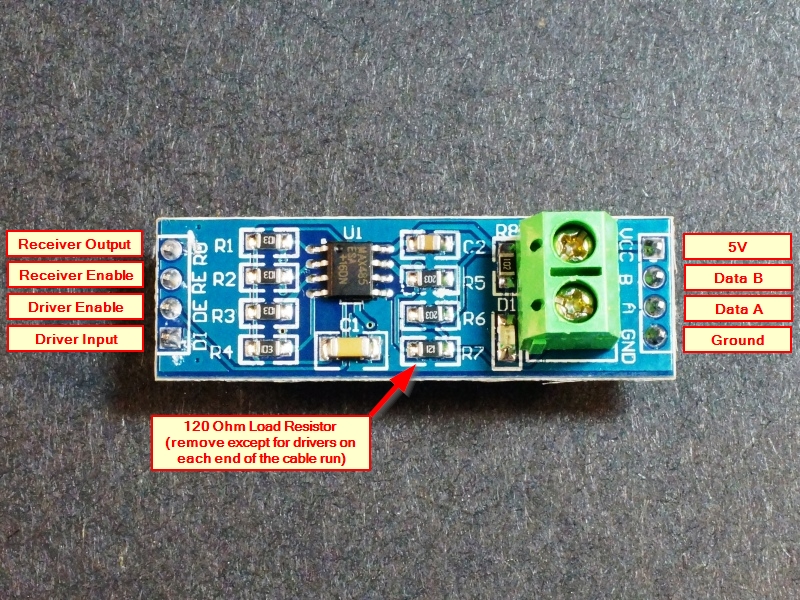
                            alt text

                            Thank you for the help.

                            robert-hhR 1 Reply Last reply Reply Quote 0
                            • robert-hhR Offline
                              robert-hh @tttadam
                              last edited by robert-hh

                              @tttadam It's not clear to me if that is easier to use than simply a one transistor level shifter. And so I would not use that choice.

                              Besides that:
                              Receiver Output -> Pycom RX
                              The board operates at 5V, so you have to add at least a resistor of 4.7k to 10k between receiver Output and Pycom RX to protect the Pycom board.
                              Driver Input -> Pycom TX
                              Receiver Enable and Driver Enable can be switched together to a GPIO which is used to switch between receive and transmit.
                              Data A and B are the differential output/inputs. And that makes the trouble, since the sensor has not differential data interface. Thats why in the post I linked there is a 1.8V reference, to create a virtual differential signal.
                              5V and Ground are obvious.

                              As said, I would prefer to connect RX and TX at the pycom device and connect it via a level shifter to the Sensor data line. You may need a pull-up resistor at the sensor to 5v, and in the software you will receive the commands that you have sent in addition to the response. In any case, it is not just plug and run.

                              The obvious advantage of the RS485 version is it's ability to drive long wires.

                              T 1 Reply Last reply Reply Quote 0
                              • T Offline
                                tttadam @robert-hh
                                last edited by

                                @robert-hh Alright, my knowledge is not so strong in this area, so I accept your recommendtation, no RS485 and level shifter it is. Thank you for the advice.
                                So level shifters, I found this one.
                                This is what was in your mind? If so, how would you wire it?

                                robert-hhR 1 Reply Last reply Reply Quote 0
                                • T Offline
                                  tvetter1976
                                  last edited by tvetter1976

                                  Regarding Level shifter. Take a look at this one:
                                  https://learn.sparkfun.com/tutorials/single-supply-logic-level-converter-hookup-guide/all
                                  and 3.3V RS485 Converter:
                                  https://eckstein-shop.de/RS485-Board-33V

                                  1 Reply Last reply Reply Quote 0
                                  • robert-hhR Offline
                                    robert-hh @tttadam
                                    last edited by

                                    @tttadam That one is OK. You need just one channel. LV to 3.3V, HV to 5V A1 to both RX and TX of the pycom device. B1 to the data line of the sensor.
                                    You have still the task to make TX high impedance when you receive. So you can try:
                                    a) to set up the UART to the desired mode, and then
                                    b) init the PIN for TX as OPEN_DRAIN.
                                    if that does not work, connect a diode (e.g. 1N4148 or 1N5711) between A1 of the level shifter to TX, such that the Cathode (the side with the bar) is at TX. That prevents the TX output from driving the signal when it is high. It still can sink the signal line.

                                    1 Reply Last reply Reply Quote 0
                                    • P Offline
                                      Pesien @tttadam
                                      last edited by

                                      @tttadam That link is the pulses_get function, not the library.
                                      I'll post the library on github once it works.

                                      robert-hhR 1 Reply Last reply Reply Quote 0
                                      • robert-hhR Offline
                                        robert-hh @Pesien
                                        last edited by

                                        @Pesien I made a PR for inverted UART signals. It is here:
                                        https://github.com/pycom/pycom-micropython-sigfox/pull/310

                                        1 Reply Last reply Reply Quote 0
                                        • T Offline
                                          tttadam
                                          last edited by

                                          Okay, so I facing with this topic again. (I put it into the drawer for some time, but it's on my desk now again)
                                          So I am using a level shifter.
                                          Also if I am right I need to use an external power source to power the teros 12, I use a 1.5A usb brick.
                                          But the wiring is still not clear to me.
                                          This is what I come up with. I don't want to fry it so first I would like to ask the community. pic of the wireing
                                          Thanks,

                                          robert-hhR 3 Replies Last reply Reply Quote 0
                                          • robert-hhR Offline
                                            robert-hh @tttadam
                                            last edited by

                                            @tttadam A diagram of the wiring with labels about what is what would be more helpful than a picture of a few wires.

                                            1 Reply Last reply Reply Quote 0

                                            Hello! It looks like you're interested in this conversation, but you don't have an account yet.

                                            Getting fed up of having to scroll through the same posts each visit? When you register for an account, you'll always come back to exactly where you were before, and choose to be notified of new replies (either via email, or push notification). You'll also be able to save bookmarks and upvote posts to show your appreciation to other community members.

                                            With your input, this post could be even better 💗

                                            Register Login
                                            • 1
                                            • 2
                                            • 3
                                            • 2 / 3
                                            • First post
                                              Last post

                                            Pycom on Twitter

                                            Pycom