BLE connection issue
-
I'm using a FiPy sitting on the PyTrack. I have updated all devices to their newest firmware version. I'm using the Bluetooth example from Github. I am some times (completely at random) able to connecto to a BLE device, but more often than not, the "connection refused" message pops up. Why? The few times I have managed to establish a connection I get this:
connecting to b'\xd2\xe0\xd0\xeb*\xfd'
Reading chars from service = 1800
char 10752 value = b'SENSOR'
char 10753 value = b'\x00\x00'
char 10756 value = b'\x10\x00<\x00\x00\x00\x90\x01'
Reading chars from service = 1801
Reading chars from service = b'\x9e\xca\xdc$\x0e\xe5\xa9\xe0\x93\xf3\xa3\xb5\x01\x00@n'What does this mean? The BLE device is capable of transmitting: Temperature and humidity, brightness, x,y,z-coordinates and angular velpcity.
I'm able to connect the BLE device using BLE scanner 4.0 for ios and through there I can easily read changes from the sensors.
Cheers
SimiamiDrew
-
@SimiamiDrew Maybe the device only accepts one connection at a time and you have something else already connected?
-
@jcaron Maybe, but before every test I make sure to not be connected to the device, so as to the FiPy is the only possible device that'll search and connect to the BLE device.
-
@SimiamiDrew What exactly tells you "connection refused"? I don't think that concept actually exists in BLE, this looks more like an unrelated TCP thing.
Can you share the actual code you use as well as the actual logs?
-
@jcaron
The code i'm using is:Insert Code Here from network import Bluetooth import binascii import time bt = Bluetooth() bt.start_scan(-1) while True: adv = bt.get_adv() if adv: # try to get the complete name print(bt.resolve_adv_data(adv.data, Bluetooth.ADV_NAME_CMPL)) # try to get the manufacturer data (Apple's iBeacon data is sent here) mfg_data = bt.resolve_adv_data(adv.data, Bluetooth.ADV_MANUFACTURER_DATA) if mfg_data: # try to get the manufacturer data (Apple's iBeacon data is sent here) print(binascii.hexlify(mfg_data)) if bt.resolve_adv_data(adv.data, Bluetooth.ADV_NAME_CMPL) == 'SENSOR': conn = bt.connect(adv.mac) print("connecting to",adv.mac ) services = conn.services() for service in services: time.sleep(0.050) if type(service.uuid()) == bytes: print('Reading chars from service = {}'.format(service.uuid())) else: print('Reading chars from service = %x' % service.uuid()) chars = service.characteristics() for char in chars: if (char.properties() & Bluetooth.PROP_READ): print('char {} value = {}'.format(char.uuid(), char.read())) conn.disconnect() break else: time.sleep(0.050``` And the "connection refused"- message 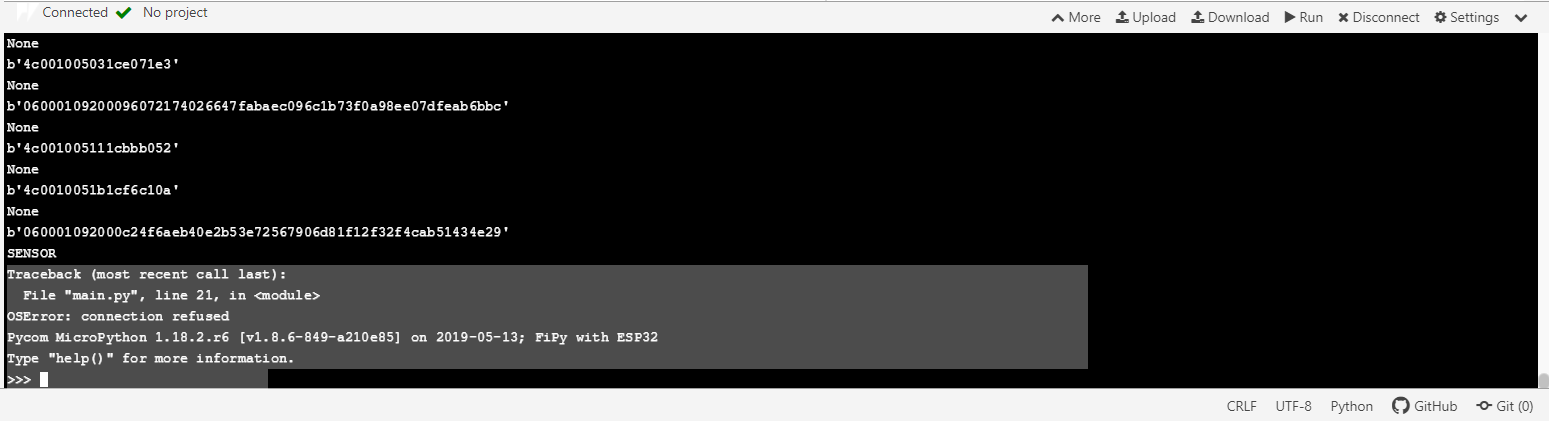 -
@SimiamiDrew Can you please edit your post and add ``` alone on a line both before and after your code? That will format it properly. Or select the code and click on one of the two code icons in the toolbar.
-
@SimiamiDrew Could you also print the
adv_typefor the device before you attempt to connect? -
Were you able to resolve this issue? I am having same issue with nRF BLE but it works with another Pycom BLE device.
Hello! It looks like you're interested in this conversation, but you don't have an account yet.
Getting fed up of having to scroll through the same posts each visit? When you register for an account, you'll always come back to exactly where you were before, and choose to be notified of new replies (either via email, or push notification). You'll also be able to save bookmarks and upvote posts to show your appreciation to other community members.
With your input, this post could be even better 💗
Register Login