Deepsleep on batteries
-
@jcaron It should not be the LTE-modem i think as it is the exact same code (in my reply to @tvetter1976). LTE should be off, same with wify.
The reason I can say I can reliably reproduce it is that I have one unit running the code. Then with the power supply turn the voltage up or down and I can consistently get the results mentioned in my original post.
-
what is your setting for:
lte_modem_en_on_boot()
True or False? -
@tvetter1976 Well, True for the first boot after flashing firmware, and then False after that.
-
@tveito There may be something weird with the regulator. I don't think the details of the regulator used have been shared by Pycom, and I can't quite identify it from the board.
According to Pycom, to solve the issue with the high deep sleep power consumption found on the first generation boards (WiPy 2, LoPy 1, SiPy), the new boards (including the FiPy)
have the switching regulator configured in automatic mode, therefore, when the module is active, the voltage regulation uses PWM mode for best performance and low ripple voltage, and when the current consumption drops to uA levels, it enters ECO mode consuming just 10uA. All the new designs with the 4MByte external RAM also use 1.8V for the VDD_SDIO supply, which comes from one of the ESP32 pins. With this approach, the flash and the external RAM are switched off during deep sleep, as well as any other additional circuits (LoRa, Sigfox, etc), ensuring the lowest possible current during deep sleep.
Not sure what exactly is the threshold for switching between ECO and PWM mode ("uA levels"), and/or if that varies depending on the input voltage. If you manage to find out the regulator used, we could probably find out more.
I'm a bit surprised by the last bit of the quote above though ("any other additional circuits (LoRa, Sigfox, etc) (...) are switched off during deep sleep"), not sure it reflects the reality of the boards.
-
@tveito
Could you set to True and retry? -
@tveito I have been having similar problems as you. In my Fipys, the deepsleep current was normally 60mA, even having lte_modem_en_on_boot() set to false. I was just able to get the deepsleep current to 30uA in safeboot, but after the first restart it was getting back to 60mA.
Cannot tell the reason, but what I have realized after trying several things is that the lte_modem_en_on_boot() was being ignored, booting with the modem on and thus having the 60mA current. So, what I do in my code is the following, upon every boot from reset:
if machine.reset_cause() != machine.DEEPSLEEP_RESET:

    pycom.lte_modem_en_on_boot(True)
    print('Disabling LTE')
    lte = LTE()
    lte.deinit()

    print('Disabling modem on further inits')
    pycom.lte_modem_en_on_boot(False)
Then I do my normal stuff (with LoRa), and go to deepsleep. On further resets from the ds timer it appeared that the modem was kept off, reason that I just put it to the deinit() on the boot from reset.
I found that was the problem because when disabling the modem from the REPL console the current consumption was drastically lower, and kept after deepsleep, but returned to normal after a normal reset.
The reason? I don't know. As I said, my best guess is that something internally ignores the lte modem on boot set to False, but with that I got to make it work in an stable manner (I have had the devices running for days and had no more random current consumptions).
As I see in your code, you just deinit the LTE on boot if the modem is enabled on boot. For me that was not working, so maybe you can try to implement my code and always deinit the modem, no matter what that parameter is true or false.
Hope it helps. This deepsleep thing in the pycom boards is sometimes a bit random and not everything seems to work in the same way to everyone, but it is worth a try.
-
@tvetter1976 So, by removing the code for making sure that LTE is off in boot.py, and manually setting pycom.lte_modem_en_on_boot(True) we have a deepsleep @5V of 21 uA and a deepsleep @ 4V of 69mA (!). This is only tested on one board.
-
@wladiarce said in Deepsleep on batteries:
pycom.lte_modem_en_on_boot(True)
print('Disabling LTE')
lte = LTE()
lte.deinit()

print('Disabling modem on further inits')
pycom.lte_modem_en_on_boot(False)
I tried using your code in the boot.py file instead of my code, the exact same result.
Just to clarify to everyone:
At the point where it goes into deepsleep, if the voltage is around 4 it will use a lot of power when sleeping. When it is in deepsleep it is totally fine to turn down the voltage to around 4V and it will still only consume around 20uA until it is woken up again, it runs fine but when it goes back to deepsleep it will use a lot of power.
I'm quite sure that in my original script, the lte modem is turned off properly as the current when awake is down to 30mA. After all the testing I have done, the crucial point is the moment it goes into deepsleep, if the voltage is too low it will be terrible. After it has gone to sleep, if the voltage was to low before, it does not help to turn it up and vice versa.
Thank you guys for your help this far =) I really want to get to the bottom of this...
-
@jcaron Just FYI this has been tested on both FiPy 1.0 and 1.2.
This is what I assume is the power supply and the markings on it does not tell me much about the part...
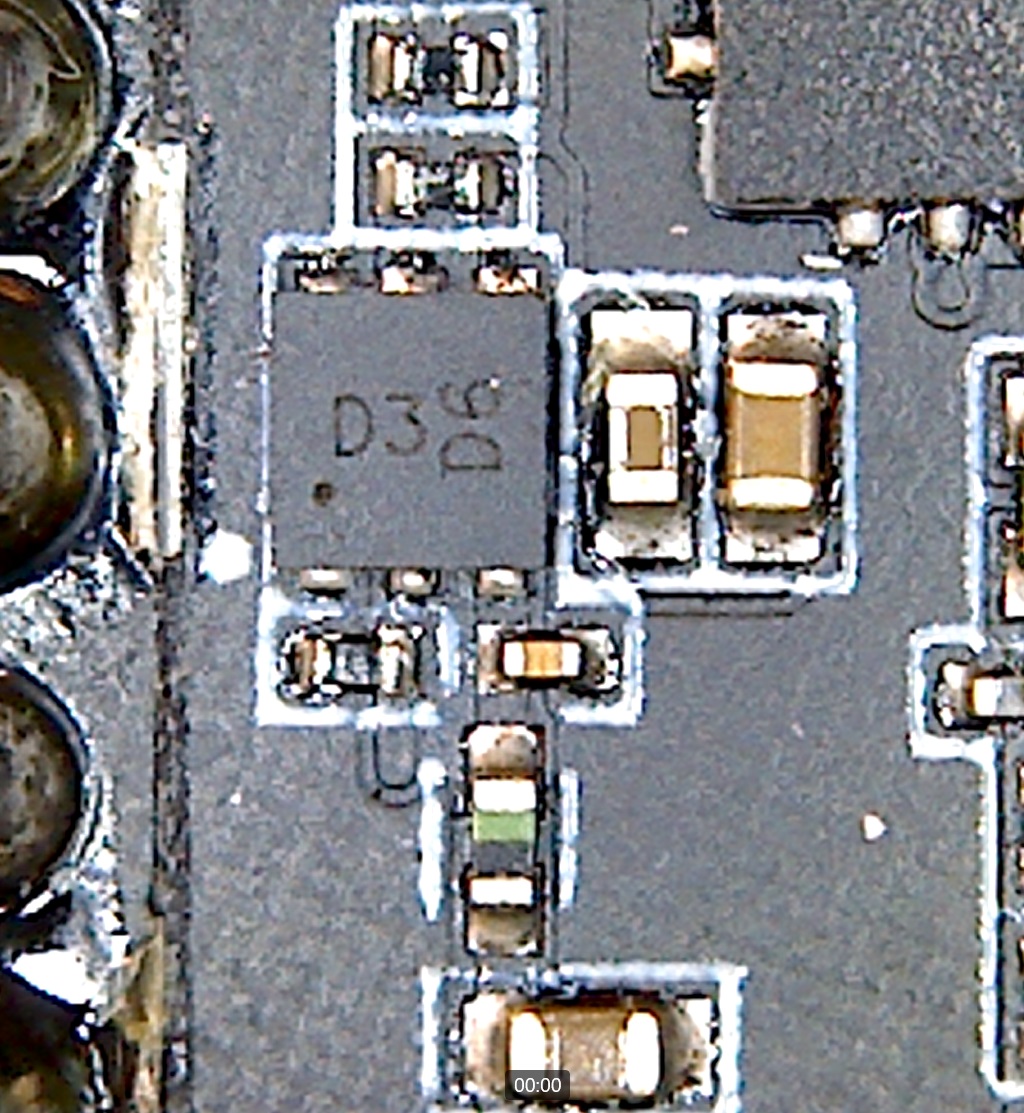
It is 2x2 mm and has 6 leads.
Edit:
It looks like it uses this regulator:
http://www.ti.com/lit/ds/symlink/lm3281.pdfAt least the Lopy 1 did, and it has the exact same characteristics as listed under the fipy
-
@tveito Unless that regulator is available with a different packaging, or the Pycom data sheets point to the wrong IC as being the regulator, this does not quite match, does it? The circuit on the board is square or very very close to, while the LM3281 is 1.465 mm x 1.190 mm. Also I don't think that circuit on the FiPy is DSBGA, is it?
-
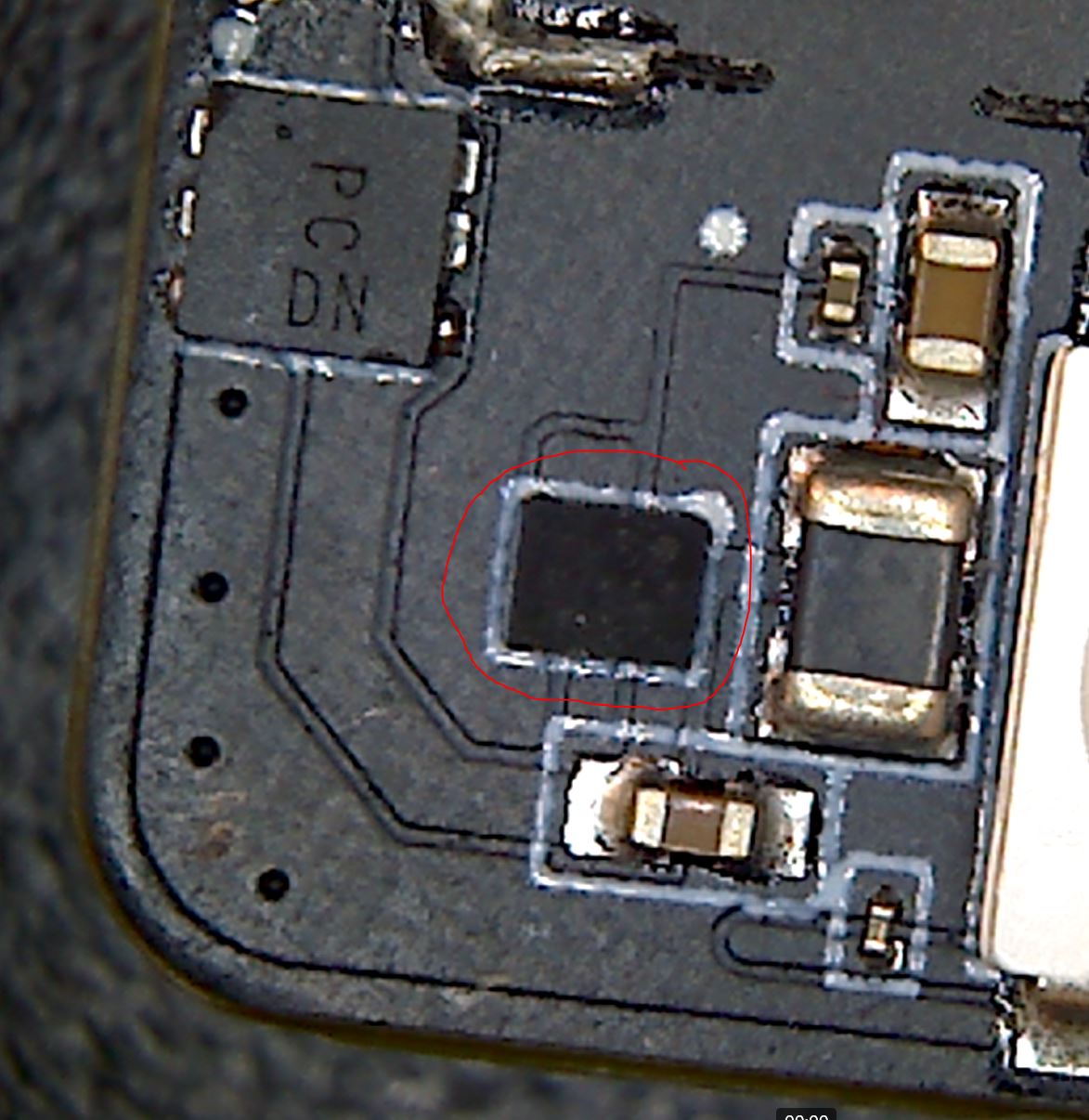
@jcaron OK, so that component is not the regulator. The regulator is a smaller component which on the LoPy 1 is between the above component and the LED. Not sure where it is on the FiPy (and/or if it's actually the same one which is used).
The schematic of the L01 reference board which includes the regulator is available here: https://docs.pycom.io/.gitbook/assets/l01-oem-schematic.pdf
And the layout can be found here: https://docs.pycom.io/datasheets/oem/l01_reference.htmlI don't believe there is an OEM version of the FiPy, but even the newer "Universal Baseboard" compatible with the GPy used the same regulator (it seems to be on the bottom side in this case, but it's always close to the square component you pictured).
-
@jcaron OK, I see your point. This might be it then... It was kind of hard to get the calipers in because of the huge cap next to it, but the dimensions seems to match better. So I didn't even need to sacrifice one of the fipy's to get to it... It does however not have any markings on it that I can see.
-
@tveito I tested your code with a Lipo-battery @3.6 V and deepsleep is working well at 22uA. Maybe it comes from the power supply characteristics?
-
@tvetter1976 Well, is it actually at 3.6V or at 4.2V (fully charged)? Have you measured it?
-
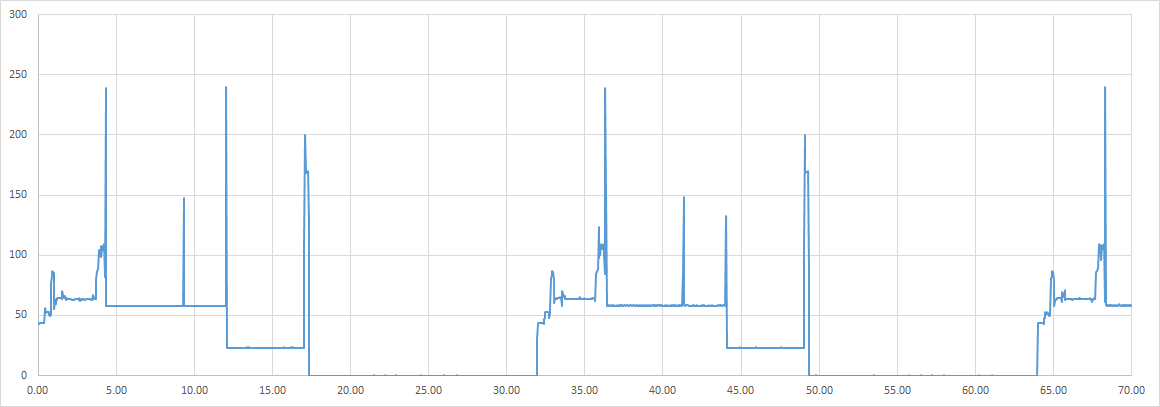
Lipo is not fully charged, so its at 3.6V. This figure shows how the current flow (mA) over time (s) looks like. The device is put into deeps sleep mode for 20s at about 12s (and again at 44s) then it takes around 5 seconds until power consumption is going down to about 20uS. I don't know what all the spikes are about.
Hello! It looks like you're interested in this conversation, but you don't have an account yet.
Getting fed up of having to scroll through the same posts each visit? When you register for an account, you'll always come back to exactly where you were before, and choose to be notified of new replies (either via email, or push notification). You'll also be able to save bookmarks and upvote posts to show your appreciation to other community members.
With your input, this post could be even better 💗
Register Login