SecureBoot and Encryption
-
I am having trouble following the instructions for SecureBoot and Encryption.
Firstly there is a bit of confusion between secure-bootloader-key.bin and signature_verification_key.bin, I think they are the same thing and this is just a typo?
When I run :
# Burning Encryption Key python $IDF_PATH/components/esptool_py/esptool/espefuse.py --port /dev/ttyUSB0 burn_key flash_encryption flash_encryption_key.bin. I am getting an error that the block is already write protected. This is the same with 3 brand new WiPys. The blocks look like this in the efuse summary.
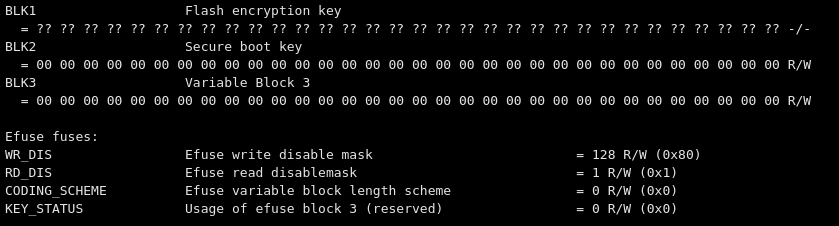
When I try and run:
# Burning Secure Boot Key python $IDF_PATH/components/esptool_py/esptool/espefuse.py --port /dev/ttyUSB0 burn_key secure_boot secure-bootloader-key.bin, I'm getting an error that a 32 byte key is required. The secure-bootloader-key.bin is 64 bytes, so I guess this error is justified. In espsecure.py (which generates this)it looks like this should be a 256bit key, so I'm not sure were this coming from.Grateful of any help. I have a few attempts at this workflow and had no luck.
-
I had the same problem, at least the key length problem. I don´t remeber exactly the solution for the problem. But look at my notes below how to generate the keys and flash the device, you should be able to get it up and running with these commands.
Johan
python $IDF_PATH/components/esptool_py/esptool/espsecure.py generate_flash_encryption_key flash_encryption_key.bin python $IDF_PATH/components/esptool_py/esptool/espsecure.py generate_signing_key secure_boot_signing_key.pem python $IDF_PATH/components/esptool_py/esptool/espsecure.py extract_public_key --keyfile secure_boot_signing_key.pem signature_verification_key.bin sudo python $IDF_PATH/components/esptool_py/esptool/espefuse.py --port /dev/ttyS6 burn_key flash_encryption /path/to/flash_encryption_key.bin sudo python $IDF_PATH/components/esptool_py/esptool/espefuse.py --port /dev/ttyS6 burn_key flash_encryption /path/to/flash_encryption_key.bin make SECURE=on SECURE_KEY=/path/to/secure_boot_signing_key.pem ENCRYPT_KEY=/path/to/flash_encryption_key.bin TARGET=boot make SECURE=on SECURE_KEY=/path/to/secure_boot_signing_key.pem ENCRYPT_KEY=/path/to/flash_encryption_key.bin TARGET=app sudo python $IDF_PATH/components/esptool_py/esptool/espefuse.py --port /dev/ttyS6 burn_key secure_boot secure-bootloader-key.bin sudo python $IDF_PATH/components/esptool_py/esptool/espefuse.py --port /dev/ttyS6 burn_efuse FLASH_CRYPT_CNT sudo python $IDF_PATH/components/esptool_py/esptool/espefuse.py --port /dev/ttyS6 burn_efuse FLASH_CRYPT_CONFIG 0x0F sudo python $IDF_PATH/components/esptool_py/esptool/espefuse.py --port /dev/ttyS6 burn_efuse ABS_DONE_0 sudo python $IDF_PATH/components/esptool_py/esptool/esptool.py --chip esp32 --port /dev/ttyS6 --baud 921600 --before no_reset --after no_reset write_flash -z --flash_mode dio --flash_freq 80m --flash_size detect 0x0 build/WIPY/release/bootloader/bootloader.bin 0x8000 build/WIPY/release/lib/partitions.bin_enc 0x10000 build/WIPY/release/wipy.bin -
@johand Sorry for the delay. I just got back around to this today, and had a win with your commands :).
Thanks for your help!!
Hello! It looks like you're interested in this conversation, but you don't have an account yet.
Getting fed up of having to scroll through the same posts each visit? When you register for an account, you'll always come back to exactly where you were before, and choose to be notified of new replies (either via email, or push notification). You'll also be able to save bookmarks and upvote posts to show your appreciation to other community members.
With your input, this post could be even better 💗
Register Login