Welcome to the Pycom forum Forum
    • \[\[global:header.categories\]\]
    • \[\[global:header.recent\]\]
    • \[\[global:header.tags\]\]
    • \[\[global:header.popular\]\]
    • Login

    Explore Pybytes | Official Documentation | Report a Firmware Bug/Issue | GitHub

    Pycom Firmware Tool error

    Scheduled Pinned Locked Moved Issues & Bugs
    15 Posts 3 Posters 1.1k Views 3 Watching
    Loading More Posts
    • Oldest to Newest
    • Newest to Oldest
    • Most Votes
    Reply
    • Reply as topic
    Log in to reply
    This topic has been deleted. Only users with topic management privileges can see it.
    • R Offline
      robertsehlstedt
      last edited by

      Hello!

      I just got a pycom lopy4 and expansion board v3.1.
      Followed this guide on how to install the Pycom Firmware Tool on my Ubuntu 18.04 LTS.

      I installed dialog and serial using both pip and pip3. But I still get this error while trying to run pycom-fwtool.

      robban-K56CB:~$ pycom-fwtool
      pycom-fwtool: error while loading shared libraries: libz.so.1: cannot open shared object file: No such file or directory
      

      Any ideas of what could be going wrong? Where is this library supposed to be and why isn't it there? Can't find this error anywhere online.

      robert-hhR R 2 Replies Last reply Reply Quote 1
      • robert-hhR Offline
        robert-hh @robertsehlstedt
        last edited by

        @robertsehlstedt try:
        sudo apt install libz-dev
        in a terminal window to install libz.

        R 1 Reply Last reply Reply Quote 2
        • R Offline
          robertsehlstedt @robert-hh
          last edited by

          @robert-hh Hi, I still get the same error unfortunately!

          R 1 Reply Last reply Reply Quote 1
          • R Offline
            rskoniec @robertsehlstedt
            last edited by

            @robertsehlstedt Could you try: sudo apt-get install lib32z1

            The machine is working as good as it's code.

            R 1 Reply Last reply Reply Quote 2
            • R Offline
              robertsehlstedt @rskoniec
              last edited by

              @rskoniec This didn't remove the error itself, but instead changed how it looks. Now I get this:

              robban-K56CB:~$ pycom-fwtool
              Traceback (most recent call last):
                File "pycom_fwtool.py", line 28, in <module>
                File "/tmp/pip-install-GwIMLo/pyinstaller/PyInstaller/loader/pyimod03_importers.py", line 687, in load_module
              ImportError: libxcb.so.1: cannot open shared object file: No such file or directory
              [2763] Failed to execute script pycom_fwtool
              
              R 1 Reply Last reply Reply Quote 2
              • R Offline
                rskoniec @robertsehlstedt
                last edited by rskoniec

                @robertsehlstedt Try: sudo apt-get install zlib1g libxcb1

                The machine is working as good as it's code.

                R 1 Reply Last reply Reply Quote 2
                • R Offline
                  robertsehlstedt @rskoniec
                  last edited by

                  @rskoniec I think it installed with the last command, because it's already installed with the latest version!

                  Reading package lists... Done
                  Building dependency tree       
                  Reading state information... Done
                  zlib1g is already the newest version (1:1.2.11.dfsg-0ubuntu2).
                  0 upgraded, 0 newly installed, 0 to remove and 0 not upgraded.
                  

                  (I can only answer every 10 minutes btw, because I don't have 3 reputation yet :))

                  R 1 Reply Last reply Reply Quote 0
                  • R Offline
                    rskoniec @robertsehlstedt
                    last edited by rskoniec

                    @robertsehlstedt What about libxcb1 package? Did you install it?

                    The machine is working as good as it's code.

                    R 1 Reply Last reply Reply Quote 0
                    • R Offline
                      robertsehlstedt @rskoniec
                      last edited by

                      @rskoniec Yes the latest version is installed!

                      R 1 Reply Last reply Reply Quote 0
                      • R Offline
                        robertsehlstedt @robertsehlstedt
                        last edited by

                        @robertsehlstedt It still doesn't work though, I should also say.

                        robert-hhR 1 Reply Last reply Reply Quote 0
                        • robert-hhR Offline
                          robert-hh @robertsehlstedt
                          last edited by

                          @robertsehlstedt Error messages are helpful. besides that, as just another blind shot you could try to install the build-essential package, although I hardly would assume that everyone else has installed that.

                          sudo apt-get update
                          sudo apt-get install build-essential
                          
                          R 1 Reply Last reply Reply Quote 0
                          • R Offline
                            robertsehlstedt @robert-hh
                            last edited by

                            @robert-hh Hey! I did provide all of my error messages in this thread, and the build-essentials were also already installed. I have no clue what's going on honestly..

                            1 Reply Last reply Reply Quote 0
                            • R Offline
                              rskoniec @robertsehlstedt
                              last edited by rskoniec

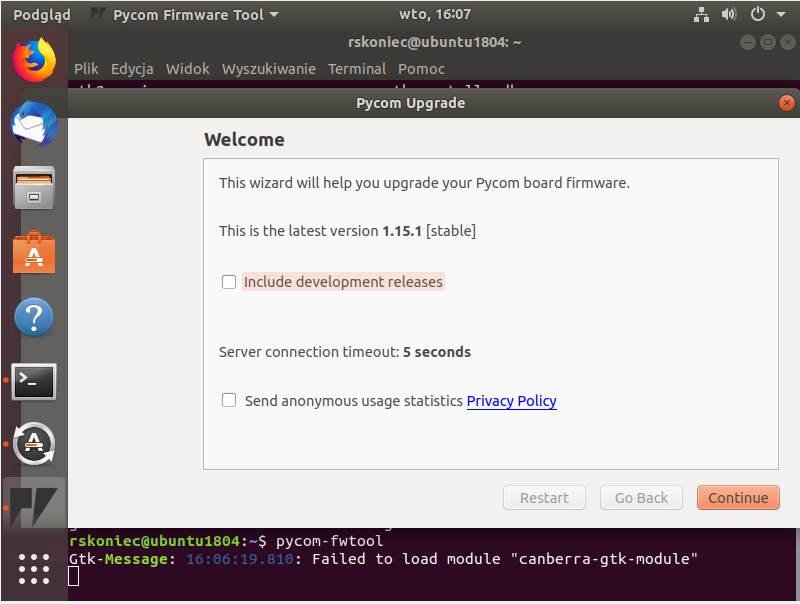
                              @robertsehlstedt I've just installed Ubuntu 18.04 LTS on VirtualBox from this ISO with Minimal type and with Updates options checked during installation. On fresh system I've downloaded DEB file and from regular user account executed command: sudo dpkg -i pycom-fwtool-1.15.1-bionic-amd64.deb in the location where this file was saved. First execute of pycom-fwtool was successful with minor error (picture below).
                              ub1.png

                              But after this command sudo apt-get install libcanberra-gtk-module this error has gone (proof below).

                              ub2.png

                              So as you can see it should be pretty straightforward. ;o)

                              The machine is working as good as it's code.

                              R 1 Reply Last reply Reply Quote 1
                              • R Offline
                                robertsehlstedt @rskoniec
                                last edited by

                                @rskoniec I don't know what went wrong last time I installed it, but I followed these exact steps now and it worked fine :) Thank you a lot!

                                R 1 Reply Last reply Reply Quote 0
                                • R Offline
                                  rskoniec @robertsehlstedt
                                  last edited by

                                  @robertsehlstedt You're welcome! :o)

                                  The machine is working as good as it's code.

                                  1 Reply Last reply Reply Quote 1

                                  Hello! It looks like you're interested in this conversation, but you don't have an account yet.

                                  Getting fed up of having to scroll through the same posts each visit? When you register for an account, you'll always come back to exactly where you were before, and choose to be notified of new replies (either via email, or push notification). You'll also be able to save bookmarks and upvote posts to show your appreciation to other community members.

                                  With your input, this post could be even better 💗

                                  Register Login
                                  • 1 / 1
                                  • First post
                                    Last post

                                  Pycom on Twitter

                                  Pycom