Time & Interrupts
-
Dear Developers,
i am currently trying to develop a driver for the DHT11/DHT22 by using
interrupt and callback handlers.
The sensor sends its data by toggling the data pin from high to low.
These flanks are already detected by my code, i can count them and all are
detected.But i need to measure the time difference between the flanks, a 1
has the length of approx. 130 us and a 0 of approx. 78 us.
When executing the code, the recorded time stamps are all above 130 us,
so they are unusable. Is there any possibility to speed things up here?
I assume that the queuing of interrupts produces those long times.Here is the result of a measurement:
[120.575, 256.6, 401.2, 547.225, 682.625, 829.225, 973.1, 1109.5, 1255.1, 1402.6, 1548.6, 1681.4, 1826.45, 1979.675, 2122.75, 2265.425, 2389.325, 2535.075, 2668.4, 2802.9, 2957.15, 3092.35, 3227.575, 3360.9, 3505.95, 3640.4, 3786.925, 3925.85, 4060.325, 4184.05, 4307.825, 4431.625, 4555.325, 4679.05, 4802.825, 4934.1, 5057.8, 5181.525, 5305.3, 5429.1, 5552.8, 5676.525]
Here is the code of the handler:
def handler(self, arg):
	self._samples[self._samplesIndex] = self._chronometer.read_us()
	# Increase the index if we are still within the bounds of the array
	if(self._samplesIndex < self._MAXSAMPLES - 1):
		self._samplesIndex = self._samplesIndex + 1
and here the code to register the handler:
self._dataPin.callback(Pin.IRQ_FALLING, self._irqHandler.handler)Any ideas how to improve the situation?
Many thanks in advance,
Marc -
When executing the code, the recorded time stamps are all above 130 us,
You register for IRQ_FALLING, then how you detect how long is 0 and how long is 1?
For IRQ_FALLING you get info that it is changing from 1 to 0. and e.g. it stay in 0 for 50us and it raising to 1 and stay for 100us and then back you get IRQ_FALLING
you count this as 150us but do not know how long is 0 and how long is 1.EDIT
Ah i forgot that DHT send low 50us and variable length of high like 28 for 0 and 70 for 1
then your concept is good - you should got 78us for 0 or 120us for 1But for dht better is to Pull pin
https://github.com/adafruit/DHT-sensor-library/blob/master/DHT.cpp
and i do not know how long your operation inhandlertake time?Try to measure it in e.g. 1000 loop - what you got?
-
Hi Marc,
I've also tried to measure a DHT22's pulse length using an interrupt callbacks. Even with the smallest (and hopefully fastest) interrupt routine I got the same results as you did; I never measured a pulse length below 100 us.
For what I did and the results see here: https://github.com/erikdelange/WiPy-2.0-DHT22
In the end the only thing which worked for me was to use polling, and even then I had to temporarily disable interrupts to get a usable result.
Regards
Erik -
Hello @livius ,
with such interrupt handler:

tested with
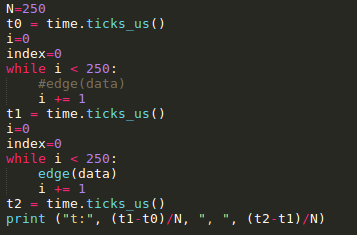
I get such results:

empty loop ~25µs, loop with hadler: ~85µs (handler alone: 65µs ?)
deltas are differences of time.ticks_us() and minimum value I get is ~84µsWould it be possible to add value of timer inside the object passed to interrupt handler, or as second parameter ???
BR,
Emmanuel. -
@MaSePreetz There was a discussion about pin interrupt latency here: https://forum.pycom.io/topic/936/pin-interrupt-latency
Unless newer version of the firmware improve things drastically, there is no chance to get data from the DHT11/DHT22 with an interrupt using driver. The only Python method that works for me is a busy polling method. -
Hello @robert-hh ,
I guess you have succeeded working with DHT11/DHT22 ?
Could you share python library (that work) ?
Thanks a lot,
Emmanuel. -
@Emmanuel-Goudot Yes, that's the piece of code below, which works for my DHT22 on a Lopy. It is buried far below in a thread, where two people fight to get it running(https://forum.pycom.io/topic/1172/pure-python-library-for-reading-dht-sensor-on-pycom-boards). No clue what their problem is, since I consider it solved, even if not bullet proof.
import time
from machine import enable_irq, disable_irq,  Pin


class DTHResult:
    'DHT sensor result returned by DHT.read() method'

    ERR_NO_ERROR = 0
    ERR_MISSING_DATA = 1
    ERR_CRC = 2

    error_code = ERR_NO_ERROR
    temperature = -1
    humidity = -1

    def __init__(self, error_code, temperature, humidity):
	self.error_code = error_code
	self.temperature = temperature
	self.humidity = humidity

    def is_valid(self):
	return self.error_code == DTHResult.ERR_NO_ERROR


class DTH:
    'DHT sensor (dht11, dht21,dht22) reader class for Pycom'

    __pin = Pin('P3', mode=Pin.OPEN_DRAIN)
    __dhttype = 0

    def __init__(self, pin, sensor=0):
	self.__pin = pin
	self.__pin(1)
	self.__dhttype = sensor

    def read(self):
	time.sleep(1)

	# send initial high
	#self.__send_and_sleep(1, 25000)

	# pull down to low
	#self.__send_and_sleep(0, 40000)

	# collect data into an array
	data = self.__collect_input()

	# parse lengths of all data pull up periods
	pull_up_lengths = self.__parse_data_pull_up_lengths(data)
	# if bit count mismatch, return error (4 byte data + 1 byte checksum)
	print(pull_up_lengths)
	if len(pull_up_lengths) != 40:
	    return DTHResult(DTHResult.ERR_MISSING_DATA, 0, 0)

	# calculate bits from lengths of the pull up periods
	bits = self.__calculate_bits(pull_up_lengths)

	# we have the bits, calculate bytes
	the_bytes = self.__bits_to_bytes(bits)
	print(the_bytes)
	# calculate checksum and check
	checksum = self.__calculate_checksum(the_bytes)
	if the_bytes[4] != checksum:
	    return DTHResult(DTHResult.ERR_CRC, 0, 0)

	# ok, we have valid data, return it
	[int_rh, dec_rh, int_t, dec_t, csum] = the_bytes
	if self.__dhttype==0:		#dht11
		rh = int_rh		#dht11 20% ~ 90%
		t = int_t	#dht11 0..50°C
	else:			#dht21,dht22
		rh = ((int_rh * 256) + dec_rh)/10
		t = (((int_t & 0x7F) * 256) + dec_t)/10
		if (int_t & 0x80) > 0:
			t *= -1
	return DTHResult(DTHResult.ERR_NO_ERROR, t, rh)

    def __send_and_sleep(self, output, mysleep):
	self.__pin(output)
	time.sleep_us(mysleep)

    def __collect_input(self):
	# collect the data while unchanged found
	unchanged_count = 0
	# this is used to determine where is the end of the data
	max_unchanged_count = 100
	last = -1
	data = []
	m = [1]*500	   # needs long sample size to grab all the bits from the DHT
	self.__pin(0)
	time.sleep_us(20000)
	self.__pin(1)
	irqf = disable_irq()
	for i in range(len(m)):
	    m[i] = self.__pin()      ## sample input and store value
	enable_irq(irqf)
	for i in range(len(m)):
	    current = m[i]
	    data.append(current)
	    if last != current:
		unchanged_count = 0
		last = current
	    else:
		unchanged_count += 1
		if unchanged_count > max_unchanged_count:
		    break
	#print(data)
	return data

    def __parse_data_pull_up_lengths(self, data):
	STATE_INIT_PULL_DOWN = 1
	STATE_INIT_PULL_UP = 2
	STATE_DATA_FIRST_PULL_DOWN = 3
	STATE_DATA_PULL_UP = 4
	STATE_DATA_PULL_DOWN = 5

	state = STATE_INIT_PULL_UP

	lengths = [] # will contain the lengths of data pull up periods
	current_length = 0 # will contain the length of the previous period

	for i in range(len(data)):

	    current = data[i]
	    current_length += 1

	    if state == STATE_INIT_PULL_DOWN:
		if current == 0:
		    # ok, we got the initial pull down
		    state = STATE_INIT_PULL_UP
		    continue
		else:
		    continue
	    if state == STATE_INIT_PULL_UP:
		if current == 1:
		    # ok, we got the initial pull up
		    state = STATE_DATA_FIRST_PULL_DOWN
		    continue
		else:
		    continue
	    if state == STATE_DATA_FIRST_PULL_DOWN:
		if current == 0:
		    # we have the initial pull down, the next will be the data pull up
		    state = STATE_DATA_PULL_UP
		    continue
		else:
		    continue
	    if state == STATE_DATA_PULL_UP:
		if current == 1:
		    # data pulled up, the length of this pull up will determine whether it is 0 or 1
		    current_length = 0
		    state = STATE_DATA_PULL_DOWN
		    continue
		else:
		    continue
	    if state == STATE_DATA_PULL_DOWN:
		if current == 0:
		    # pulled down, we store the length of the previous pull up period
		    lengths.append(current_length)
		    state = STATE_DATA_PULL_UP
		    continue
		else:
		    continue

	return lengths

    def __calculate_bits(self, pull_up_lengths):
	# find shortest and longest period
	shortest_pull_up = 1000
	longest_pull_up = 0

	for i in range(0, len(pull_up_lengths)):
	    length = pull_up_lengths[i]
	    if length < shortest_pull_up:
		shortest_pull_up = length
	    if length > longest_pull_up:
		longest_pull_up = length

	# use the halfway to determine whether the period it is long or short
	halfway = shortest_pull_up + (longest_pull_up - shortest_pull_up) / 2
	bits = []

	for i in range(0, len(pull_up_lengths)):
	    bit = False
	    if pull_up_lengths[i] > halfway:
		bit = True
	    bits.append(bit)

	return bits

    def __bits_to_bytes(self, bits):
	the_bytes = []
	byte = 0

	for i in range(0, len(bits)):
	    byte = byte << 1
	    if (bits[i]):
		byte = byte | 1
	    else:
		byte = byte | 0
	    if ((i + 1) % 8 == 0):
		the_bytes.append(byte)
		byte = 0
	#print(the_bytes)
	return the_bytes

    def __calculate_checksum(self, the_bytes):
	return the_bytes[0] + the_bytes[1] + the_bytes[2] + the_bytes[3] & 255

Hello! It looks like you're interested in this conversation, but you don't have an account yet.
Getting fed up of having to scroll through the same posts each visit? When you register for an account, you'll always come back to exactly where you were before, and choose to be notified of new replies (either via email, or push notification). You'll also be able to save bookmarks and upvote posts to show your appreciation to other community members.
With your input, this post could be even better 💗
Register Login