FiPy - getting started
-
- while disconnected I inserted the SIM card into FiPy, connected USB to my laptop and then registered my SIM card with Hologram.
- I downloaded FW upgrade tool and upgraded FW to 1.20.1.r1
- Then in VSCode I wrote boot.py and main.py - both very simple.
- I reconnect FiPy and it connected to port COM15 that I configured in Global Settings and Project Settings
- When I do Upload, I get:
Uploading project (main folder)...
Not safe booting, disabled in settings
Uploading to /flash...
Reading file status
Failed to read project status, uploading all files
[1/2] Writing file boot.py (0kb)
Failed to write file, trying again...
Failed to write file, trying again...
timeout
[2/2] Writing file main.py (0kb)
Failed to write file, trying again...
Failed to write file, trying again...
Upload failed.: timeout Please reboot your device manually.Then I tried Filezilla after I ran Advanced IP Scanner and found IP: 192.168.1.133 - it is the only active one whose manufacturer is espressif Inc (meaning ESP32 chip, I think). Connection to its FTP fails:
"Connection attempt failed with "ECONNREFUSED - Connection refused by server".Does anyone knows what's going on? No writing rights on the FiPy?
-
@securigy The default IP address of a pycom board is 192.168.4.1, and it starts as Access point. So you have to re-configure your PC to connect it. If you want to use your device regularly in your local network, better configure it to the STA mode and let it connect to your local router. Instructions are here: https://docs.pycom.io/tutorials/all/wlan/ in the section: "Connecting to a router"
Question: In a terminal emulator like putty or the pymakr teminal window, you you get the REPL prompt? If yes, you can check using pyton commands, if files are present, like with:
import uos
uos.listdir("")You can also use adafruit ampy or rshell as the very basic tool to upload scripts. I'm not saying that this is the best procedure. But Integrated environments like Pymakr/VSCode sometimes hide the problems.
Install ampy or rshell with:pip install adafruit-ampy
pip install rshell -
@robert-hh said in FiPy - getting started:
import uos
uos.listdir("")I reconnected LTE antenna (I realized it was connected to the wrong spot on FiPy).
I connected FiPy (which is mounted on PyTrack) to the laptop with mini USB and clicked on Connect - it got me connected.
Then I issued the commands abouve on REPL and got this:x00\x00\x00\x00\x00\x00.\x00\x00\x00', '\x00\x00\x00\x00\x00\x00\x00\x00.\x00\x00\x00', '\x00\x00\x00\x00\x00\x00\x00\x00.\x00\x00\x00', '\x00\x00\x00\x00\x00\x00\x00\x00.\x00\x00\x00', '\x00\x00\x00\x00\x00\x00\x00\x00.\x00\x00\x00', '\x00\x00\x00\x00\x00\x00\x00\x00.\x00\x00\x00', '\x00\x00\x00\x00\x00\x00\x00\x00.\x00\x00\x00', 'main.py', 'sys', 'lib', 'cert', 'boot.py', 'project.pymakr'] Upload done, resetting board... OKets Jun 8 2016 00:22:57 rst:0x7 (TG0WDT_SYS_RESET),boot:0x17 (SPI_FAST_FLASH_BOOT) configsip: 0, SPIWP:0xee clk_drv:0x00,q_drv:0x00,d_drv:0x00,cs0_drv:0x00,hd_drv:0x00,wp_drv:0x00 mode:DIO, clock div:1 load:0x3fff8020,len:8 load:0x3fff8028,len:2136 load:0x4009fa00,len:19880 entry 0x400a05d0 Smart Provisioning started in the background See https://docs.pycom.io/smart for details Traceback (most recent call last): File "main.py", line 18 SyntaxError: invalid syntax Pycom MicroPython 1.20.1.r1 [v1.11-3138a13] on 2019-10-08; FiPy with ESP32 Pybytes Version: 1.1.3 Type "help()" for more information. >>>which is actually very good...since it shows some errors in my code but shows that the files got actually loaded...
So I made no changes to anything except reconnected antenna to correct socket... -
...and yet, although I consider this a progress, there are problems uploading the files...sometimes it is successful and sometimes it is not...
Uploading to /flash...
Reading file status
Failed to read project status, uploading all files
Creating dir lib
[1/5] Writing file boot.py (0kb)
[2/5] Writing file lib/L76GNSS.py (3kb)
[3/5] Writing file lib/LIS2HH12.py (6kb)
[4/5] Writing file lib/pytrack.py (1kb)
[5/5] Writing file main.py (0kb)
Failed to write file, trying again...
Failed to write file, trying again...

Uploading to /flash...
Reading file status
Failed to read project status, uploading all files
Creating dir lib
[1/5] Writing file boot.py (0kb)
[2/5] Writing file lib/L76GNSS.py (3kb)
Failed to write file, trying again...
Failed to write file, trying again...
timeout
[3/5] Writing file lib/LIS2HH12.py (6kb)
Failed to write file, trying again...
Failed to write file, trying again...
timeout
...and I can't figure out why...switching to other tools is just sweeping the problem under the rug...besides using VSCode is very convenient when it works...
-
seems that rshell and adafruit-ampy are linux tools... and I am running Windows 10....
I am just curios why I am getting
"Connection attempt failed with "ECONNREFUSED - Connection refused by server".
When I try to copy with FileZilla... I tried both without credentials and with user=micro and password=python with the same result... using plain FTP (insecure) -
@securigy When trying to use FileZilla, did you connect your PC to the AP, set up by the FiPy?
Adafruit ampy and rshell are python scripts. So they works on windows too. They just require Python to be installed. For ampy, look here on setup notes: https://learn.adafruit.com/micropython-basics-load-files-and-run-code/install-ampy -
@robert-hh When I boot up FiPy and get into REPL on COM15, and then execute from REPL the following commands, I do not get any SSID:
>>>import pycom
>>> from network import WLAN
>>> wlan=WLAN()
>>> wlan.init()
>>> wlan.mode()
1
>>> wlan.ssid()
>>> wlan.auth()
(3, 'www.pycom.io')
Is that normal? I read everywhere that FiPy boots in WLAN.AP mode...
Redundant to say - I do not see any FiPy network in a list of available wireless networks...
Another strange thing: when I scan all IPs with Advanced IP Scanner it shows me the Espressif Inc for address 192.168.1.133 while the name is some kind of 12#@*san.rr.com - the last part is the Internet provider domain...
Anyway, I am at loss - already spent 2 days trying to copy the files to FiPy... -
@robert-hh
I connected FiPy instead of LoPy4 and having the following problems:- Both FiPy and PyTrack get hot, they do not burn the skin but still quite hot...
- FiPy on the boot does not exhibit any SSID
- I have tremendous problems copying files (over the same COM port I used for LoPy4) to FiPy using VSCode/pymakr - the success rate is 1:100, File uploading still works fine for LoPy on the same PyTrack.
So, did I receive defected FiPy? Or those are just "immaturity" problems of this device, and it is simply not ready for prime time? Can I return it to the distributor I bought it from?
-
@securigy I have FiPy and LoPy4 devices. They do not get hot. If you supply them though a Pytrack board and USB, there is nothing that should damage them supply wise. The consume less than 1W power, so that should not get to any excess temperatures. If you have the chance to measure the current they consume, you should do that. There are low cost USB adapters who do that.
Generally the xxPy devices are of good manufacturing quality. They are built as intended, even if the intention is sometimes wrong. You should however upload the recent firmware.
Pymakr in my view is a source of trouble. You get problems with any change of VSC or Atom. Better use simple tools. For the REPL console, use a terminal emulator like Putty (do nto forget to set flow control to None). For file upload, you can use adafruit-ampy or rshell as basic tools, and go for FTP or FileZilla as soon a the WiFi is set up.
P.S.: Do not call both the constructor wlan=WLAN(...) and wlan.init(), because the latter will set what have been initialized in the constructor, maybe to the default.
My WiFi init sequence is:def do_connect(): import network import time from uos import uname wlan = network.WLAN(mode=network.WLAN.STA) # create station interface if not wlan.isconnected(): # check if the station is connected to an AP wlan.ifconfig(config=(WIFI_IP, "255.255.255.0", ROUTER_IP, ROUTER_IP)) wlan.connect(ssid=WIFI_SSID, auth=(network.WLAN.WPA2, WIFI_PASSWD)) for _ in range(100): if wlan.isconnected(): # check if the station is connected to an AP break print('.', end='') time.sleep_ms(200) else: print("Connect attempt timed out\n") return print('\nnetwork config:', wlan.ifconfig()) do_connect()It sets a fixed IP address in my local network range. IP-Addresses are strings in the form "xx.xx.xx.xx". If oyu omit the ifconfig call, then dhcp is requested. You may also call:
import pycom pycom.wifi_on_boot(True) -
@robert-hh I tried ampy and after installing and setting it up on Windows 10 following instruction to the latter, I was not able to issue command 'ampy ls'. It
C:\Users\sales>ampy ls
Traceback (most recent call last):
  File "c:\python374\lib\runpy.py", line 193, in _run_module_as_main
    "__main__", mod_spec)
  File "c:\python374\lib\runpy.py", line 85, in _run_code
    exec(code, run_globals)
  File "C:\Python374\Scripts\ampy.exe\__main__.py", line 9, in <module>
  File "c:\python374\lib\site-packages\click\core.py", line 764, in __call__
    return self.main(*args, **kwargs)
  File "c:\python374\lib\site-packages\click\core.py", line 717, in main
    rv = self.invoke(ctx)
  File "c:\python374\lib\site-packages\click\core.py", line 1134, in invoke
    Command.invoke(self, ctx)
  File "c:\python374\lib\site-packages\click\core.py", line 956, in invoke
    return ctx.invoke(self.callback, **ctx.params)
  File "c:\python374\lib\site-packages\click\core.py", line 555, in invoke
    return callback(*args, **kwargs)
  File "c:\python374\lib\site-packages\ampy\cli.py", line 99, in cli
    _board = pyboard.Pyboard(port, baudrate=baud, rawdelay=delay)
  File "c:\python374\lib\site-packages\ampy\pyboard.py", line 147, in __init__
    raise PyboardError('failed to access ' + device)
ampy.pyboard.PyboardError: failed to access \\.\COM15
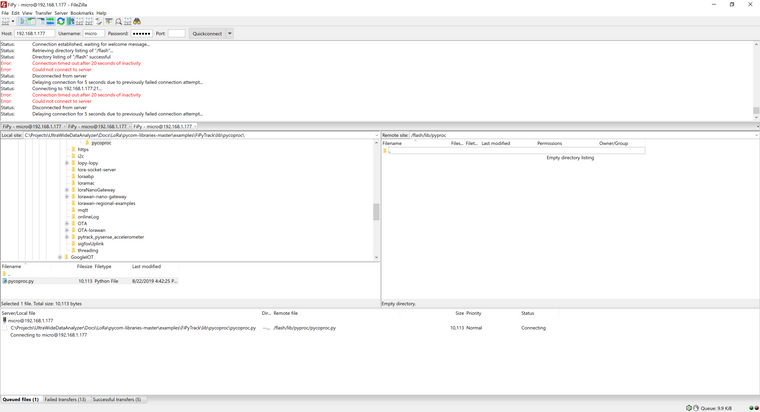
So I switched to FTP, and using your script I established finally WiFi connection by setting static IP to FiPy. Thank you for that. I was able to connect and copy files that coded and some pytrack libraries. However, I must notice that FTP implementation of FiPy is very flaky. I implemented a few FTP clients and servers over the years and I know bad implementation when I see one...upon connection FiPy FTP server does not issue a welcome message that FileZilla expects and this breaks the whole thing...but somehow after 20-30 attempts I succeeded to copy all files but one... Not sure if this feedback helps or not but I am just stating what I see... (I am using PASSIVE mode and insecure and plan FTP...)
-
@securigy Thank you for the feedback. Th eampy error log shows, that ift could not access the com port, for whatever reason. The command line in the window does not show the COM port for the connection. Did you call it with:
ampy -p COMxx ls
About ftp: My experience with ftp and Pycom boards is very well. I use that all the time, and had never problem with it. The devices connect immediately. There are many aspects to argue about with the pycom firmware, but the ftp server always worked. Using command line ftp, i can see that there is a welcome message:
"220 Micropython FTP Server"
So there may be another problem in your set-up.
On windows the command line ftp is very limited. but at least opening a session works, and it will show you the 220 welcome message. -
@robert-hh Ampy: I set AMPY_PORT=COM15 as environmental variable for myself as a specific user.
I will try FTP command line per your suggestion - but I don't think it will help... Besides, Filezilla is very reliable FTP tool - I used it for years with 100% success...
At this point I will probably shelve the whole project. I had high hopes for it in LTE-M area but I have to deal with facts, and the facts are that I cannot even start making progress since I have been trying to transfer files to FiPy...
That's what leads me to conclusion that the chip is defective...I purchased it from Seeed that was the least expensive $39 instead of other names such as Digi-Key and Mouser that offered it for $60-$70. My understanding is that Seeed is a Chinese company and maybe the lower price has its reason.
One more thing that I will try is to re-flash the chip - during one of the successful FTP connects I noticed lots of identical CDUP files that I was not able to delete...Will FW update tool re-format the whole chip and re-install the firmware of the same version? (the latest)
-
One more thing that I will try is to re-flash the chip - during one of the successful FTP connects I noticed lots of identical CDUP files that I was not able to delete...
That is indeed strange. A clean Pycom device should only show the default boot.py, main.py and three empty directories cert, lib and sys. And yes, using the pycom updater you have the option to erase the flash.
That's what leads me to conclusion that the chip is defective...I purchased it from Seeed that was the least expensive $39 instead of other names such as Digi-Key and Mouser that offered it for $60-$70. My understanding is that Seeed is a Chinese company and maybe the lower price has its reason.
That is too interesting. I looked at that page, and it shows a version # 1.0r on the back side. That model has a problem, in that is only support a limited number of LTE channels. That cannot be fixed by software. So maybe that is the reason why it is way cheaper than the actual model, which is version 1.2. It works in some regions, and the other components are fine.
Edit: Pycom has a RMA process for replacing 1.0 devices with 1.2 models.
-
@robert-hh
"Pycom has a RMA process for replacing 1.0 devices with 1.2 models."
That's a great news.
I really exhausted all options - tried cmd-line FTP: no luck.
I re-flashed the FiPy - same thing as before. Finally got through with Filezilla only to see that both /flash dir and /flash/dir contain those weird CDUP folders (see below).
...numerous days spend/wasted...
Any specific links to their RMA process?BTW, thank you, Robert, I appreciate your patience.
 image url)
 -
@securigy You can use esptool.py to erase the flash. That's the simple tool behind the pyupgrader and will really erase everything.
link here: https://github.com/espressif/esptool
But you may also able to install it with pip.
The you can upload the firmware again. I'm still puzzled about the IP address 192.168.1.177. Are you sure that you connect to the right device? A really clean installed new device should create an access point with the address 192.168.4.1. Unless you computer is not configured to that address space 192.168.4.x, you will not be able to detect it.
For the rma, look here: https://forum.pycom.io/topic/3843/important-news-regarding-cat-m1-and-nb-iot-cellular-range -
@robert-hh After using the firmware upgrader/updater tool I disconnect and reconnect power to WiFy simply by unplugging USB cable and plugging it back. After that - you cannot see FiPy as AP - it does not show up in the list of wireless network and there is no FTP access to 192.168.4.1. The upload via COM/UART (in my case COM15) is not working - failing to copy files. The only way I could get something is by executing WLAN commands from command line and assigning a static IP address - in my case 192.168.1.177. After that there is 10% success rate of FTP connection (with 1% success rate of file transfers) and 0.1% success rate of COM/UART file transfers. Those numbers are not exact numbers - my impression only. And as you could see the FPT shows lots of garbage of CDUP directories...
I already contacted Pycom RMA and am waiting for their response. In fact I just wanted to buy another FiPy from another source but everywhere I go (digi-key, mouser, etc.) I see FiPy 1.0. The FiPy 1.2 is nowhere to be found. Even if you follow the link from Pycom.io - I am puzzled...
-
@securigy You can tell the model you have by looking at the bottom side of it. The top side always shows 1.0.
About the garbage files: If erasing and reloading firmware worked, they should be gone. So I assume that something went wrong. -
@robert-hh The version says: 1.0r
-
@securigy OK. So it is the old version. But besides the limits for LTE, it should work normally. So the device may have other defects.
-
@robert-hh BTW, same question again: where can I buy FiPy 1.2 ?


Hello! It looks like you're interested in this conversation, but you don't have an account yet.
Getting fed up of having to scroll through the same posts each visit? When you register for an account, you'll always come back to exactly where you were before, and choose to be notified of new replies (either via email, or push notification). You'll also be able to save bookmarks and upvote posts to show your appreciation to other community members.
With your input, this post could be even better 💗
Register Login