Welcome to the Pycom forum Forum
    • \[\[global:header.categories\]\]
    • \[\[global:header.recent\]\]
    • \[\[global:header.tags\]\]
    • \[\[global:header.popular\]\]
    • Login

    Explore Pybytes | Official Documentation | Report a Firmware Bug/Issue | GitHub

    Test DNS NB-IoT FiPy (v. 41019)

    Scheduled Pinned Locked Moved FiPy
    10 Posts 4 Posters 572 Views 5 Watching
    Loading More Posts
    • Oldest to Newest
    • Newest to Oldest
    • Most Votes
    Reply
    • Reply as topic
    Log in to reply
    This topic has been deleted. Only users with topic management privileges can see it.
    • T Offline
      Tgasser
      last edited by Tgasser

      Hello,

      I'm looking for help for this mistake:
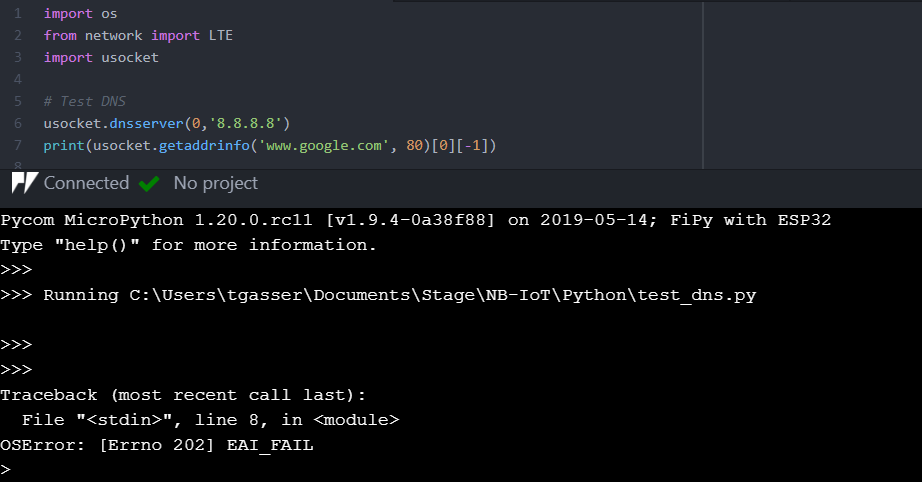
      Capture.PNG
      Do you have any ideas please?
      Thank you in advance!

      O 1 Reply Last reply Reply Quote 0
      • T Offline
        Tgasser
        last edited by

        No one ?

        I have another mistake when I try this way:
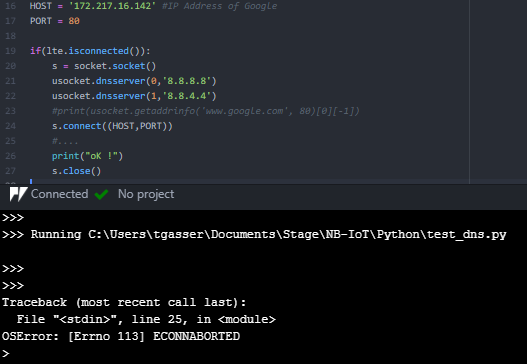
        Capture.PNG

        But I can't find any information to unlock the problem either.

        robert-hhR 1 Reply Last reply Reply Quote 0
        • robert-hhR Offline
          robert-hh @Tgasser
          last edited by

          @Tgasser This sequence works for me:

              s = socket.socket()
              ss = ssl.wrap_socket(s)
              socket.dnsserver(0, "8.8.8.8")
              i = socket.getaddrinfo('www.google.com', 443)[0][-1]
              # i = ('172.217.22.110', 443)
              print('Connecting to socket...')
              ss.connect(i)
              print('Send...')
              ss.send(b"GET / HTTP/1.0\r\n\r\n")
              print(ss.recv(4096))
              print('Close...')
              ss.close()
          
          T 1 Reply Last reply Reply Quote 0
          • O Offline
            oligauc @Tgasser
            last edited by oligauc

            @Tgasser Please can you use secure sockets ? Most servers no long accept connections on port 80.

            s = socket.socket()
            s = ssl.wrap_socket(s)
            s.connect(socket.getaddrinfo('www.google.com', 443)[0][-1])
            s.send(b"GET / HTTP/1.0\r\n\r\n")
            print(s.recv(4096))
            s.close()
            
            T 1 Reply Last reply Reply Quote 0
            • T Offline
              Tgasser @oligauc
              last edited by

              @oligauc @robert-hh I tried with your code I get the same errors as before. If I use getaddrinfo then it returns EAI_FAIL and if I put the IP address directly with the port then it returns ECONNABORTED :/

              1 Reply Last reply Reply Quote 0
              • T Offline
                Tgasser @robert-hh
                last edited by

                @robert-hh @oligauc I'm only starting on networks and IoT and I was wondering if you didn't know about tests maybe more basic to try to see where the problem might come from?

                1 Reply Last reply Reply Quote 0
                • T Offline
                  Tgasser
                  last edited by

                  Even with the last update of the pycom firmware I couldn't find a solution...

                  1 Reply Last reply Reply Quote 0
                  • T Offline
                    Tgasser
                    last edited by

                    Maybe some progress? I have no error this time when I do ss.connect() but nevertheless it remains blocked at this step for more than an hour... Any idea, please?

                    1 Reply Last reply Reply Quote 0
                    • T Offline
                      Tgasser
                      last edited by

                      Hello !
                      I still have an error that is EHOSTUNREACH yet google servers should be available? I use the Windows console with tracert google.com to know the IP address then I enter it in the socket.connect to avoid the EAI_FAIL bug of the getaddrinfo()...
                      If you have any ideas I'm listening, thank you :)

                      1 Reply Last reply Reply Quote 0
                      • V Offline
                        v2h
                        last edited by

                        This post is deleted!
                        1 Reply Last reply Reply Quote 0

                        Hello! It looks like you're interested in this conversation, but you don't have an account yet.

                        Getting fed up of having to scroll through the same posts each visit? When you register for an account, you'll always come back to exactly where you were before, and choose to be notified of new replies (either via email, or push notification). You'll also be able to save bookmarks and upvote posts to show your appreciation to other community members.

                        With your input, this post could be even better 💗

                        Register Login
                        • 1 / 1
                        • First post
                          Last post

                        Pycom on Twitter

                        Pycom
