Fipy crashing when using Loramesh
-
Hello all,
I am using Fipy devices for a month or so now and I started using loramesh a couple of weeks ago. Except the initial issue with the firmware (only version 1.20.0.rc11 would accept loramesh in my case) everything was going fine until on Friday I was testing my scenario where I started seeing gibberish data on my vscode pymkr output in one of the devices. I tried to solve it by changing the firmware and uploading a code that I downloaded from github related to loramesh from beginning and un-touched, nothing worked (the said code is no longer available in github! https://github.com/pycom/pycom-documentation/blob/publish/content/pymesh/lora-mesh.md). Today I started to get the same problem in my second device. At first I thought Fipy is physically broken but that wasn't the case since they both are working using other codes! I chacked the pymesh project and downloaded the following link for test, received the same gibberish results: https://github.com/pycom/pycom-libraries/tree/master/pymesh/pymesh_frozen
The gibberish output looked like this:
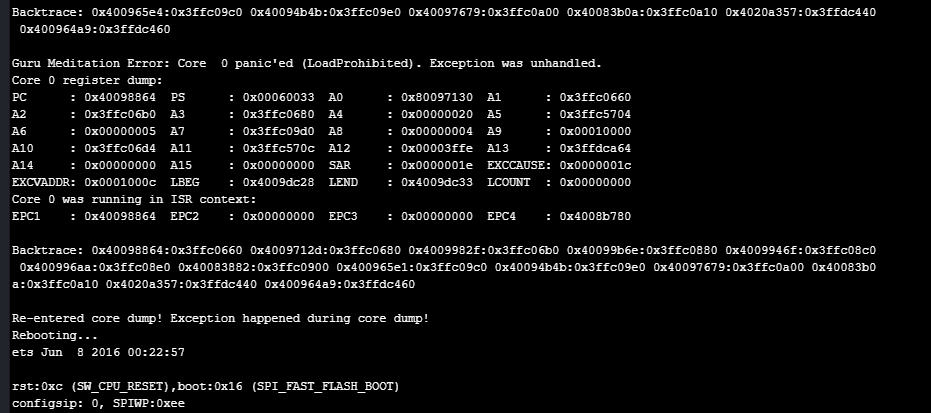
I would appreciate if anybody has any knowledge on how to solve this issue, it's really important to me.
I might also add that I was working with pymkr in VS Code but I started getting an error which stated some sort of problem with serial port there so I changed to atom for now.
Thank you very much in advance
-
@shadi That is a coredump and it contains meaningful information on the crash. Please can you try to use the Pycom firmware updater cli to do an erase all and redo the testing please ?
-
hi @shadi,
As we announced on https://docs.pycom.io/pymesh/licence/ we have a new release for Pymesh, subject to a simple licence.
Additionally, there's a new, more simple micropython api: https://docs.pycom.io/pymesh/lib-api/ and a nice starting example: https://docs.pycom.io/pymesh/simple-example/
Please watch these forum threads for further announcements:
https://forum.pycom.io/topic/5356/pymesh-release-v1-20-1-r2
https://forum.pycom.io/topic/4449/pymesh-updates/70<later edit:> Also, about VSC, for the v1.40 (latest release) we released Friday a new Pymakr extension v1.1.5.
-
@oligauc Thank you for acknowledging my post. I changed the firmware on each of my Fipy boards and erased them at least 20 times using pycom firmware update application for windows! Everytime I receive the same error after uploading the loramesh example.
-
@catalin Hello. Thanks for the reply. I tried that example also, but it still does not work. and it is funny because the link that is supposed to redirect me to pycome-libraries repositories is not accessible and give me the error 404!! I however tried to run the pymesh-frozen in this link https://github.com/pycom/pycom-libraries/tree/master/pymesh and still did not work. So, I was wondering on which firmware this should be executable? What is interesting is that now the previous code works on one of my boards but not the other one!! (they both have the same firmware and code on them).
On a different note, I was wondering is it possible to connect loramesh devices to an existing openthread network (since it is based on openthread)? because that would help my application a looot!
-
@shadi
Yes, https://github.com/pycom/pycom-libraries/tree/master/pymesh/pymesh_frozen is the right micropy lib.Do you have the
Pymesh release v1.20.1.r2? Then just put this singlemain.pyfrom https://docs.pycom.io/pymesh/simple-example/. -
@catalin I don't have the firmware release 1.20.1.r2. I update my firmware using pycom firmware update application for windows and this version is not presented there. I guess I have to fill in the licensing form and then get access to this release?
-
@shadi
The Pymesh releases will be done only thru the licensing process.Regarding a previous question:
On a different note, I was wondering is it possible to connect loramesh devices to an existing openthread network (since it is based on openthread)? because that would help my application a looot!
The Thread official protocol is specified only on 2.4Ghz 802.15.4, while Pymesh is using LoRa modulation with kilometers/miles distance between nodes. So due to different frequency and modulation won't be interoperable.
-
@catalin Ok, I will try the licensing then. Thank you very much.

Hello! It looks like you're interested in this conversation, but you don't have an account yet.
Getting fed up of having to scroll through the same posts each visit? When you register for an account, you'll always come back to exactly where you were before, and choose to be notified of new replies (either via email, or push notification). You'll also be able to save bookmarks and upvote posts to show your appreciation to other community members.
With your input, this post could be even better 💗
Register Login