LoPy4 LoRaWAN OTAA tx_counter not incrementing
-
I am currently using a LoPy4 as a node for LoRaWAN OTAA transmission of ultrasonic sensor readings. My issue is that for some reason, after adding the code to read ultrasonic sensor readings from pins on the expansion board, my data is transmitted every 2 seconds but the packet counter never changes, thus preventing me from being able to enable Frame Counter Checks. My gateway receives all of the messages, but if Frame Counter Checks are enabled, only the first datapoint is received by my application on The Things Network. Below is my code.
from network import LoRa
from machine import Pin
from machine import Timer
import pycom
import socket
import utime
import time
import ustruct
import ubinascii

# Colors
off = 0x000000
red = 0xff0000
green = 0x00ff00
blue = 0x0000ff

pycom.heartbeat(False)

# Initialise LoRa in LORAWAN mode.
# Please pick the region that matches where you are using the device:
# Asia = LoRa.AS923
# Australia = LoRa.AU915
# Europe = LoRa.EU868
# United States = LoRa.US915
lora = LoRa(mode=LoRa.LORAWAN, region=LoRa.US915, tx_power=20, bandwidth = LoRa.BW_500KHZ, sf=7, frequency = 903900000)


def lora_cb(lora):
    events = lora.events()
    if events & LoRa.RX_PACKET_EVENT:
        print('Lora packet received')
    if events & LoRa.TX_PACKET_EVENT:
        print('Lora packet sent')
lora.nvram_restore()
lora.nvram_erase()
# remove all the channels the gateway doesn't use
for channel in range(16, 72):
    lora.remove_channel(channel)
for channel in range(0,7):
    lora.remove_channel(channel)

# create an OTAA authentication parameters
dev_eui = ubinascii.unhexlify('70B3D549952757BF') # these settings can be found from TTN
app_eui = ubinascii.unhexlify('70B3D57ED0028A4F')
app_key = ubinascii.unhexlify('88397B010F71D34BEDF77DA003C3A54C')

# join a network using OTAA (Over the Air Activation)
if not lora.has_joined():
    lora.join(activation=LoRa.OTAA, auth=(app_eui, app_key), timeout=0)
    pycom.rgbled(green)
    time.sleep(2.5)

handshk_time = Timer.Chrono()
handshk_time.start()
# wait until the module has joined the network
while not lora.has_joined():
    pycom.rgbled(off)
    time.sleep(0.1)
    pycom.rgbled(red)
    time.sleep(2.4)
    print('Not yet joined...')

lora.nvram_save()
handshk_time.stop()
print("Total handshake time: {0}".format(handshk_time.read()))
print('Joined!')
pycom.rgbled(blue)

# create a LoRa socket
s = socket.socket(socket.AF_LORA, socket.SOCK_RAW)
#set to confirmed type of messages

# set the LoRaWAN data rate
s.setsockopt(socket.SOL_LORA, socket.SO_DR, 3)

# make the socket blocking
# (waits for the data to be sent and for the 2 receive windows to expire)
s.setblocking(True)

# send some data
s.send(bytes([0x01, 0x02, 0x03]))

# make the socket non-blocking
# (because if there's no data received it will block forever...)
s.setblocking(False)

time.sleep(3.0)

# get any data received (if any...)
data = s.recvfrom(128)
print(data)

i = 7
trigger = Pin('P7', mode=Pin.OUT)
echo = Pin('P8', mode=Pin.IN)


trigger.value(0)


# Ultrasonic distance measurment
def distance_measure():
    # trigger pulse LOW for 2us (just in case)
    trigger(0)
    utime.sleep_us(2)
    # trigger HIGH for a 10us pulse
    trigger(1)
    utime.sleep_us(10)
    trigger(0)
    # wait for the rising edge of the echo then start timer
    while echo() == 0:
        pass
    start = utime.ticks_us()
    # wait for end of echo pulse then stop timer
    while echo() == 1:
        pass
    finish = utime.ticks_us()
    # pause for 20ms to prevent overlapping echos
    utime.sleep_ms(20)

    # calculate distance by using time difference between start and stop
    # speed of sound 340m/s or .034cm/us. Time * .034cm/us = Distance sound travelled there and back
    # divide by two for distance to object detected.
    # Note: changing the multiplying factor to 0.0133858 for inches
    distance = ((utime.ticks_diff(start, finish)) * 0.034)/2

    return distance*-1

   # to reduce errors we take ten readings and use the median
def distance_median():

    # initialise the list
    distance_samples = []
    # take 10 samples and append them into the list
    for count in range(10):
        distance_samples.append(int(distance_measure()))
    # sort the list
    distance_samples = sorted(distance_samples)
    # take the center list row value (median average)
    distance_median = distance_samples[int(len(distance_samples)/2)]
    # apply the function to scale to volts

    print(distance_samples)

    return int(distance_median)

# set LED to red
pycom.rgbled(red)

#s.settimeout(3)
# limit to 200 packets; just in case power is left on
while True:
    # take distance measurment, turn the light blue when measuring
    pycom.rgbled(blue)
    distance = distance_median()
    #utime.sleep_us(100)
    print("distance = {0} inches".format(distance))
    utime.sleep_ms(100)
    #print('Sending distance')
    pycom.rgbled(green)
    #Sending...
    packet = ustruct.pack('f', distance)
    print("Packet= {0}".format(ustruct.unpack('f',packet)))
    try:
        s.send(packet)
    except OSError as e:
        if e.args[0] == 11:
            # EAGAIN error occurred, add your retry logic here
            time.sleep(2)
            s.send(packet)
            print('error!')
    s.recvfrom(128)
    print(lora.stats(),'\n')
    time.sleep(2)
I have noticed that specifically, the only lines of code that cause this issue are the three lines where I initialize pins at outputs/inputs and trigger them:
trigger = Pin('P7', mode=Pin.OUT)
echo = Pin('P8', mode=Pin.IN)

trigger.value(0)
In my TTN application, here is an example of the packet counter failing to increment.
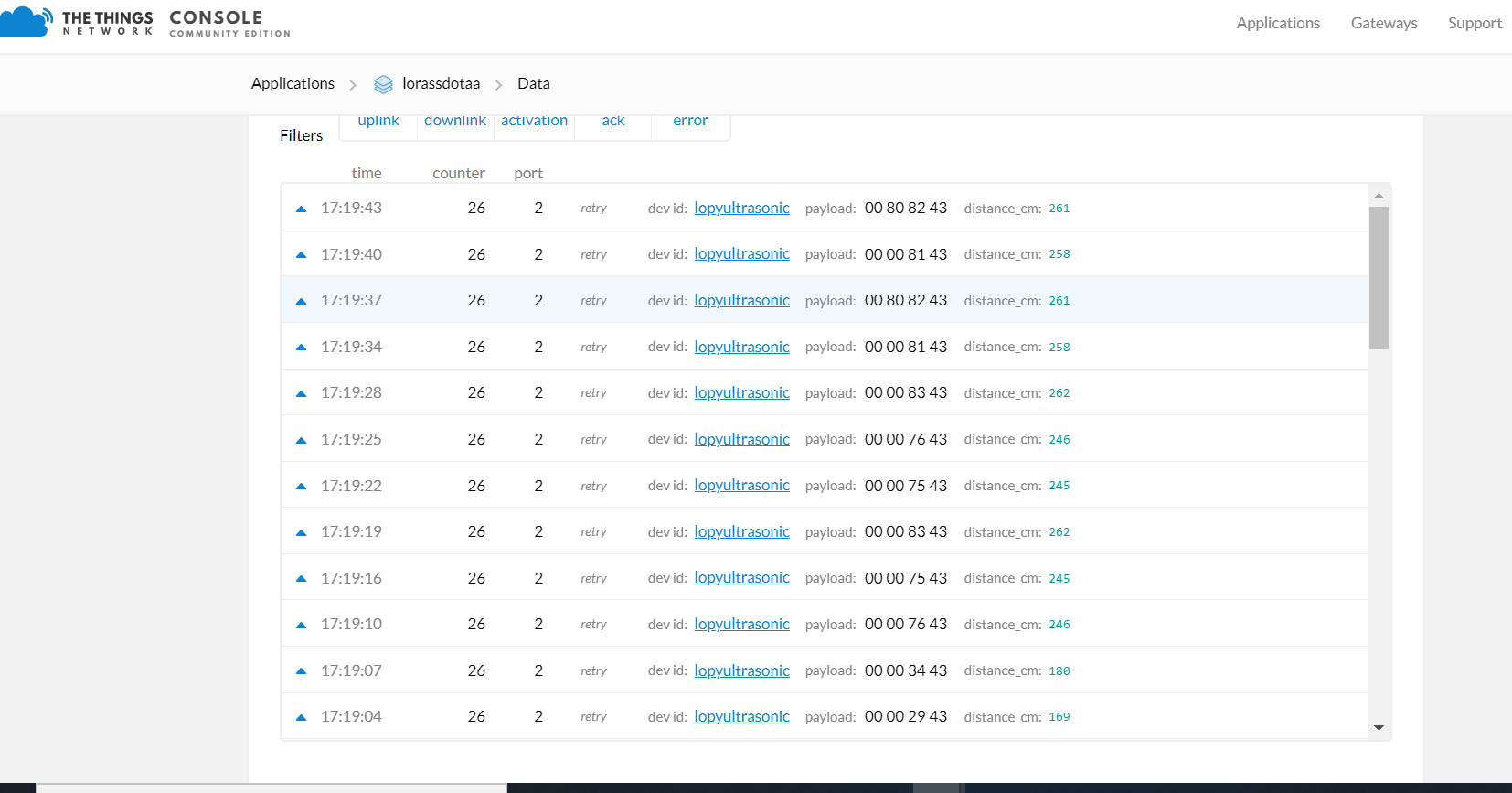
However, this is not an issue at all if I remove the three lines of code mentioned above and send a variable 'i' every 2 seconds. Without those three lines of code, my packets increment just fine. Does anyone know what might be causing this issue? -
@aplountz p5, p6 and P7 are connected to the Lora module. So you must not use these for other purposes.
-
@robert-hh I changed P8 to P9 and it works great! Thank you so much!

Hello! It looks like you're interested in this conversation, but you don't have an account yet.
Getting fed up of having to scroll through the same posts each visit? When you register for an account, you'll always come back to exactly where you were before, and choose to be notified of new replies (either via email, or push notification). You'll also be able to save bookmarks and upvote posts to show your appreciation to other community members.
With your input, this post could be even better 💗
Register Login