How to recover a FiPy which is half-bricked ^^!
-
Hi,
I successfully burned a LED-RGB blinking code using the Arduino IDE by connecting P2 into GND but now I cannot connect the FiPy into Atom.
Keep in mind the following:
-
I do have a Pysense board.
-
I still can flash the ESP32 using the Arduino IDE by doing the P2-GND shunt.
-
When I shunt P2-GND the LED turns on emitting a random colour.
-
I can see that the serial port is available.
-
I can use the DFU software to flash the firmware into the Pysense.
-
If I shunt P12-3V3 I cannot enter into safe boot. Also, the RGB LED is not flashing orange or any other colour.
-
Using Pycom upgrade I get the following error: "Failed to connect to ESP32: Timed out waiting for packet header"
-
Using Pycom upgrade while shunting P2-GND:
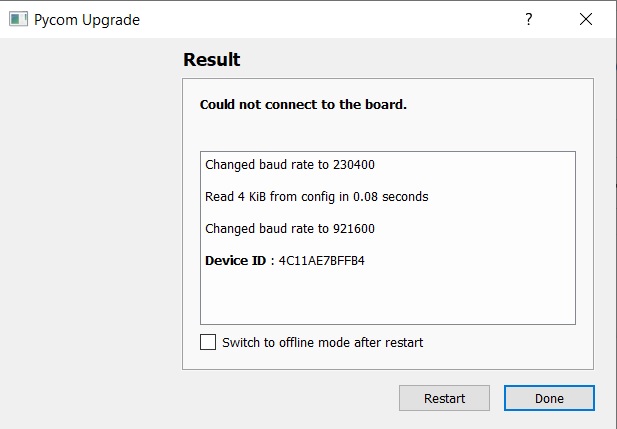
So, what am I missing to restore the FiPy?
Thank you.
-
-
@Vasco-Ferraz When using the pycom updater: After connecting P2-> GND, push reset to place the device into bootloader mode. Then the updater should be able to connect the board.
Chose to upload from a appropriate tar package, which you can download here. https://software.pycom.io/downloads/FiPy.html
Even if these are not the most recent packages, they make a good starting point.You may also use the command line update tool updater.py, which you can find here: https://github.com/pycom/pycom-micropython-sigfox/tree/Dev/esp32/tools/fw_updater
Use python updater.py --help
for instructions. Erasing the flash before upload is recommended.
updater.py is a front-end to esptool.py, but can deal die Pycom firmware packages.
Note: When you get the help page from updater.py, it will point at a page https://docs.pycom.io/advance/cli/, which talks about a tool called pycom-fwtool-cli. That should be essentially the same as updater.py. -
FiPy is alive :D
Thank you so much!


Hello! It looks like you're interested in this conversation, but you don't have an account yet.
Getting fed up of having to scroll through the same posts each visit? When you register for an account, you'll always come back to exactly where you were before, and choose to be notified of new replies (either via email, or push notification). You'll also be able to save bookmarks and upvote posts to show your appreciation to other community members.
With your input, this post could be even better 💗
Register Login