Welcome to the Pycom forum Forum
    • \[\[global:header.categories\]\]
    • \[\[global:header.recent\]\]
    • \[\[global:header.tags\]\]
    • \[\[global:header.popular\]\]
    • Login

    Explore Pybytes | Official Documentation | Report a Firmware Bug/Issue | GitHub

    MQTT example in doc fails

    Scheduled Pinned Locked Moved WiPy 2&3
    5 Posts 4 Posters 393 Views 5 Watching
    Loading More Posts
    • Oldest to Newest
    • Newest to Oldest
    • Most Votes
    Reply
    • Reply as topic
    Log in to reply
    This topic has been deleted. Only users with topic management privileges can see it.
    • ShanevanJS Offline
      ShanevanJ
      last edited by ShanevanJ

      Noob question - when try this MQTT Example with new Wipy and latest firmware, it fails with this error

      WiFi connection established
      >MQTT ERROR! function got multiple values for argument 'user'
      >ERROR! Could not connect to Pybytes!
      >Pybytes configuration read from /flash/pybytes_config.json
      >Connected to Wifi
      >
      >Traceback (most recent call last):
      >  File "main.py", line 29, in <module>
      >  File "/flash/lib/mqtt.py", line 28, in __init__
      >OSError: [Errno 202] EAI_FAIL
      >Pycom MicroPython 1.20.1.r1 [v1.11-3138a13] on 2019-10-08; WiPy with ESP32
      >Pybytes Version: 1.1.3
      

      Design | Develop | Deploy

      1 Reply Last reply Reply Quote 0
      • J Offline
        jirkakrepl
        last edited by jirkakrepl

        Hi @ShanevanJ

        I recommend using latest firmware updater tool. And then..

        I would try to flash the firmware with disabled Pybytes first. (unchecked Enable Pybytes checkbox)
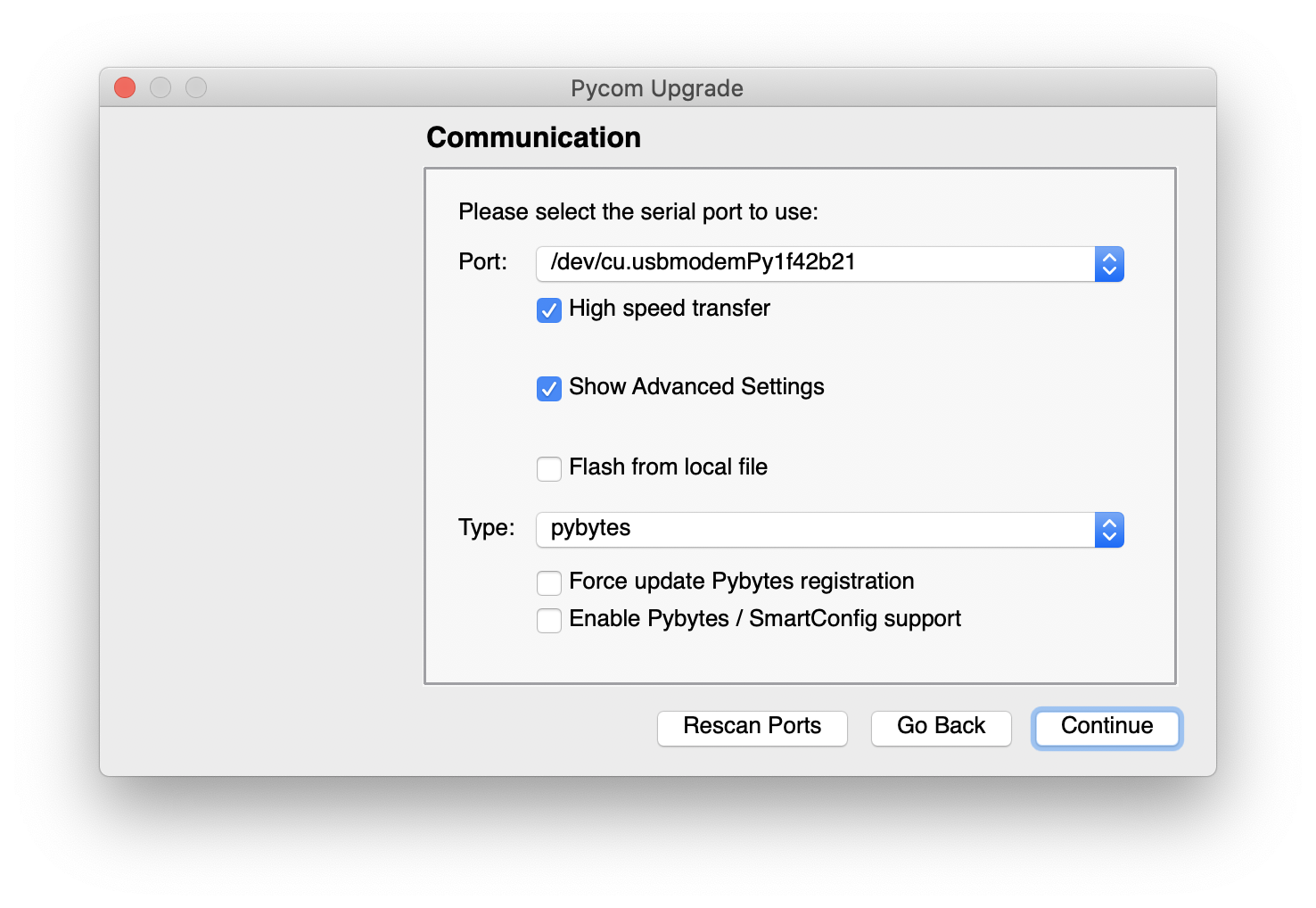
        Screen Shot 2020-02-18 at 17.18.29.png

        software developer @ Pycom

        Have you checked out our docs for the answer? (Now with an easy search function) https://docs.pycom.io

        Check out our newly revamped device management platform, Pybytes! https://pybytes.pycom.io/

        ShanevanJS 1 Reply Last reply Reply Quote 0
        • ShanevanJS Offline
          ShanevanJ @jirkakrepl
          last edited by

          @jirkakrepl Thanks - so does this mean the example mqtt.py clashes with the internal pybytes mqtt usage ?

          I did get this user app working using the umqtt simple.py and robust.py libraries and apart from the occasional

          mqtt: OSError(104,)
          

          errors - seems to work ok

          I will test further and advise.

          It may be useful to update the mqtt example from the docs as it wasted a whole day of head scratching to get around the issue?

          Design | Develop | Deploy

          1 Reply Last reply Reply Quote 0
          • N Offline
            nervencid
            last edited by

            I have a similar problem, what is the true mqtt library ?

            I dont' kno if is MQTTLib or mqtt.

            Where can i find documentation about MQTTLib?

            Or how i can work with mqtt, the examples here:

            https://docs.pycom.io/tutorials/all/mqtt/

            Are not working

            R 1 Reply Last reply Reply Quote 0
            • R Offline
              railmonitor @nervencid
              last edited by

              @nervencid I made it work using the simple mqtt library, to connect to Azure IoT Hub without using Pybytes. Have a look at this thread:

              https://forum.pycom.io/topic/5713/send-data-to-azure-iothub-with-mqtt-protocol-without-using-pybytes-solved

              1 Reply Last reply Reply Quote 0

              Hello! It looks like you're interested in this conversation, but you don't have an account yet.

              Getting fed up of having to scroll through the same posts each visit? When you register for an account, you'll always come back to exactly where you were before, and choose to be notified of new replies (either via email, or push notification). You'll also be able to save bookmarks and upvote posts to show your appreciation to other community members.

              With your input, this post could be even better 💗

              Register Login
              • 1 / 1
              • First post
                Last post

              Pycom on Twitter

              Pycom