Send data to Azure IoTHub with MQTT protocol, without using pybytes (solved)
-
I was looking around for some examples and found this:
Re: AMQP to Azure IoTHub via CAT-MI have used the libraries downloaded from github: https://github.com/micropython/micropython-lib
And tried both versions of the generate_sas_token() method without luck. It seems that either the API, libraries or something has changed since. Does anyone got a working example running?
Current firmware:

Thanks in advance!
Edit: So i got a little further now, was using the connection string arguments wrong. Now i can get it to compile all the way until client.connect(), where i run in to trouble with the libraries. I am using the umqtt.simple library from micropython-lib-master, which is supposed to be for use with micropython. I tried the regular mqtt library from pycom as well, but ran into the same problem:
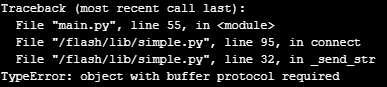
This refers to following line in the library:
self.sock.write(s)I did some futher digging based on the TypeError message, and found some posts:
https://forum.pycom.io/topic/3222/object-with-buffer-protocol-required/5
https://forum.micropython.org/viewtopic.php?t=2797Seems that there was some changes to Micropython, and that the library isn't updated. From the above posts, i see that the "TypeError: object with buffer protocol required", can be fixed by putting brackets or packing what you write in a bytearray. I tried both, but ran into similar errors other places in the library. I don't want to edit too much in libraries, so i would really appreciate any help on this topic!
-
Following my Edit, i got another step further. I am going to show my main code below here, to better show and tell what i found out so far (Sorry for all the outcommenting, been at it for a while now).
What i did now, was to edit the client = MQTTClient() parameters for user and password, with a b'username' and b'password', which seems to have helped others (see link):
https://forum.pycom.io/topic/4775/solved-mqtt-and-tls/5
This got rid of the "object with buffer protocol required" error. Now i am instead getting a MQTTException: 3

I am no sure what is causing the problems. Would really appreciate some updated documentation / examples on how to do this!
Code below:
from wlan_module import wlan_module
from simple import MQTTClient
#import paho.mqtt.client as mqtt
from base64 import b64encode, b64decode
from _sha256 import sha256
from hmac import HMAC
from parse import quote_plus, urlencode, quote
import machine
import time

wl = wlan_module()
wl.wifiConnect()

#set time
print("setting time")
rtc = machine.RTC()
rtc.ntp_sync("pool.ntp.org")
while not rtc.synced():
    machine.idle()
print("Time set to: " + str(rtc.now()))

def generate_sas_token(uri, key, keyName, ttl=3600):
    expiry = int(time() + ttl)

    uri = quote_plus(uri)
    sas = key.encode('utf-8')
    string_to_sign = (uri + '\n' + str(expiry)).encode('utf-8')
    signed_hmac_sha256 = HMAC(sas, string_to_sign, sha256)
    signature = quote(b64encode(signed_hmac_sha256.digest()))
    return {
        'expiry': expiry,
        'token': 'SharedAccessSignature sr={}&sig={}&se={}&skn={}'.format(uri, signature, expiry, keyName)
        #'token': 'SharedAccessSignature sr={}&sig={}&se={}'.format(uri, signature, expiry)
    }
#Azure IoT-hub settings
hostname = "XXXXXXXXXXXXXX"

#This needs to be the key of the "device" IoT-hub shared access policy, NOT the device
policy_name = "XXXXXXXXXXXXX"
primary_key = "XXXXXXXXXXXXXXXXXXXXX"

device_id = "XXXXXXXXXXXX"

uri = "{hostname}/devices/{device_id}".format(hostname=hostname, device_id=device_id)

print(generate_sas_token(uri, primary_key, policy_name))
print(uri)

password =generate_sas_token(uri, primary_key, policy_name)

#print(password)

username_fmt = "{}/{}/api-version=2018-06-30"
username = username_fmt.format(hostname, device_id)

client = MQTTClient(device_id, hostname, user=b'username', password=b'password', ssl=True)

client.connect()

topic = "devices/{device_id}/messages/events/".format(device_id=device_id)
client.publish(topic, "test", qos=1)
Update: I made it work finally, leaving my solution here, for anyone in similar situation. Basically it was a combination of a missing certificate, and an error in the "generate_sas_token()" method i was using. So the solution was to use the Boston Certificate mentioned here: http://blogs.recneps.org/post/Connecting-the-ESP-8266-to-Azure-IoT-Hub-using-MQTT-and-MicroPython
And the generate_sas_token() method from here: https://docs.microsoft.com/en-us/azure/iot-hub/iot-hub-devguide-security
from base64 import b64encode, b64decode from hashlib import sha256 from time import time from urllib import parse from hmac import HMAC def generate_sas_token(uri, key, policy_name, expiry=3600): ttl = time() + expiry sign_key = "%s\n%d" % ((parse.quote_plus(uri)), int(ttl)) print sign_key signature = b64encode(HMAC(b64decode(key), sign_key.encode('utf-8'), sha256).digest()) rawtoken = { 'sr' : uri, 'sig': signature, 'se' : str(int(ttl)) } if policy_name is not None: rawtoken['skn'] = policy_name return 'SharedAccessSignature ' + parse.urlencode(rawtoken) -
Are you also using client.check_msg() to check if messages has been sent to the device? When I use this function and no message is the queue its blocking my code until I send a message to the device but I would like to only check if there is a message and then the code should be continued. Do you have any suggestions for this problem?
Hello! It looks like you're interested in this conversation, but you don't have an account yet.
Getting fed up of having to scroll through the same posts each visit? When you register for an account, you'll always come back to exactly where you were before, and choose to be notified of new replies (either via email, or push notification). You'll also be able to save bookmarks and upvote posts to show your appreciation to other community members.
With your input, this post could be even better 💗
Register Login