FiPy LTE hangs / freezes board for seconds

-
Dear @railmonitor,
did you already try
lte.deinit(detach=False, reset=True)? This might speed up the invocation, however I don't have a clue about side effects. You might want to report back about that.With kind regards,
Andreas. -
Hi @railmonitor
Why do you have to initialize/deinit it often? That should be more like a one off exercise, no?
Also have a look at my post here: https://forum.pycom.io/topic/5547/power-saving-mode-psm-in-nb-iot-problems-with-reconnecting-after-deepsleep/3
this should allow you to attach faster (not needed at all actually), if that helps you...@andreas said in FiPy LTE hangs / freezes board for seconds:
lte.deinit(detach=False, reset=True)
for
detach=Falseto make sense, you have to configure PSM first. -
@peterp said in FiPy LTE hangs / freezes board for seconds:
for detach=False to make sense, you have to configure PSM first.
Thanks! I have to admit that we used these parameters in order to shut down the modem even without using it, because we didn't want to invoke things like [1]. As the default of
detachhappens to beTrue[2], we thought it would be a good idea to disable it in order to reduce communication delays coming from [1].We don't know how this will actually relate to actually using the modem with or without PSM, so sorry for the noise.
[1] https://github.com/pycom/pycom-micropython-sigfox/blob/v1.20.2.rc6/esp32/mods/modlte.c#L878-L888
[2] https://github.com/pycom/pycom-micropython-sigfox/blob/v1.20.2.rc6/esp32/mods/modlte.c#L534 -
@andreas said in FiPy LTE hangs / freezes board for seconds:
@peterp said in FiPy LTE hangs / freezes board for seconds:
for detach=False to make sense, you have to configure PSM first.
Thanks! I have to admit that we used these parameters in order to shut down the modem even without using it, because we didn't want to invoke things like [1]. As the default of
detachhappens to beTrue[2], we thought it would be a good idea to disable it in order to reduce communication delays coming from [1].We don't know how this will actually relate to actually using the modem with or without PSM, so sorry for the noise.
[1] https://github.com/pycom/pycom-micropython-sigfox/blob/v1.20.2.rc6/esp32/mods/modlte.c#L878-L888
[2] https://github.com/pycom/pycom-micropython-sigfox/blob/v1.20.2.rc6/esp32/mods/modlte.c#L534No problem! Maybe I need to clarify: It could be that there are use cases where
detach=Falseis useful even without PSM, I haven't looked deeply. Thanks for the pointers. -
@andreas said in FiPy LTE hangs / freezes board for seconds:
we used these parameters in order to shut down the modem even without using it, because we didn't want to invoke things like [1].
I'm still thinking about this. Are you saying you don't want to use the LTE modem at all? Why do you
lte.deinit(something)anyway? Can't you just not instantiatelte = LTE()in the first place? I'm just curious whether there is something going on that we should be aware of. -
Dear Peter,
we tried to do it that way because the community has been unsure whether this would save additional power - which we wanted to achieve. There are different advises within the forum regarding this detail. We are invoking this directly after system start [1], not even just before going to deepsleep, in order to save maximum power - given it will actually do the right thing here. We are always happy to learn more or otherwise.
However, there are countless obstacles like this and different attempts to mitigate them. Please don't worry too much about that specific one.
With kind regards,
Andreas.[1] https://github.com/hiveeyes/terkin-datalogger/blob/3cb8d98c/src/lib/terkin/device.py#L302-L345
-
@peterp said in FiPy LTE hangs / freezes board for seconds:
I'm still thinking about this. I'm just curious whether there is something going on that we should be aware of.
I think a lot of us feel there is more going on with the lte modem than meets the eye Peter. Do you know why more recent firmwares (eg NBIoT 40343 & catm1 43818) are not available for download @ https://software.pycom.io/downloads/sequans2.html ? I personally feel I could make better progress if I could swap firmwares amongst modems in an effort to trace problems to hardware or firmware.
-
@peterp I realize that it is maybe inefficient to connect and disconnect so often, this i can tweak for sure. But the problem is also seen when i publish to the IOT hub. Every time i transfer data, there is also a delay in the readings from the accelerometer, at least when looking at the timestamps. This is the worst bit, since i want to be able to get accurate measurements with timestamps, even while transferring. I naturally try to connect / publish etc. while there is not any activity, but i must be able to detect and start measuring at any time. If i run this code (I have my LTE and IOT methods in seperate classes):
py = Pysense()
acc = LIS2HH12()
im = iothub_module()
lm = LTE_Module()
db = db_module()


lm.LTEconnect()
lm.setRTC()
im.iot_connect()

data = []
int_counter = 0

def sample():
    sample = acc.acceleration()
    time_to_convert = lm.getRTC()
    data = str(sample)+' at: '+str(time_to_convert)+', '
    print(data)

def publisher():
    timestamp = lm.getRTC()
    publishedData = "Hi at "+str(timestamp)
    im.iot_publish(publishedData)

sampling_timer = Timer.Alarm(lambda x: sample(), s = 1, periodic = True)
publish_timer = Timer.Alarm(lambda y: publisher(), s=4, periodic = False)
The output is this:
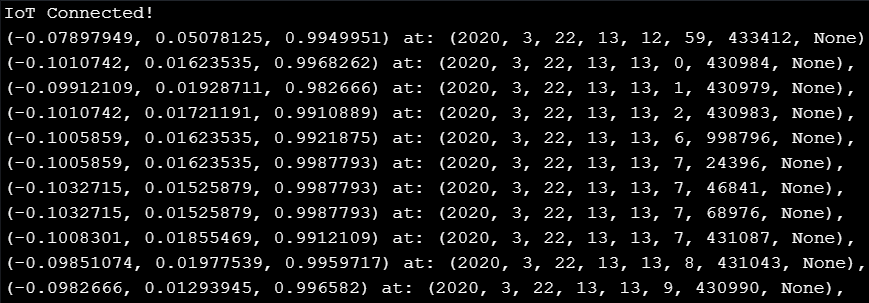
As you can see, the first four measurements happens in correct order with a second apart. The next four are delayed because of the publish to IoT Hub creates the delay.
Is there any way to work around this?
-
@railmonitor maybe multithreaded? https://docs.pycom.io/firmwareapi/micropython/_thread
-
@peterp Tried that, did not help. But i have now found out that the problem is caused by the timer-alarms alone, not because of actually transferring. If i put the transfer inside a while loop instead, with a 4 second sleep interval, i dont have the same delay... So if you want precise timing of events, you can only use a single timer-alarm, which is kinda bad, since Timer-alarms are otherwise a good way of ensuring precise timing..
Hello! It looks like you're interested in this conversation, but you don't have an account yet.
Getting fed up of having to scroll through the same posts each visit? When you register for an account, you'll always come back to exactly where you were before, and choose to be notified of new replies (either via email, or push notification). You'll also be able to save bookmarks and upvote posts to show your appreciation to other community members.
With your input, this post could be even better 💗
Register Login