General LTE-M (Cat M1) connection problems thread 2020
-
So specific issues don't get mixed up or lost in one thousands other threads I'm starting this thread to collect all general issues with Cat M1 connections.
Please post your connection reports here if you have problems connecting to a public Cat M1 network.
Please include at a minimum operator, country, SIM card used
It would help if you know the APN and frequency bands used
If you have a more specific issue, e.g. using an LTE simulator please post a new thread.
Thank youCountry= Mexico
I use Fipy LTE-M
SIM CARD=Vasanta
Operator= Vasanta.I used this code:
 import time

 from machine import RTC

 from network import LTE


 NTP_SERVER = "mx.pool.ntp.org"


 # Need to use global variables.

 # If in each function you delare a new reference, functionality is broken

 lte = LTE()

 rtc = RTC()


 # Returns a network.LTE object with an active Internet connection.
 def getLTE():

     # If already used, the lte device will have an active connection.

     # If not, need to set up a new connection.

     if lte.isconnected():

         return lte


     # Modem does not connect successfully without first being reset.

     print("Resetting LTE modem ... ", end='')

     lte.send_at_cmd('AT^RESET')

     print("OK")

     time.sleep(1)


     # While the configuration of the CGDCONT register survives resets,

     # the other configurations don't. So just set them all up every time.

     print("Configuring LTE ", end='')

     lte.send_at_cmd('AT+CGDCONT=1,"IP","internet.vasanta.com"')

     print(".", end='')

     lte.send_at_cmd('AT!="RRC::addscanfreq band=28 dl-earfcn=9410"')

     print(".", end='')

     lte.send_at_cmd('AT+CFUN=1')

     print(" OK")


     # If correctly configured for carrier network, attach() should succeed.

     if not lte.isattached():

         print("Attaching to LTE network ", end='')

         lte.attach()

         while(True):

             if lte.isattached():

                 print(" OK")

                 break

             print('.', end='')

             time.sleep(1)


     # Once attached, connect() should succeed.

     if not lte.isconnected():

         print("Connecting on LTE network ", end='')

         lte.connect()

         while(True):

             if lte.isconnected():

                 print(" OK")

                 break

             print('.', end='')

             time.sleep(1)


     # Once connect() succeeds, any call requiring Internet access will

     # use the active LTE connection.

     return lte


 # Clean disconnection of the LTE network is required for future

 # successful connections without a complete power cycle between.

 def endLTE():


     print("Disonnecting LTE ... ", end='')

     lte.disconnect()

     print("OK")

     time.sleep(1)

     print("Detaching LTE ... ", end='')

     lte.dettach()

     print("OK")


 # Sets the internal real-time clock.

 # Needs LTE for Internet access.

 def setRTC():


     # Ensures LTE session is connected before attempting NTP sync.

     lte = getLTE()


     print("Updating RTC from {} ".format(NTP_SERVER), end='')

     rtc.ntp_sync(NTP_SERVER)

     while not rtc.synced():

         print('.', end='')

         time.sleep(1)

     print(' OK')


 # Only returns an RTC object that has already been synchronised with an NTP server.

 def getRTC():


     if not rtc.synced():

         setRTC()


     return rtc


 # Program starts here.

 try:

     print("Initially, the RTC is {}".format("set" if rtc.synced() else "unset"))

     rtc = getRTC()

     while(True):

         print("RTC is {}".format(rtc.now() if rtc.synced() else "unset"))

         time.sleep(5)

 except Exception:

     pass # do nothing on error<


 finally:

     endLTE()132854.png)}
I get this:
 See https://docs.pycom.io/smart for details

 Initially, the RTC is unset

 Resetting LTE modem ... OK

 Configuring LTE .. OK

 Attaching to LTE network .... OK

 Connecting on LTE network  OK

 Updating RTC from au.pool.ntp.org ................................................................................................................................................................................................................................................................................
Why does it stay like a bug?
I am also trying to use the following code, but I get this other error.
Code:
import socket import ssl import time from network import LTE lte = LTE() # instantiate the LTE object lte.attach() # attach the cellular modem to a base station while not lte.isattached(): time.sleep(0.25) print(lte.connect()) # start a data session and obtain an IP address while not lte.isconnected(): time.sleep(0.25) s = socket.socket() s = ssl.wrap_socket(s) s.connect(socket.getaddrinfo('www.google.com', 443)[0][-1]) s.send(b"GET / HTTP/1.0\r\n\r\n") print(s.recv(4096)) s.close() lte.disconnect -
@Erick-Falcon Please include your code sections in lines with three backticks each: ```
Or use the </> button above the message window. Then the code will be properly formatted. -
@robert-hh Sorry, I don't understand you, what part of the code do you need?
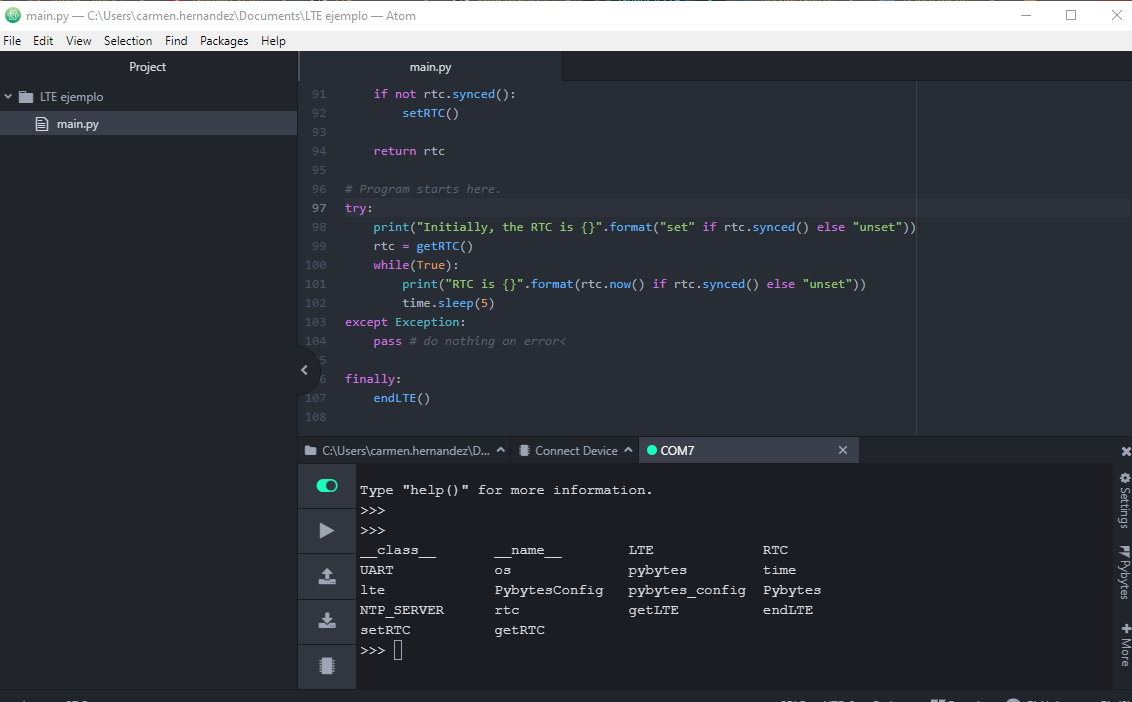
-
@robert-hh you posted some code. But that lost it's indentation, which makes it hard to read.
-
@robert-hh ok, I edited it
-
error:
See https://docs.pycom.io/smart for details
None
Traceback (most recent call last):
  File "main.py", line 16, in <module>
OSError: [Errno -80] MBEDTLS_ERR_NET_CONN_RESET
Pycom MicroPython 1.20.2.rc6 [v1.11-01f49f7] on 2020-02-28; FiPy with ESP32
Pybytes Version: 1.3.1
Type "help()" for more information.
>>>

Hello! It looks like you're interested in this conversation, but you don't have an account yet.
Getting fed up of having to scroll through the same posts each visit? When you register for an account, you'll always come back to exactly where you were before, and choose to be notified of new replies (either via email, or push notification). You'll also be able to save bookmarks and upvote posts to show your appreciation to other community members.
With your input, this post could be even better 💗
Register Login