Update problem with last updater
-
Hello
I have not updated my Lopys during 2 months, I waited more features in the firmware and I had other project to finish.
In december, I have updated the Lopy with updater : pycom_firmware_update_0.9.5.b1 all was OK.Now I use the last updater pycom_firmware_update_1.0.0.b3 and I am not able to update my Lopys.
When I launch the updater, I am waiting on this screen, nothing appends :
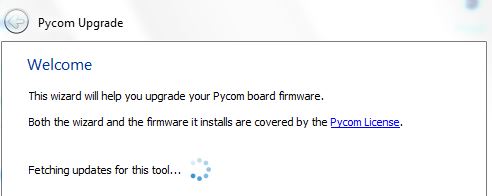
After more minutes if I clicks on Next, I can choose between "Lopy" and "Wipy 2" and if I clicks on Next I wait on this screen. Never the countries names are writed in the combobox, the updater waits.

In my company I am behind a proxy, it is a problem to download firmware?
Best regards
-
@ChristianGardens, the updater was improved in a way that you don't need to re-download and reinstall it every single time. Sadly, proxy connections are not supported at the moment.
-
@abilio I have installed the current updater to install the last firmware 1.5.0.b2.
In December I had used an old installer which include the firmware 0.9.5.b1.If your updater do not run behind proxy it is a big problem for me. How to proceed to update my Lopys. Actually I have firmware 0.9.5.b1.
-
@abilio I have used with success this method [https://forum.pycom.io/topic/517/downgrading-firmware-advanced-users](link url) to update my Lopy with the firmware 1.3.0.b1.
My question where can I find the last firmware 1.5.0.b.2 to download it. It is not listed on this web page.
-
@abilio Daniel sent me by mail the last firmware. I have updated manually my Lopys. It is OK
Thank for your help
Hello! It looks like you're interested in this conversation, but you don't have an account yet.
Getting fed up of having to scroll through the same posts each visit? When you register for an account, you'll always come back to exactly where you were before, and choose to be notified of new replies (either via email, or push notification). You'll also be able to save bookmarks and upvote posts to show your appreciation to other community members.
With your input, this post could be even better 💗
Register Login