LoPy REPL in VSCode not working with firmware higher then 1.20.1
-
Hello,
I just started on using my LoPy4 with VSCode (Windows 10 64bit) on top of a PySense. First I updated the firmware on the PySense as well as on the LoPy4 to the latest version (1.20.2.rc7). I then couldn't connect to the LoPy4 with the REPL in VSCode. After trying a lot of thing I found out, that the REPL console only works if I downgrade the firmware on the LoPy4 to version 1.20.1. I have tried every single version in between.
Any of the newer firmwares (1.20.1.r1, 1.20.1.r2,....1.20.2.rc7 ) doesn't work and I can't use the REPL an/or program the LoPy4.Is there something I am missing? Does anyone know what to do?
I have seen similar posts with same problem with the firmware but different tool chain and sensor board. -
@dyhrberg I experience exactly the same problem since several months. Very annoying. I am afraid this is something that the Pycom people need to look into.
My VScode configuration is as follows:
Version: 1.45.1 (user setup)
Commit: 5763d909d5f12fe19f215cbfdd29a91c0fa9208a
Date: 2020-05-14T08:27:35.169Z
Electron: 7.2.4
Chrome: 78.0.3904.130
Node.js: 12.8.1
V8: 7.8.279.23-electron.0
OS: Windows_NT x64 10.0.17763And I use Pymakr 1.1.6
-
Can you connect via Pymakr in Atom and Putty/minicom?
Can you connect via Pybytes/Telnet/FTP? -
With firmware 1.20.1
os.uname() yields the following:
(sysname='LoPy4', nodename='LoPy4', release='1.20.1', version='v1.11-12f4ce0 on 2019-10-06', machine='LoPy4 with ESP32', lorawan='1.0.2', sigfox='1.0.1', pybytes='1.1.2')
ways to connect to the device:
Pymakr in VScode: OK
Pymakr in Atom: OK
Putty via wifi: OK
Putty via COM port (usb): OKWith firmware 1.20.2.rc7
ways to connect to the device:
Pymakr in VScode: can’t connect
Pymakr in Atom: can’t connect
Putty via COM port (usb): can’t connect
Putty via wifi: lopy4 doesn’t show up as wifi network, and I can’t check wlan settings of lopy4 device as I cannot connect to it -
hi @jand,
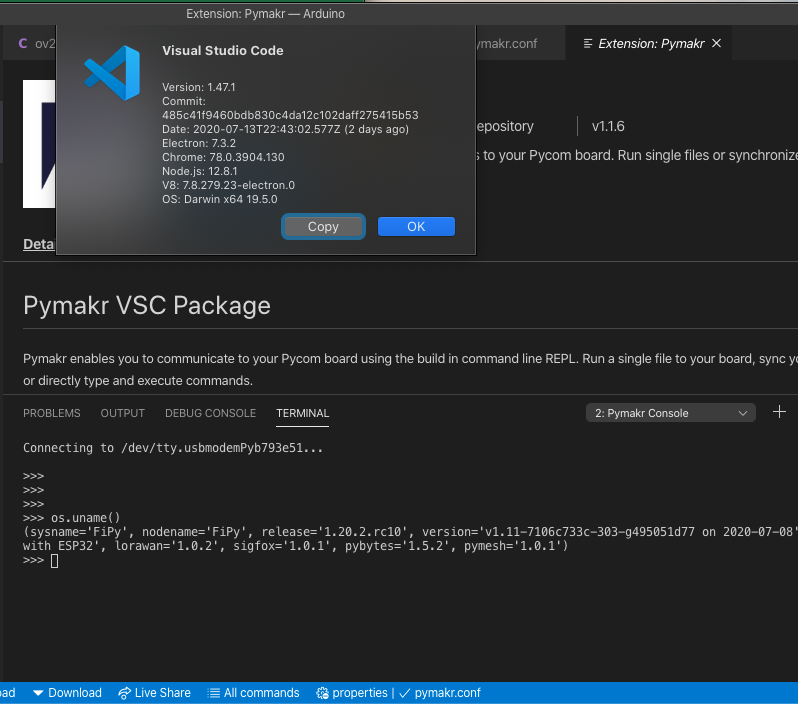
I've just tried with the latest v1.20.2.rc10 and VSC+Pymakr connection over USB works fine (Fipy + Expansion Board v3.1).
-
@jand said in LoPy REPL in VSCode not working with firmware higher then 1.20.1:
Hi @jand. I was about to ask whether you could try with another computer with Linux or MacOS, but now I re-read this and I'm wondering
With firmware 1.20.2.rc7
ways to connect to the device:
Pymakr in VScode: can’t connect
Pymakr in Atom: can’t connect
Putty via COM port (usb): can’t connect
Putty via wifi: lopy4 doesn’t show up as wifiSo, once you have 1.20.2.rc7 you can't connect at all anymore? Including COM port. How do you go to any other version? The firmware updater also connects via the COM port ...
-
@peterp With the firmware updater I can always connect. So I can always install another version. When I install again 1.20.1 with the firmware updater, I can connect again from VSC.
I now analysed again what is happening.
Step 1: I install firmware 1.20.1 with the firmware updater. Next I can connect from VSC to the lopy4 (via USB cable) without any problem. To make sure that the problem is not due to a faulty script, I removed all scripts and made sure the module only contains an empty main.py (only containing '# main.py -- put your code here!') and an empty boot.py (only containing '# boot.py -- run on boot-up')Step 2: I closed VSC, started the firmware updater and now installed 1.20.1.r1 [pybytes]. The firmware is installed without a problem, but I notice that when the lopy4 reboots, the RGB led blinks red for 2 seconds before it goes to the heartbeat. Next I close the firmware updater, and open VSC again. I cannot connect anymore. When I reset the module with the reset button, the RGB led blinks red again for 2 seconds, and the pymakr console in VSC shows the following:
ets Jun  8 2016 00:22:57

rst:0x1 (POWERON_RESET),boot:0x12 (SPI_FAST_FLASH_BOOT)
configsip: 0, SPIWP:0xee
clk_drv:0x00,q_drv:0x00,d_drv:0x00,cs0_drv:0x00,hd_drv:0x00,wp_drv:0x00
mode:DIO, clock div:1
load:0x3fff8020,len:8
load:0x3fff8028,len:2136
load:0x4009fa00,len:19880
entry 0x400a05d0
So at startup there is some communication to the pymakr console, but the boot process does not complete (or at least, we do not receive the complete messages from the reboot). And I cannot connect anymore, I don't get the prompt. The same also happens with a safe boot.
What is the meaning of this red led? It is for sure not something in my scripts, because I removed all scripts. And it blinks red only from firmware 1.20.1.r1 [pybytes] onwards.
Step 3: I also tried some more recent versions like 1.20.2.rc10 [pybytes] and 1.20.2.rc10 [pygate]. It all give the red blinking led at startup and I cannot connect.
That red led also blinks if I power the lopy4+expansion board from a battery (without any usb cable and computer attached). So it is a problem in the booting with the firmware. It think it has nothing to do with the laptop or its operating system etc. Also, I reproduced the problem with another lopy4 connected to another expansion board.
If you cannot reproduce it, I may show you what happens in a Skype session (in which I share my laptop screen and I show you the RGB led blinking red at startup).
-
@peterp I finally found the solution myself: when updating the firmware I needed to request that the file system is erased during the update. That avoids the problem. I have no idea why that is.
-
-
For those who are still facing this issue, I solved it on two of my LoPy4s by updating first to 1.20.2.rc6 and then to a later version, 1.20.2.r4 in my case. Seems there is an issue doing to straight update from 1.20.1 or earlier to the latest version.
-
@peterp I'm stumbling on this old issue as it seems to match what I am finding now -- this is a blocker for me.
To answer the questions:
I can connect in everything, but the serial connection seems to be one-way. I get reset logs back from the device, but I cannot get into the REPL, update, or control it in any way.
The connection behaviour seems identical in Pymakr, npmjs mctl, and even the Mac screen program at 115200. No idea about Pybytes because I'm not competent to use it.
-
@Stuart-Watt said in LoPy REPL in VSCode not working with firmware higher then 1.20.1:
@peterp I'm stumbling on this old issue as it seems to match what I am finding now -- this is a blocker for me.
To answer the questions:
I can connect in everything, but the serial connection seems to be one-way. I get reset logs back from the device, but I cannot get into the REPL, update, or control it in any way.
The connection behaviour seems identical in Pymakr, npmjs mctl, and even the Mac screen program at 115200. No idea about Pybytes because I'm not competent to use it.
Let's stick to your own thread https://forum.pycom.io/topic/7305/after-firmware-update-to-1-20-2-r4-serial-is-broken otherwise we risk mixing unrelated issues

Hello! It looks like you're interested in this conversation, but you don't have an account yet.
Getting fed up of having to scroll through the same posts each visit? When you register for an account, you'll always come back to exactly where you were before, and choose to be notified of new replies (either via email, or push notification). You'll also be able to save bookmarks and upvote posts to show your appreciation to other community members.
With your input, this post could be even better 💗
Register Login