Pygate - ethernet reliability issues
-
Hi,
Been using my pygate with POE for a while now and I notice that it frequently stops communications over ethernet and has to be reset or power cycled to get it to work again. My code is based on the examples in the documentation.
I've not tried the same tests with wifi yet.
Has anyone else experienced this?
Thanks
Andrew
-
Hi,
I cannot confirm your problem.
For me, the Pygate with PoE has been working correctly for several days.
Unfortunately you do not specify which board you use on the PyGate, so only a few general tips:-
Is the firmware on the board up to date and did you select PyGate in the firmware programming tool?
-
Did you cut off the pins of the RJ45 socket on the bottom of the PoE module to prevent shortcuts with the heatsink?
-
Maybe your PyGate or PoE module is defective. In this case, please contact sales@pycom.io.
Here is my code that works with Ethernet:
boot.py# boot.py -- run on boot-up import machine import pycom # We want to save a little bit power # Disable Heartbeat LED pycom.heartbeat_on_boot(False) # Disable WIFI completely pycom.wifi_on_boot(False) # Proceed with main.py machine.main('main.py')from network import ETH from machine import RTC import time import machine import pycom # Define callback function for Pygate events def machine_cb (arg): evt = machine.events() if (evt & machine.PYGATE_START_EVT): # Green pycom.rgbled(0x103300) elif (evt & machine.PYGATE_ERROR_EVT): # Red pycom.rgbled(0x331000) elif (evt & machine.PYGATE_STOP_EVT): # RGB off pycom.rgbled(0x000000) # register callback function machine.callback(trigger = (machine.PYGATE_START_EVT | machine.PYGATE_STOP_EVT | machine.PYGATE_ERROR_EVT), handler=machine_cb) # Connect to Ethernet Network eth = ETH() eth.ifconfig(config=('172.17.1.5','255.255.255.0','172.17.1.1','172.17.1.1')) while not eth.isconnected(): time.sleep(1) print("") print("ETH Connection established") # Sync time via NTP server for GW timestamps on Events rtc = RTC() rtc.ntp_sync(server="0.de.pool.ntp.org") # Read the GW config file from Filesystem fp = open('/flash/config.json','r') buf = fp.read() # Start the Pygate machine.pygate_init(buf)Hope this helps, best regards
Peter -
-
I'm using the WiPy 3.0 with PyGate.
-
Lopy4 here buy got a wipy 3 on order as I need the lopy4 elsewhere
-
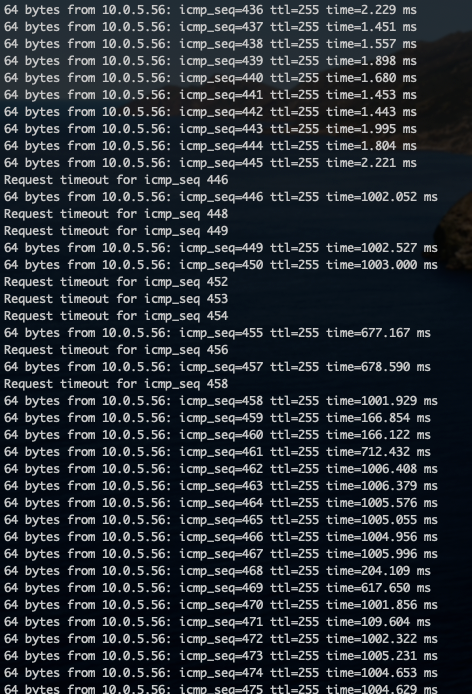
@thinginnovations I'm having a similar issue that you describe. Unit powers up fine, and after a period of time (30 min~) the latency from a ping increases dramatically (1ms to 1000ms) and the unit loses connectivity fully and has to be power cycled to respond again.
-
@tronto said in Pygate - ethernet reliability issues:
@thinginnovations I'm having a similar issue that you describe. Unit powers up fine, and after a period of time (30 min~) the latency from a ping increases dramatically (1ms to 1000ms) and the unit loses connectivity fully and has to be power cycled to respond again.
Is this with or without lora gateway? Can you reproduce it without gateway? Is it happening once, sometimes, always? Is it with POE or just Ethernet?
-
@peterp Pygate is the lora gateway!
-
I've changed the LoPy4 for a WiPy3, still using POE Ethernet for backhaul to The Things Network. It barely lasts overnight.
-
@thinginnovations said in Pygate - ethernet reliability issues:
@peterp Pygate is the lora gateway!
Sure. I was trying to suggest steps to narrow down the problem.
I.e., establish an eth connection and use it continuously for some up/downloads, but do NOT use the gateway functionality. Is the connection stable? If yes, then the counter test could be gateway over WiFi.
-
Hi,
ok. I can confirm that the PyGate with WiPy3 stops responding to PING requests a few minutes after startup with PoE.
But I can't confirm that the PyGate didn't work anymore. The Gateways status within the TTN Console is updated every 30 Seconds or so for the last 15 days.Hope this helps
Peter -
@schmelpe given the timeframes announced by several people (hours or days) I was wondering if maybe there was a link with DHCP lease times or something similar. But if you see issues after a few minutes, unless your DHCP leases are extremely short, that’s probably not the culprit.
Is the “stops pinging after a few minutes” repeatable? Is it always the same time/number of pings? Are you pinging from a box on the same network or a different one?
-
@jcaron I found an interesting thing.....
DHCP Lease is set to 8 hours on my router.
-
During my tests yesterday, my Pygate stops answering to a PING after 1 or 2 minutes after powering up the device (remember, it runs 15 days or so 24/7 and was really hot). Yesterday afternoon I disconnected the Pygate because one of my Sensors didn't Join via OTAA (a known PyGate problem).
-
This morning I powerded up the PyGate again (ca. 29°C room temperature) and the PyGate always answers to a PING.
##########################################
### PyGate powerded up in "cold" condition
##########################################
PS C:\WINDOWS\system32> date

Wednesday, August 12, 2020 12:05:15 PM

PS C:\WINDOWS\system32> ping 192.168.1.5

Pinging 192.168.1.5 with 32 bytes of data:
Reply from 192.168.1.5: bytes=32 time=6ms TTL=255
Reply from 192.168.1.5: bytes=32 time=2ms TTL=255
Reply from 192.168.1.5: bytes=32 time=2ms TTL=255
Reply from 192.168.1.5: bytes=32 time=2ms TTL=255

Ping statistics for 192.168.1.5:
    Packets: Sent = 4, Received = 4, Lost = 0 (0% loss),
Approximate round trip times in milli-seconds:
    Minimum = 2ms, Maximum = 6ms, Average = 3ms
PS C:\WINDOWS\system32> date

##########################################
### PyGate is in "warm/hot" condition
##########################################
PS C:\WINDOWS\system32> date

Wednesday, August 12, 2020 12:21:35 PM

PS C:\WINDOWS\system32> ping 192.168.1.5

Pinging 192.168.1.5 with 32 bytes of data:
Reply from 192.168.1.5: bytes=32 time=76ms TTL=255
Request timed out.
Request timed out.
Request timed out.

Ping statistics for 192.168.1.5:
    Packets: Sent = 4, Received = 1, Lost = 3 (75% loss),
Approximate round trip times in milli-seconds:
    Minimum = 76ms, Maximum = 76ms, Average = 76ms

PS C:\WINDOWS\system32> date

Wednesday, August 12, 2020 12:26:08 PM


PS C:\WINDOWS\system32> ping 192.168.1.5

Pinging 192.168.1.5 with 32 bytes of data:
Reply from 192.168.1.5: bytes=32 time=843ms TTL=255
Request timed out.
Reply from 192.168.1.5: bytes=32 time=421ms TTL=255
Request timed out.

Ping statistics for 192.168.1.5:
    Packets: Sent = 4, Received = 2, Lost = 2 (50% loss),
Approximate round trip times in milli-seconds:
    Minimum = 421ms, Maximum = 843ms, Average = 632ms
PS C:\WINDOWS\system32>
As you can see, the PyGate starts stop responding to a PING request when it becomes warm/hot...
But, the connection to TTN is working and refreshes every 30 seconds. Only PING is no longer working.
Don't know how to figure out the problem.Hope this helps
Peter -
-
@peterp Using a pygate lora gateway. Attached is a photo of ping results from local network using dhcp and POE+ ethernet. Happens every time. Disabled lora gateway and trying with WIFI (powered via POE) to narrow it down. Will follow up.
-
Hi,
I believe the issue is not heat related (I just tested the Pygate (with the lora concentrator disabled)) and PyEthernet. Applied heat with a heatgun and checked the ping times. I was not able to find any differences, with heat applied of about 100*C.Now I did some further testing, and sometimes pings are not getting through with the Gateway enabled or disabled. I cannot seem to reproduce the case of @tronto Where the ping times significantly increase after a few timeouts.
Pings are generally <10ms on our network, with few going above that..
Also, I see no relation in the lost pings compared to the Pygate dropping any lora packets, but please do let us know of your findings!
Btw @schmelpe, you mention OTAA not joining being a known Pygate problem, could you elaborate? I believe the issue you are referring to has to do with frequency plan settings not being in sync..
Best,
Gijs -
@Gijs My issue seems to be related to ethernet communication. I don't seem to have the same issue using wifi for communication (and power from POE). Have tried two different brands of switch (ubnt + cisco) with same results with eventual ethernet drop out.
I believe both switches saw the POE module as 10FDX if that makes any difference.
-
Hi @Gijs ,
no, I don't think so.
Please look at this Thread: https://forum.pycom.io/topic/6206/cannot-make-join-otaa-timely-with-pygate-and-lopy4.
I'm using a WiPy3 with firmware 1.20.2rc10 and have exact the same problem.
OTAA JOIN request over Pygate do not work for me (EU868), OTAA JOIN requests with my other TTN Gateway are working fine within two or three attempts.
You'll find my code in the this thread.
config.json:{ "SX1301_conf": { "lorawan_public": true, "clksrc": 1, "antenna_gain": 0, "radio_0": { "enable": true, "type": "SX1257", "freq": 867500000, "rssi_offset": -164.0, "tx_enable": true, "tx_freq_min": 863000000, "tx_freq_max": 870000000 }, "radio_1": { "enable": true, "type": "SX1257", "freq": 868500000, "rssi_offset": -164.0, "tx_enable": false }, "chan_multiSF_0": { "enable": true, "radio": 1, "if": -400000 }, "chan_multiSF_1": { "enable": true, "radio": 1, "if": -200000 }, "chan_multiSF_2": { "enable": true, "radio": 1, "if": 0 }, "chan_multiSF_3": { "enable": true, "radio": 0, "if": -400000 }, "chan_multiSF_4": { "enable": true, "radio": 0, "if": -200000 }, "chan_multiSF_5": { "enable": true, "radio": 0, "if": 0 }, "chan_multiSF_6": { "enable": true, "radio": 0, "if": 200000 }, "chan_multiSF_7": { "enable": true, "radio": 0, "if": 400000 }, "chan_Lora_std": { "enable": true, "radio": 1, "if": -200000, "bandwidth": 250000, "spread_factor": 7 }, "chan_FSK": { "enable": true, "radio": 1, "if": 300000, "bandwidth": 125000, "datarate": 50000 }, "tx_lut_0": { "pa_gain": 0, "mix_gain": 5, "rf_power": 9, "dig_gain": 3 }, "tx_lut_1": { "pa_gain": 0, "mix_gain": 5, "rf_power": 9, "dig_gain": 3 }, "tx_lut_2": { "pa_gain": 0, "mix_gain": 5, "rf_power": 9, "dig_gain": 3 }, "tx_lut_3": { "pa_gain": 0, "mix_gain": 5, "rf_power": 9, "dig_gain": 3 }, "tx_lut_4": { "pa_gain": 0, "mix_gain": 5, "rf_power": 9, "dig_gain": 3 }, "tx_lut_5": { "pa_gain": 0, "mix_gain": 5, "rf_power": 9, "dig_gain": 3 }, "tx_lut_6": { "pa_gain": 0, "mix_gain": 5, "rf_power": 9, "dig_gain": 3 }, "tx_lut_7": { "pa_gain": 0, "mix_gain": 6, "rf_power": 11, "dig_gain": 3 }, "tx_lut_8": { "pa_gain": 0, "mix_gain": 5, "rf_power": 13, "dig_gain": 2 }, "tx_lut_9": { "pa_gain": 0, "mix_gain": 8, "rf_power": 14, "dig_gain": 3 }, "tx_lut_10": { "pa_gain": 0, "mix_gain": 6, "rf_power": 15, "dig_gain": 2 }, "tx_lut_11": { "pa_gain": 0, "mix_gain": 6, "rf_power": 16, "dig_gain": 1 }, "tx_lut_12": { "pa_gain": 0, "mix_gain": 9, "rf_power": 17, "dig_gain": 3 }, "tx_lut_13": { "pa_gain": 0, "mix_gain": 10, "rf_power": 18, "dig_gain": 3 }, "tx_lut_14": { "pa_gain": 0, "mix_gain": 11, "rf_power": 19, "dig_gain": 3 }, "tx_lut_15": { "pa_gain": 0, "mix_gain": 12, "rf_power": 20, "dig_gain": 3 } }, "gateway_conf": { "gateway_ID": "myID", "server_address": "router.eu.thethings.network", "serv_port_up": 1700, "serv_port_down": 1700, "keepalive_interval": 10, "stat_interval": 30, "push_timeout_ms": 100, "forward_crc_valid": true, "forward_crc_error": false, "forward_crc_disabled": false } }I'll reflash the actual firmware 1.20.2 today, but I think it won't help because it's the same as 1.20.2rc10.
There is no new firmware for the PyGate available. 1.20.2rc10 seems to be the last one.Best regards
Peter -
@tronto The PyEthernet has a 10/100 Mbps ethernet (in 10 mode) controller that talks over an SPI bus at 8MHz. In that datalink, it is probable some incoming packets will get dropped. Ive had mine run over the weekend and it is still connected to TTN (on a netgear gigabit switch). I have heard of the possibility that using a 10 Mbps device on a switch could drop all the traffic through the switch to 10 Mbps (I have yet to see a reproduction with the PyEthernet though). Another issue can be related to the single jumper on the PyEthernet (close to the Ethernet port). Some (older) PoE adapters require a minimum amount of current to be drawn or they will switch off. The Pygate is generallly below the minimum, causing the PoE to dropout for a second, inserting the jumper will connect a default resistor load.
@schmelpe, I looked into the OTAA issue myself as well, and could only reproduce it (as the original problem states) by bodging of frequency settings.. Moreover, the OTAA join accept is still send out when the logs mention 'Ignored not rejected'. If you are experiencing LoRa OTAA issues at EU868MHz, with the frequency settings set correctly on all devices, please do let us know! (nb. Ill take up the firmware versioning with the firmware team, seems they missed to upload it!)
I am currently working on testing different frequency settings using the configuration files from here: https://github.com/TheThingsNetwork/gateway-conf and adding
		"gateway_ID": "XXXX",
		"keepalive_interval": 10,
		"stat_interval": 30,
		"push_timeout_ms": 100,
		"forward_crc_valid": true,
		"forward_crc_error": false,
		"forward_crc_disabled": false
at the bottom of the config file, within the closing brackets. Let me know if that works better for you! (ill add it to the other thread as well)
-
-
Sorry for the confusion!
The configuration files are very similar in the end, but I feel like the configuration provided by TTN is slightly better than the one we created ourselves, but let me know of your experiences! They also have examples for more regions than we do currently ;)Best,
Gijs -
@Gijs: Ok, understood. I'll update my PyGate in a few minutes and see the what's going on. :-)
Thanks, Peter

Hello! It looks like you're interested in this conversation, but you don't have an account yet.
Getting fed up of having to scroll through the same posts each visit? When you register for an account, you'll always come back to exactly where you were before, and choose to be notified of new replies (either via email, or push notification). You'll also be able to save bookmarks and upvote posts to show your appreciation to other community members.
With your input, this post could be even better 💗
Register Login