lte cat m-1 stuck at WAIT_RSSI
-
from network import LTE
import time
import socket

lte = LTE()
#when using verizon, use
#lte.init(carrier=verizon)
#when usint AT&T use,
#lte.init(carrier=at&t)

#some carriers do not require an APN
#also, check the band settings, for some carriers they auto-configure.
lte.attach(band= 20, apn="internet")
while not lte.isattached():
    time.sleep(0.25)
    print('.')
    print(lte.send_at_cmd('AT!="fsm"'))         # get the System FSM
print("LTE modem attached!")
lte.connect()
while not lte.isconnected():
    time.sleep(0.25)
    print('#')
    #print(lte.send_at_cmd('AT!="showphy"'))
    print(lte.send_at_cmd('AT!="fsm"'))
print("LTE modem connected!")

print(socket.getaddrinfo('pycom.io', 80))

lte.deinit()
Although I connected the antenna correctly, it gets stuck in WAIT_RSSI
ı already did documentation orders and firmware update.Could you show me a way?
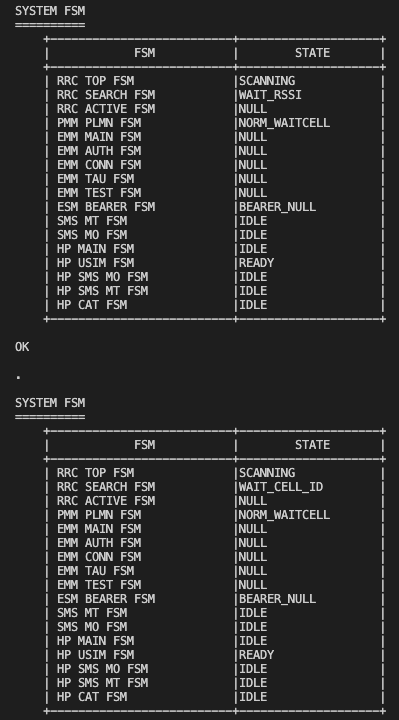
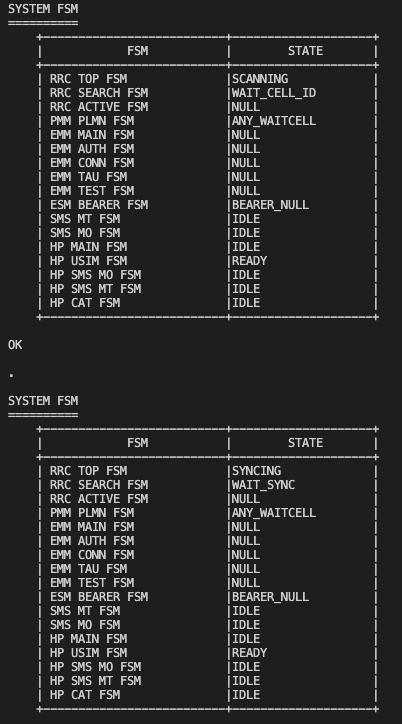
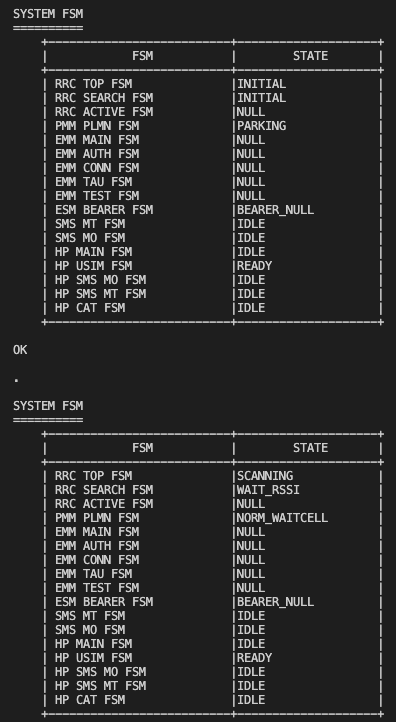
The process happens like this.
Thanks for your help -
Hi,
Make sure the antenna is also connected to the correct connector. Sometimes I make the mistake between a Fipy and GPy and attach the antenna on the LoRa connector accidentally.If that is not the case, check if you have coverage in your area. It could be the case that in your specific location (eg. if you are indoors), there is no coverage by your LTE provider / carrier.
-
This post is deleted! -
@Gijs ı connect antenna under the fipy and try it outside(coverage by your LTE provider / carrier) again it didn't work. Do you have any idea? Could it be about sim card.
Thanks again. -
When I insert no Simcard, the output of
print(lte.send_at_cmd('AT!="fsm"'))will give:SYSTEM FSM ========== +--------------------------+--------------------+ | FSM | STATE | +--------------------------+--------------------+ | RRC TOP FSM |CAMPED | | RRC SEARCH FSM |CAMPED_ANY | | RRC ACTIVE FSM |IDLE | | PMM PLMN FSM |ANY_CAMPED | | EMM MAIN FSM |NULL | | EMM AUTH FSM |NULL | | EMM CONN FSM |NULL | | EMM TAU FSM |NULL | | EMM TEST FSM |NULL | | ESM BEARER FSM |BEARER_NULL | | SMS MT FSM |IDLE | | SMS MO FSM |IDLE | | HP MAIN FSM |IDLE | | HP USIM FSM |ABSENT | <-------- | HP SMS MO FSM |IDLE | | HP SMS MT FSM |IDLE | | HP CAT FSM |NULL | +--------------------------+--------------------+I marked the line with HP USIM FSM = ABSENT. The simcard should be inserted with the missing triangle end first, and with the contacts to the board of course.
Were you able to check with your provider for the coverage map? Does your carrier provide the LTE CAT-M1? And of course, check the APN and band settings, but I believe those should give different results.
-
This post is deleted! -
-
@Gijs band is B20 and apn is "internet". ı checked. it would be sım pin problem. ı didn't set pin in code.
-
Hi,
It seems, in the second and third FSM call it is making good progess by "WAITING_CELL_ID" and "SYNCING", then failing somewhere in the process and returning to "SCANNING". In my testing, that only occured when there was no good connection possible, or the modem firmware was for the wrong version (can you check the modem firmware?) Please do remove the pin code from the simcard if it has one by default (there is an AT command for that).AT+CPIN? +CPIN: <code>Now I still believe, as the AT+CSQ command returns 99,99, there is no (or not enough) CATM1 coverage in your area. Even if I try without a simcard, my AT+CSQ returns 26,99 (RSSI, BER), as I am currently not attached to any network, or trying to attach, the Bit Error Rate is unknown. But I am currently not able to test that.
Best,
Gijs -
So, Was there a solution?
I have the same problem, with bouncing from Syncing to Scanning and the CSQ 99,99 .
Thanks.
Hello! It looks like you're interested in this conversation, but you don't have an account yet.
Getting fed up of having to scroll through the same posts each visit? When you register for an account, you'll always come back to exactly where you were before, and choose to be notified of new replies (either via email, or push notification). You'll also be able to save bookmarks and upvote posts to show your appreciation to other community members.
With your input, this post could be even better 💗
Register Login