Has anyone got the FiPy working with Twilio (T-Mobile) sim?
-
I'm now working on getting the LTE connection working on my FiPy. I'm still fumbling through documentation but so far I haven't been able to get the right combo of settings/commands to get LTE connected with my programmable wireless Twilio sim (not a super sim).
Does anyone have any advice or experiences they're willing to pass on? I'm super new to LTE to still learning how all the pieces fit together.
I've tried some APN settings from both Twilio documetation as well as T-Mobile documentation.
Following along with the code samples, it seems the modem never ends up
attaching so when I runlte.connect()it errors, telling me the modem isn't attached.When I run
print(lte.send_at_cmd('AT!="fsm"'))I get a very nice table of things I don't understand :). -
Somehow I pasted the same link twice. Here's the actual T-Mobile doc I'm looking at:
https://www.t-mobile.com/support/devices/not-sold-by-t-mobile/byod-t-mobile-data-and-apn-settings
and this one as well
-
If you look further down the pycom documentation page, there are explanations listed for the fsm output. Have a look at that!
Gijs
-
@Gijs Thank you. Somehow I missed those tables when viewing the page on my phone. My fault.
I'm still having trouble getting the FiPy to connect with my Twilio SIM but I'm not really sure how to debug. I'm also not sure if Twilio's "normal" SIMs have Cat-M1 capability.
For a telephony newbie like myself, I believe that NB-IoT is the newest protocol and not all SIMs support it. Twilio has a "super sim" that for sure can handle both Cat-M1 and NB-IoT, https://www.twilio.com/docs/iot/supersim.
Is it possible their "normal" SIM can do neither. What other protocols are there?
-
Hi,
No problem, I'll try to make it more clear!
There is indeed a difference between regular 'consumer phone' sims, and sims compatible with NB-IoT or CAT M1 (I have yet to see one thats compatible with both). I suspect when you have such a sim on hand (the latter), it will be explicitely mentioned in the documents supplied with it.A regular 4G simcard will (unfortunately) not work.
Best,
Gijs -
Thanks @Gijs, I bet that's what's going on here. I'm going to order a few of the Twilio Super SIMs and try again. They support both Cat-M1 and NB-IoT.
Since I will have the option for either protocol, is one of them preferred for people just starting out?
I read on the documentation that I'd need to flash new firmware onto FiPy that will support NB-IoT, which is newer and uses much less data. But is one "simpler" than the other?
-
Hi, depending on the type you choose, you have to update the modem firmware of the modem to reflect the correct version: https://docs.pycom.io/updatefirmware/ltemodem/
There are indeed several ways to update the firmware. It depends on the options (SD card, USB access, Python already installed etc.) you have available. I think all options are the same level of difficulty.
Let me know if you need additional information, I can add it to the documentation!Gijs
-
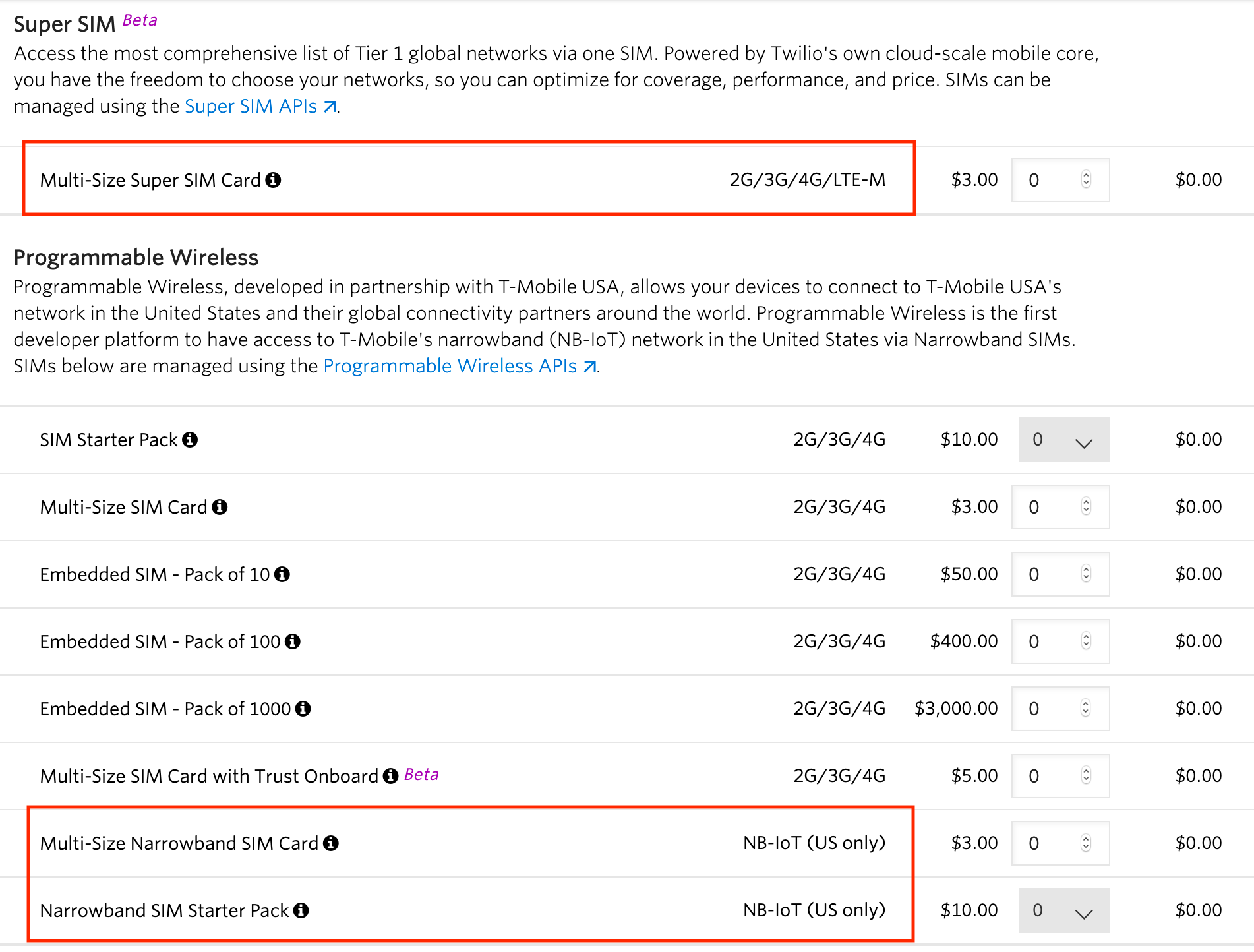
I've done some more digging into the different kinds of SIM cards Twilio offers and believe I've found my problem. Looks like you'll need either a Super SIM or a narrowband SIM. I was using one of the "regular" SIMs which is likely why it wasn't working for me. I've ordered one of each of the Super SIMs and narrowband SIMs and will update this thread once I get things working.
-
@Gijs It looks like the Super SIM will do Cat-M1 by default so I'm going to try that one first since it won't involve updating from the default firmware. Is my understanding correct here?
-
Yes, I believe we ship the modems with a CAT-M1 firmware!
-
For what it's worth, I've tried MANY times to connect my FiPy to Twilio (both their NBIoT specific sims and their standard iot sims). No luck. Spent hours back and forth with Twilio support and they ultimately gave up trying because they said the modem should work, but is not officially certified by TMobile.

Hello! It looks like you're interested in this conversation, but you don't have an account yet.
Getting fed up of having to scroll through the same posts each visit? When you register for an account, you'll always come back to exactly where you were before, and choose to be notified of new replies (either via email, or push notification). You'll also be able to save bookmarks and upvote posts to show your appreciation to other community members.
With your input, this post could be even better 💗
Register Login