Pycom Firmware Upgrade - Failed to connect to ESP32: Timed out
-
Good evening
Tryed to upgrade the firmware on a Lopy4 + 3.1 expansion board and it seems i was unable to no matter what i tryed.
Details:
-OS: Windows 10
-Checked COM port, and the port selected is the correct one
-Can connect to devices to upload/download code trough USB + IDE like Atom
-Have the latest version of the upgrade tool
-IDE is closed when tool is openThe error occurs when the tool tries to read information about the board with the following error:
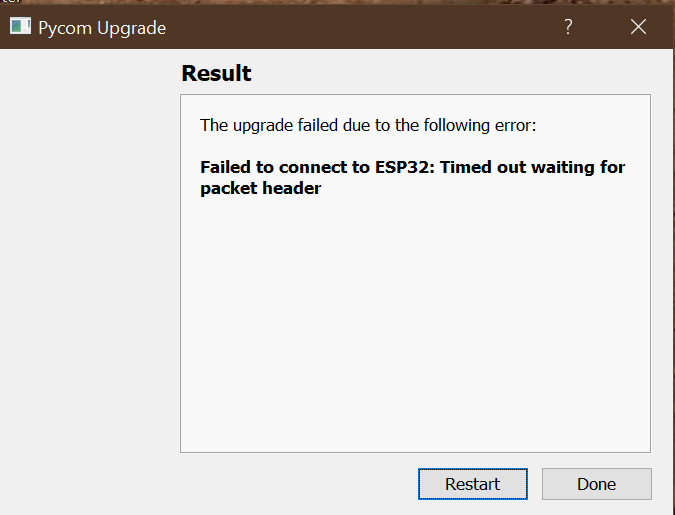
i do note that from the moment i try to use the tool, the expansion board led indicator named "LED" is blinquing quickly.
When the error happens, if i imediatly close the tool and open the IDE to see the output of the device, it seems he is in a loop with this mensage:
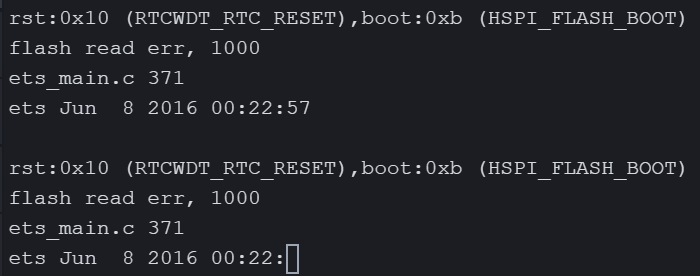
only way to get the LoPy to come back to normal is to either unpower it or by pressing the reset button on board.
Any sugestions?
extra note: was able to use the tool on a complitely diferent lopy4 and board the day before, so drivers or windows bugs shoulnt be a problem
-
Hi,
I have not seen this issue before, but it seems the device is stuck in a boot loop as it could not find a bootloader at 0x1000. Now this can (probably) be fixed when using the command line interface: https://docs.pycom.io/advance/cli/ but Im not 100% sure -
@Gijs will try, i dont have much experience with the cli. Any positive results i will post here. Meanwhile any others tips are welcome
Hello! It looks like you're interested in this conversation, but you don't have an account yet.
Getting fed up of having to scroll through the same posts each visit? When you register for an account, you'll always come back to exactly where you were before, and choose to be notified of new replies (either via email, or push notification). You'll also be able to save bookmarks and upvote posts to show your appreciation to other community members.
With your input, this post could be even better 💗
Register Login