read_battery_voltage() Voltage value to Battery Level
-
Hi all, have a FiPy & a Pysense with 2000mAh LiPo battery.
Found some good info on the forums to get its voltage from the pycoproc.py library.
Using it as follows:from pysense import Pysense py = Pysense() print(py.read_battery_voltage()) >> 4.656595What's the best way to convert that into a rough battery level precentage.
I thought perhaps the 1S chart values from here (https://blog.ampow.com/lipo-voltage-chart) but I imagine its not as simple as just doing the conversion math.
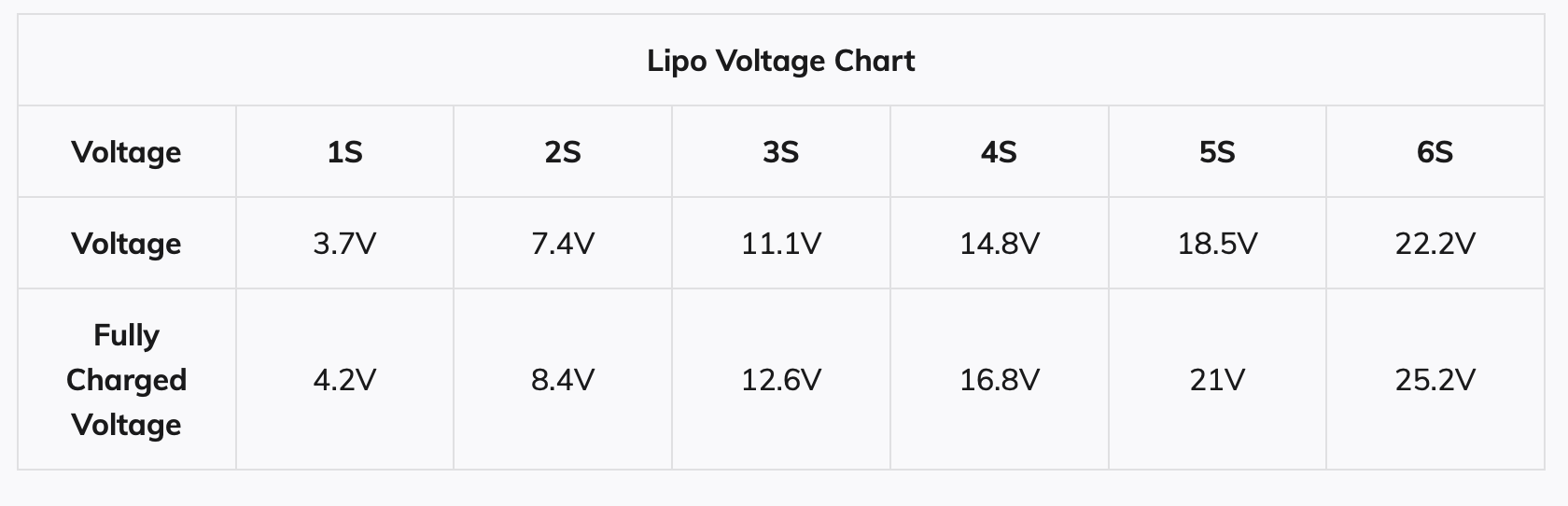
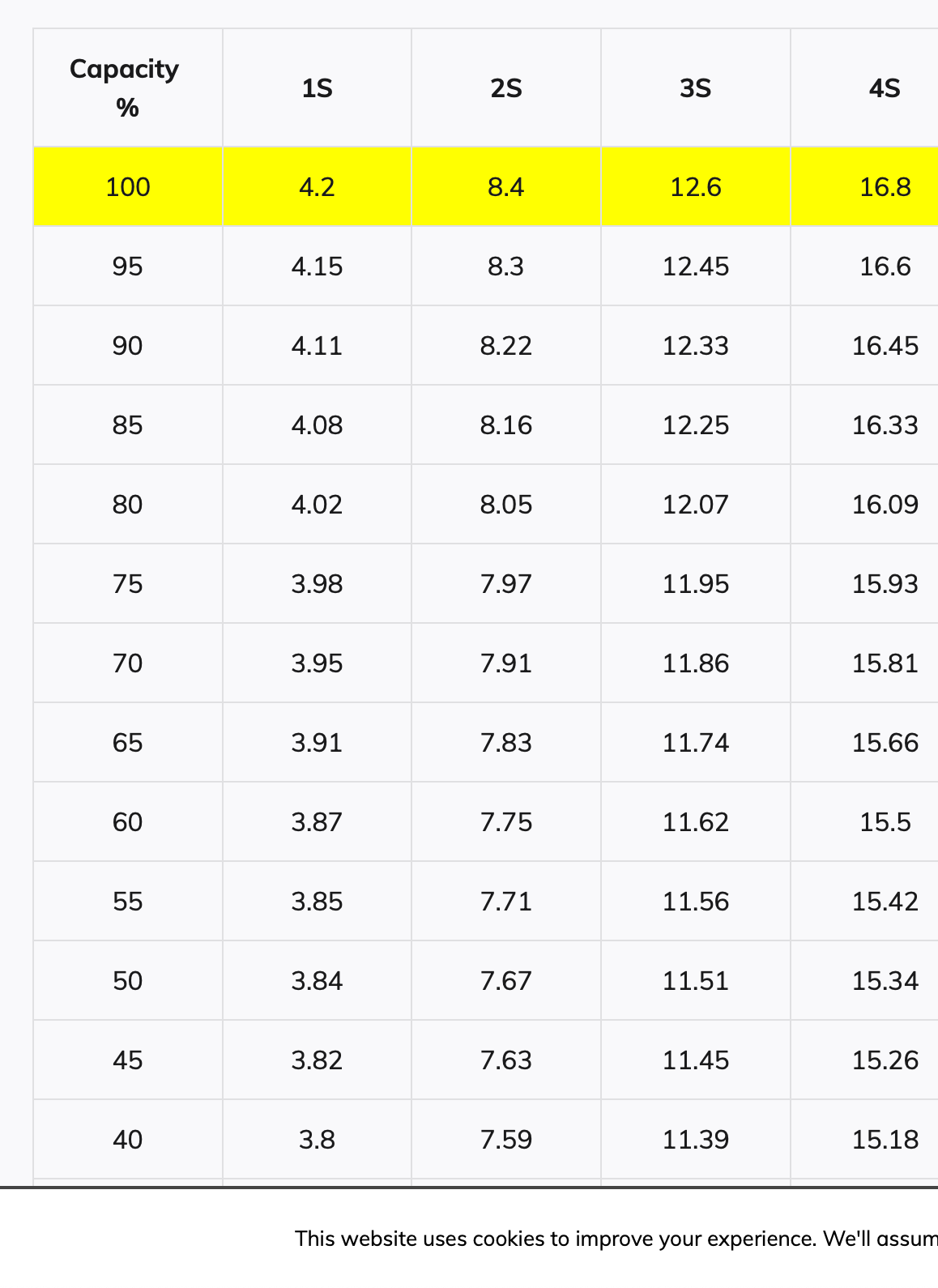
Is there anything I'm missing?
-
@barryjump no, it’s not that simple.
First, you should use the chart for the specific battery you are using. Even though batteries with the same chemistry should have similar profiles, it’s not a given that they are identical.
Next, battery discharge profiles can vary a lot with temperature and with the actual load (though this depends on the battery type – some are very sensitive to either or both, others much less).
Next, you’ll notice that the curve for LiPo batteries is quite steep when close to full charge and to low charge, and very flat in the middle part. It’s so flat that imprecisions in readings (ADC noise, temperature variations...) can result in wild fluctuations in the result.
I’m not quite convinced by the values in the table either.
You can definitely get a sense of the battery state (e.g. over 4 V means the battery is close to being fully charged). But it’s difficult to get an accurate and consistent status all along the discharge curve, especially along the pretty long and flat middle section. So you may end up with 3 states: pretty darn full, somewhere in the middle, nearly empty, but the first and last will be pretty short.
Of course YMMV depending on the environment (indoors vs outdoors), the specific battery type, the load profile...
-
@jcaron Good info thanks a bunch. Had a hunch that that was the case.
I think I'd be happy with a 0-25%, 25-50%, 50-75%, 100% scale so I might be able to get close to that as you mentioned. Basically pretty low res estimation would suffice for now.
-
@barryjump If you take 4.25v as fully charged and 3.25 as empty then (Vbatt-3.25)*100 is a quick & dirty battery percentage.
-
@barryjump A typical lipo discharge curve looks like this

If you want more precise results than a linear interpolation you could easily measure the curve with your device. Write a program with more or less constant power consumption, say sending the voltage every minute via WiFi. Then just record voltage over time. Inverting this curve gives time left until discharge (which you set as a given voltage) over voltage and you can use this result to get a quite precise percentage of charge for your device and ambient conditions for any voltage. The curve changes as the battery degrades, laptops and phones remeasure it over time.
-
@claus and @kjm excellent tips guys thank you.
I'm going to do both, first with the quick and dirty:battery_voltage = read_battery_voltage() roughbatt = (battery_voltage - 3.25)*100 print(roughbatt) >> 92.00001Whilst also recording raw timestamped voltage from full to empty (last transmission) a few times and basically just dividing that scale and tweaking above.
Hello! It looks like you're interested in this conversation, but you don't have an account yet.
Getting fed up of having to scroll through the same posts each visit? When you register for an account, you'll always come back to exactly where you were before, and choose to be notified of new replies (either via email, or push notification). You'll also be able to save bookmarks and upvote posts to show your appreciation to other community members.
With your input, this post could be even better 💗
Register Login