WLAN connection problem "dhcps: send_nak>>udp_sendto result 0"
-
Hi everyone,
I've recently connected my FiPy device to WLAN and began experiencing the persistent message:
dhcps: send_nak>>udp_sendto result 0WLAN is still able to connect and I have successfully been able to send messages to Adafruit IO, however, this error-like message is very bothering as it continues printing in what I believe is in a thread. Meaning even when I do Ctrl+C the message still persists.
My code in boot.py is as follows:
import network

def do_connect():
    import network
    wlan = network.WLAN(network.WLAN.STA)

    if not wlan.isconnected():
        print('connecting to network...')
        wlan.connect('ssid',  auth=(network.WLAN.WPA2, 'password'))
        while not wlan.isconnected():
            pass
    print('network config:', wlan.ifconfig())

do_connect()
Is there something I am missing or doing wrong that's causing this message? Would greatly appreciate any guidance out of this annoying issue!
Thank you.
-
@Anthony-Leung what firmware version are you running? This log should only appear of the ESP-IDF has been compiled with the DHCP server debug flag set.
Also, it is related to the DHCP server, which should only be running if in AP (or AP+STA) mode.
-
Hi @jcaron! I've taken a screenshot of my board's information. It looks a bit corrupted.
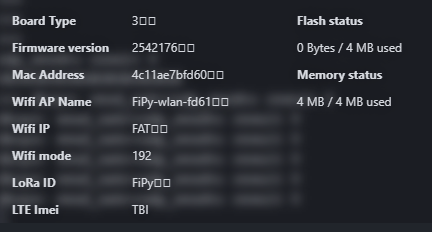
Because of this I am trying to reinstall firmware however this is the error I am getting:
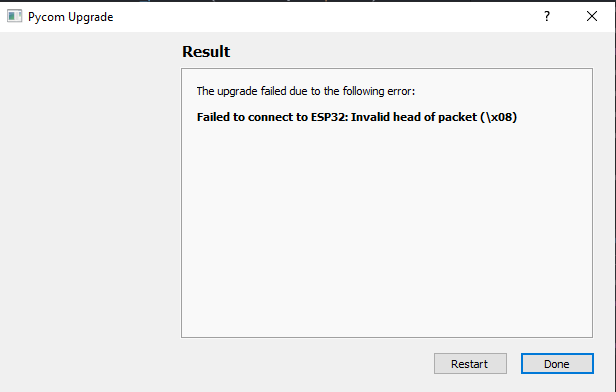
How should I go about this?
Thank you again!
-
Okay great news.
After I connected up the expansion board 3.1 to my FiPy instead of FTDI I was able to reinstall the firmware. This resolved the issue.
Thank you @jcaron for pointing me to check the firmware!
-
@Anthony-Leung Updating with a FTDI adapter works, if you pull P2 low and push reset before starting the update. This will put the device into bootloader state.
-
Thanks @robert-hh ! I will make note of that for next time :)
-
Hey @jcaron I've come back realising that I had used AP+STA mode prior to using STA mode. I actually need to use AP+STA mode for my project and once activating it, I do get
dhcps: send_nak>>udp_sendto result 0continuously. I am not too sure what these mean however it doesn't impede functionality as of yet.What function/command would I need to run in order to stop these from printing?
Thank you!
-
@Anthony-Leung I suppose the firmware or the underlying ESP-IDF starts the dhcp server when in AP or AP+STA mode and doesn’t stop it when you switch. Not sure if there’s anything you could do from your micropython code to stop the messages, but I would believe them to be pretty harmless, though one would need to recheck the code which prints this.
Things you could try include switching off WiFi via WLAN.deinit() and then switching it on again. Or worst case, reboot the board between the two modes.

Hello! It looks like you're interested in this conversation, but you don't have an account yet.
Getting fed up of having to scroll through the same posts each visit? When you register for an account, you'll always come back to exactly where you were before, and choose to be notified of new replies (either via email, or push notification). You'll also be able to save bookmarks and upvote posts to show your appreciation to other community members.
With your input, this post could be even better 💗
Register Login