Lorawan datarate
-
Hello,
I'm using the Fipy with a single Channel Gateway to TTN.# set the LoRaWAN data rate s.setsockopt(socket.SOL_LORA, socket.SO_DR, 5)What does the '5' mean? Is there a documentation of the datarate (dr) values (0-7)?
In the Lora Documentation (https://docs.pycom.io/firmwareapi/pycom/network/lora/) it reads:
In LoRa.LORAWAN mode, only adr, public, tx_retries and device_class are used. All the other params will be ignored as they are handled by the LoRaWAN stack directly.
So there is no way to set the spreading factor manually? -
Hello
the spreading factor is a parameter used by (raw) LoRa.
You can set it using the sf method of a LoRa object instance.
Eg :from network import LoRa import socket # A raw LoRa interface(note the mode) LoRa_Interface = Lora(mode=LoRa.LORA, region=LoRa.EU868, public=False) #Now I set the SF parameter to 12 for the interface LoRa_Interface.sf(12) #And now a LoRa Socket LoRa_Socket = socket.socket(socket.AF_LORA, socket.SOCK_RAW)Now, the line you talk about is a LoRaWAN parameter:
Eg# A raw LoRaWAN interface(note the mode) LoRaWAN_Interface = Lora(mode=LoRa.LORAWAN, region=LoRa.EU868, public=False) #And now a LoRaWAN Socket (unfortunately the creation have the same parameters) s = socket.socket.(socket.AF_LORA, socket.SOCK_RAW) # Set the LORAWAN DR to 5. s.setsockopt(socket.SOL_LORA, socket.SO_DR, 5)You may find a documentation about DataRate in LoRaWAN specification (or here)
To summarize :
-
Spreading Factor is a raw LoRa parameter
-
DataRate is a LoRaWAN parameter
Note that DataRate is related to Speading Factor but they are not the same.
Hope this help.
-
-
@Hella-Koe The data rate is a combination of modulation (LoRa, FSK, LR-FHSS…), bandwidth (in RF terms, expressed in kHz, like 125 kHz or 500 kHz) and spreading factor.
Each region defines its own set of data rates. For instance, in the EU868 region:
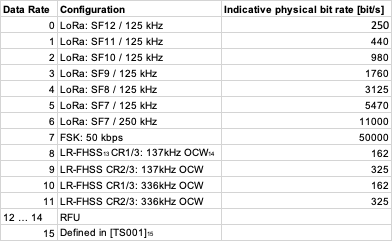
(8 to 11 and 15 are new and AFAIK not available on LoPys).They're defined as combinations rather than independent settings because there are quite a few rules which map a given data rate to another (for ADR or RX1DROffset), and that also allows capabilities to be declared with a simple 2-byte bitfield.
If you are using LoRaWAN, you have to use the data rates defined for your region. Note that not all data rates may be available for all channels, and that on top of the regional spec, you have to take into account the network settings and the capabilities of the device and gateway.
If you are using raw LoRa, then you can set the parameters individually, you just need to make sure that sender and receiver use the same settings.
-
Hello! It looks like you're interested in this conversation, but you don't have an account yet.
Getting fed up of having to scroll through the same posts each visit? When you register for an account, you'll always come back to exactly where you were before, and choose to be notified of new replies (either via email, or push notification). You'll also be able to save bookmarks and upvote posts to show your appreciation to other community members.
With your input, this post could be even better 💗
Register Login