Welcome to the Pycom forum Forum
    • \[\[global:header.categories\]\]
    • \[\[global:header.recent\]\]
    • \[\[global:header.tags\]\]
    • \[\[global:header.popular\]\]
    • Login

    Explore Pybytes | Official Documentation | Report a Firmware Bug/Issue | GitHub

    PYMAKR FILES REFRESH

    Scheduled Pinned Locked Moved Support & Troubleshooting
    10 Posts 4 Posters 133 Views 5 Watching
    Loading More Posts
    • Oldest to Newest
    • Newest to Oldest
    • Most Votes
    Reply
    • Reply as topic
    Log in to reply
    This topic has been deleted. Only users with topic management privileges can see it.
    • A Offline
      almeos
      last edited by

      Hello,
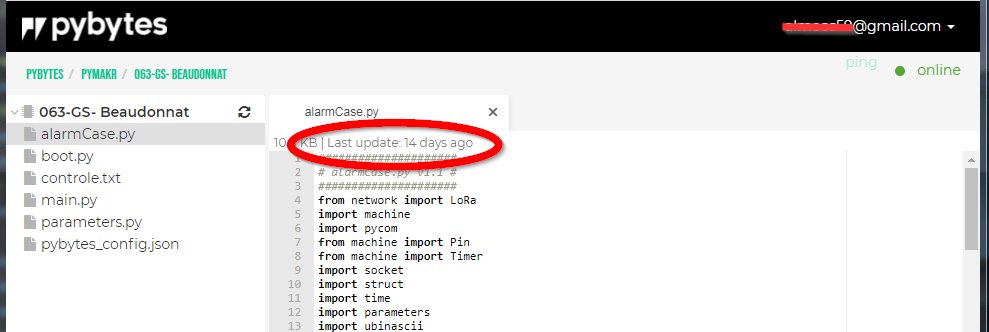
      I have connected my fipy on Pybytes via LTEM network, everythings OK: I can send for exemple, signals on pybytes. and i can see with Pymakr the Folder Hierarchy. Problem: Even if I use refresh hierarchy button, some files do not update and some do... How can I update all the files in the foilder?
      0f265032-ae32-41fe-b06f-667ca3d097bd-image.png
      Thank you in advance.
      Denis

      1 Reply Last reply Reply Quote 1
      • G Offline
        Gijs
        last edited by

        Sorry im not exactly sure what you're after. You mean that not all files in Pymakr online update when you click the refresh button? Are there any changes to the files in the meantime that do not get synced?

        1 Reply Last reply Reply Quote 0
        • A Offline
          almeos
          last edited by

          Hello, yes, you are right. I have modified Fipy files using Atom pymakr. Then, when I connect with Pybytes pymakr, this is the old file version that still appears.

          1 Reply Last reply Reply Quote 0
          • G Offline
            Gijs
            last edited by

            Hi,
            Im able to reproduce the issue, thanks for highlighting it. It indeed appears to be an issue with no apparent workaround at this time. I'l submit a bug report internally to have it fixed

            Thanks again

            A 1 Reply Last reply Reply Quote 1
            • A Offline
              almeos @Gijs
              last edited by

              @Gijs
              Hello Gijs, it would be a good news if your team could find a solution.

              1 Reply Last reply Reply Quote 0
              • G Offline
                Gijs
                last edited by

                I did some further testing, and it seems that only 'new' files get loaded when refreshing the hierarchy (ie, the files which were not there in the last refresh), and old (or already present) files do not get updated. Let me know if you see the same.

                A R 2 Replies Last reply Reply Quote 0
                • A Offline
                  almeos @Gijs
                  last edited by

                  @Gijs
                  Yes you are right, when Pybytes Pymakr find new files, it loads them, but the existing files are not updated even if there content has been modified.

                  1 Reply Last reply Reply Quote 1
                  • R Offline
                    Roman Kostecki @Gijs
                    last edited by

                    @Gijs This problem still hasn't been rectified. It seems like an easy thing to fix. Do you know if it has been reported and do you have an estimated time when this will be done?
                    Thanks.

                    1 Reply Last reply Reply Quote 1
                    • A Offline
                      almeos
                      last edited by

                      Hello,
                      Did someone is able to find a solution to this problem? It causes me many desagrement.
                      Thank you.

                      Yusuf BAYLAVY 1 Reply Last reply Reply Quote 0
                      • Yusuf BAYLAVY Offline
                        Yusuf BAYLAV @almeos
                        last edited by

                        Hello @almeos,

                        If the potential problem being claimed is still presistent please drop an email to support@pycom.io with the logs and screenshots. I will have this redirected to our teams. Thank you.

                        KR.
                        Yusuf BAYLAV
                        Solutions Architect / Evangelist @ pycom

                        1 Reply Last reply Reply Quote 0

                        Hello! It looks like you're interested in this conversation, but you don't have an account yet.

                        Getting fed up of having to scroll through the same posts each visit? When you register for an account, you'll always come back to exactly where you were before, and choose to be notified of new replies (either via email, or push notification). You'll also be able to save bookmarks and upvote posts to show your appreciation to other community members.

                        With your input, this post could be even better 💗

                        Register Login
                        • 1 / 1
                        • First post
                          Last post

                        Pycom on Twitter

                        Pycom